 Charles Schwab
 Fidelity
 Interactive Brokers
 E*TRADE
 Webull
 TradeStation
 tastytrade
 eToro
eToro Trading 212
 Interactive Investor
 IG
IG Interactive Brokers
 XTB
XTB Hargreaves Lansdown
 Saxo
Saxo Charles Stanley Direct
 CIBC Investor's Edge
 Interactive Brokers
 Moomoo
 Questrade
 Qtrade
 TD Direct Investing
 Wealthsimple
 Finviz
 Stock Rover
 Seeking Alpha
 StockHero
 TipRanks
 TrendSpider
 Trade Ideas
 TraderSync
 TradingView
 Tradervue
 TradeZella
NinjaTrader Review

Written by Steven Hatzakis
Director of Online Broker Research

Edited by Jeff Anberg
Senior Editor

Fact-checked by Joey Shadeck
Research Analyst
Steven HatzakisDirector of Online Broker Research
Steven Hatzakis is the Global Director of Online Broker Research and Partner with Reink Media Group, parent of StockBrokers.com. He has spoken and moderated numerous forex and finance industry panels across the globe and has been in the finance industry for more than 20 years.


NinjaTrader is an NFA-regulated futures broker and platform provider that serves as a powerful gateway to the futures market for traders of all skill levels. Now acquired by Kraken, NinjaTrader combines professional-grade software, including its famous SuperDOM for ultra-fast, one-click trading, with one of the most aggressive pricing models in the industry.
Traders can use the platform for free for advanced charting and unlimited simulated trading, or purchase a Lifetime License to unlock commissions as low as $0.09 per micro contract. With flexible intraday margins, access to affordable micro and nano futures, and a vast ecosystem of third-party add-ons, NinjaTrader offers an accessible path for beginners while retaining the depth required by professionals.
-
Minimum deposit:
$0.00 -
Commission per side (Standard):
$1.29 -
Commission per side (Micro):
$0.39
| Trading costs | |
| Range of Markets | |
| Trading Platforms | |
| Mobile Trading Apps | |
| Research | |
| Education |
 Why you can trust us
Led by Jessica Inskip, Director of Investor Research, the StockBrokers.com research team collects thousands of data points across hundreds of variables. We evaluate features important to every kind of investor, including beginners, casual investors, passive investors, and active traders. We carefully track data on margin rates, trading costs, and fees to rate stock brokers across our proprietary testing categories.
Our researchers open personal brokerage accounts and test all available platforms on desktop, web, and mobile for each broker reviewed on StockBrokers.com. Learn more about how we test.
Table of Contents
Pros and cons
PROS
- Industry-leading pricing: Commissions start at just $0.09 per micro contract for Lifetime License holders, or $0.39 for the free plan.
- Professional execution: The flagship SuperDOM (Depth of Market) allows for ultra-fast, one-click order entry and cancellation.
- Active community: Access daily live streams and webinars.
- Market data: Funded accounts receive free CME market data on free and paid plans, reducing upfront costs for futures traders.
CONS
- Steep learning curve: The desktop platform is highly complex and generally not ideal for beginners or casual traders.
- Limited asset class: NinjaTrader Brokerage is strictly for futures; it does not offer stocks, ETFs, or direct options trading.
My top takeaways for NinjaTrader in 2026:
- Futures‑first brokerage: NinjaTrader supports all major futures asset classes and offers standard, E-mini, micro, and even nano contracts. Micro and nano contracts are one-tenth or one-hundredth the size of standard contracts, allowing traders to size positions more precisely and manage risk with smaller exposure.
- Flexible pricing plans: Traders can opt for a free plan, a $99 monthly plan, or a $1,499 lifetime license. The free tier charges $1.29 per standard contract and $0.39 per micro, while the lifetime plan drops pricing to $0.59 per standard and $0.09 per micro. Exchange, clearing, and routing fees add roughly $0.19 to $0.44 per contract on top, so total trading expenses depend on both the product traded and the chosen plan.
- Powerful trading tools: The NinjaTrader 8 Desktop platform delivers professional-grade charting, advanced order-flow analytics, customizable indicators built on the C# programming language, automation tools, developer access via a REST API, and a market replay feature.
- Growing education and community: NinjaTrader streams live sessions daily, providing pre-market analysis and trade ideas. Combined with its trading simulator, which offers a free 14-day trial and unlimited paper trading for funded accounts, new traders can learn, test strategies, and practice in a risk-free environment.
- Limited research beyond futures analytics: While the charting and technical tools are strong, there is very little fundamental research or stock analysis, underscoring the platform’s clear focus on futures trading.
NinjaTrader fees
NinjaTrader is strong on fees for active futures traders because its tiered plans push commissions well below standard rates. You can trade on the Free Plan at higher per-contract rates, or buy a Monthly or Lifetime License to cut costs. During my testing, the Lifetime License offered the best value for high-volume traders, though the break-even depends on your asset class.
Commissions: Commissions per side start at $1.29 for standard and E-mini contracts and $0.39 for micro contracts on the free plan. Rates drop to $0.99 and $0.29 on the monthly plan, and as low as $0.59 and $0.09 on the lifetime plan, which requires a one-time $1,499 payment to lock in pricing indefinitely.
To justify the $1,499 Lifetime License, you need enough volume for the per-contract savings to clear the upfront cost. Against the Free Plan, the Lifetime License saves $0.70 per side on standard and E-mini contracts ($1.29 versus $0.59) and $0.30 per side on micros ($0.39 versus $0.09). That works out to roughly 1,070 round turns on standard contracts, or about 2,500 round turns on micros, to break even. A trader placing 50 standard round turns a month would recoup the cost in about 18 months. At 200 a month, it pays for itself in under six.
Nano crypto futures, available through Coinbase Derivatives, are priced even lower at roughly $0.20 per side on the free plan.
Fees: Exchange fees and NFA clearing costs add about $0.19 per contract and are standard regardless of the broker. Order routing through CQG or Rithmic adds another $0.25 per contract. There is no minimum deposit requirement, and ACH deposits and withdrawals are free.
Margin rates and requirements: Requirements vary by product and by time of day. Overnight initial margin is higher than the reduced intraday day-trading margin. Intraday requirements run as low as $25 for nano contracts and as high as $20,000 for certain crypto indices. Around major economic news releases, NinjaTrader raises intraday margin, sometimes by as much as four times, starting about 15 minutes before the release and holding for five minutes or more after volatility settles.
| Feature |
 NinjaTrader NinjaTrader
|
|---|---|
| Minimum deposit | $0.00 |
| Commission per side (Standard) | $1.29 |
| Commission per side (Mini) | $1.29 |
| Commission per side (Micro) | $0.39 |
| Commission per side (Nano) | $0.20 |
| Market data fees | No |
| Active trader/VIP discount | No |
Range of markets
NinjaTrader provides access to more than 100 futures contracts spanning equity indexes, currencies, interest rates, metals, energy, and agricultural markets. Micro contracts are available for many of the most popular products, including the S&P 500, Nasdaq 100, Dow 30, Russell 2000, gold, silver, crude oil, and major forex pairs, each sized at one-tenth of the standard or E-mini contract.
NinjaTrader also supports crypto futures, including micro Bitcoin and micro Ethereum contracts from CME, along with nano Bitcoin and nano Ethereum via Coinbase Derivatives. Exchange access, however, is limited to CME Group markets (CME, CBOT, NYMEX, COMEX, and MGE), ICE US, and Eurex, with no connectivity to CBOE futures or to Asian exchanges such as HKEX, DCE, or ZCE.
NinjaTrader Prop: NinjaTrader provides its trading platform to more than a dozen third-party proprietary trading firms through what it labels the NinjaTrader Prop program. These offerings are paid demo-account evaluations run entirely by the prop firms, not NinjaTrader, and are governed by strict trading rules and profit targets. Paying an evaluation fee does not guarantee a payout, funded status, or continued access. If you meet the performance criteria, you may earn a cash payout; if not, you forfeit the evaluation fee. While these challenges may be designed to help experienced traders refine and test their skills, they are not a substitute for live trading and are generally unsuitable for beginners, who are better served by starting with a free demo account.
| Feature |
NinjaTrader
|
|---|---|
| Forex futures | Yes |
| Equity futures | Yes |
| Interest rate futures | Yes |
| Metal futures | Yes |
| Agricultural futures | Yes |
| Energy futures | Yes |
| CME Group | Yes |
| ICE | Yes |
| Eurex | Yes |
| Cboe | No |
| HKEX | No |
| Exchange-traded futures | Yes |
| Off-exchange futures (CFDs/derivatives) | No |
| Forward futures | No |
| Options futures | Yes |
Trading platforms
NinjaTrader is good for platform choice because it offers web, desktop, and mobile versions plus support for CQG and TradingView. The web platform is the most accessible and the one I'd recommend to most traders. The desktop platform requires more setup and suits experienced futures traders.
NinjaTrader Web: When logging into the web platform, the initial layout feels clean and uncluttered. While it appears simple on the surface, there’s depth beneath it, with modular components you can drag and drop to add features such as news, sentiment tools, and the ability to modify orders directly on the chart by dragging along the price axis.
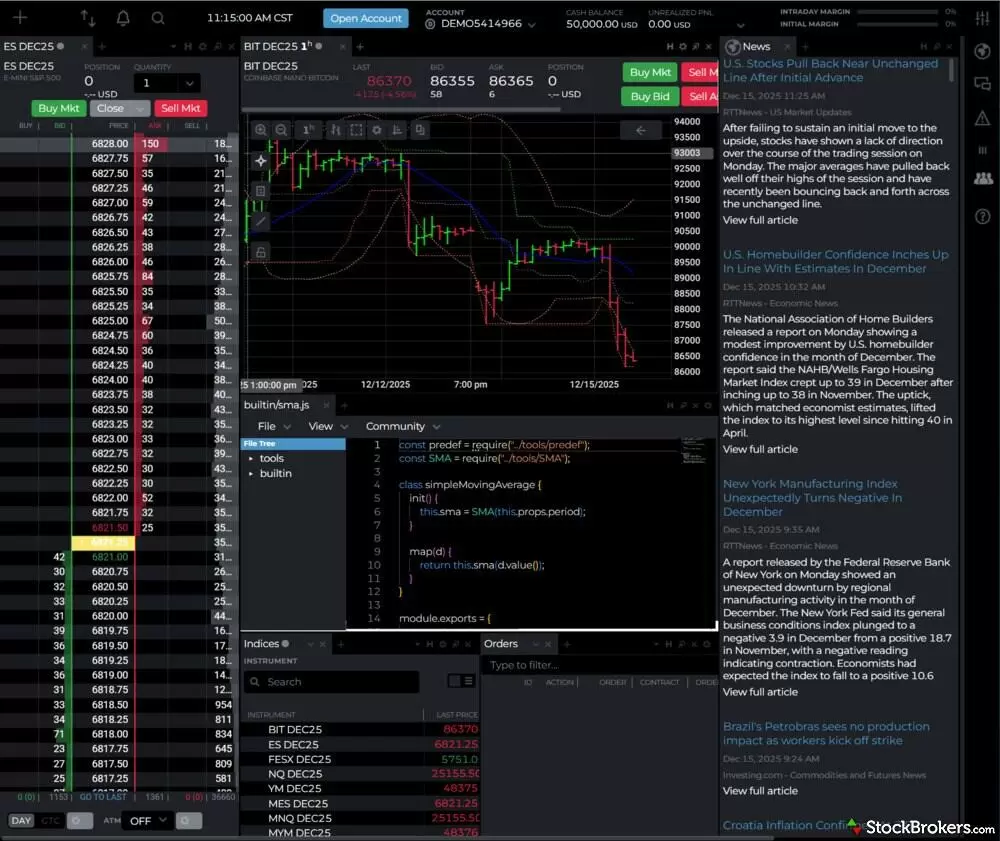
The NinjaTrader Web platform offers a clean, modular interface that runs natively in modern browsers. This workspace layout showcases the SuperDOM (left) for fast order execution on E-mini S&P 500 futures, positioned alongside a chart tracking Nano Bitcoin (BIT). A key feature for technical traders is the Script Editor (center-bottom), which allows users to view and modify the code for indicators. On the far right, the integrated News panel streams real-time headlines from sources like RTTNews and Investing.com.
NinjaTrader Desktop: The NinjaTrader 8 desktop platform is one of the most powerful tools available for futures trading. It offers multi-time-frame charting, hundreds of technical indicators, customizable hotkeys, and advanced order types. News headlines stream from RTT News and Investing.com, just as they do on the web platform. One drawback I noticed is that opening news articles displays them in an iframe from the original source, often cluttered with banner ads, which makes reading the articles less seamless.
Steven's take:
"NinjaTrader is built for traders who live in the futures market and want granular control over contract size and cost. I tested the web, desktop, and mobile platforms, and the web version is the one I'd point most traders to first because it delivers the core tools without the desktop's lengthy setup."
Steven Hatzakis
Director of Online Broker Research
The desktop version of NinjaTrader isn’t ideal for beginners or traders who prefer a streamlined interface, since it requires lengthy setup to arrange floating windows after logging in. By contrast, the web platform keeps everything neatly organized in one browser tab. For experienced traders and technical analysis enthusiasts, however, the desktop platform delivers all the advanced charting and tools NinjaTrader is known for:
- NinjaScript: Using NinjaScript, traders can manage workspaces, run market replay simulations, and develop strategies through the built-in NinjaScript Editor and Strategy Builder, complete with five example strategies. I found the editor particularly powerful, offering access to hundreds of files and 114 native indicators that can be edited directly at the source-code level.
- Strategy Builder: The Strategy Builder is designed to simplify the process compared to coding a bot directly in C#, but it still involves nuance, with dozens of input parameters and settings to configure during the wizard. I wouldn’t consider it beginner-friendly unless you’re willing to experiment or test it in a demo environment.
- Strategy Analyzer: The Strategy Analyzer module includes powerful backtesting tools, ranging from multi-objective and forward-walk optimizations to an experimental AI Generate feature, which is highly CPU intensive and can take hours or even days to complete.
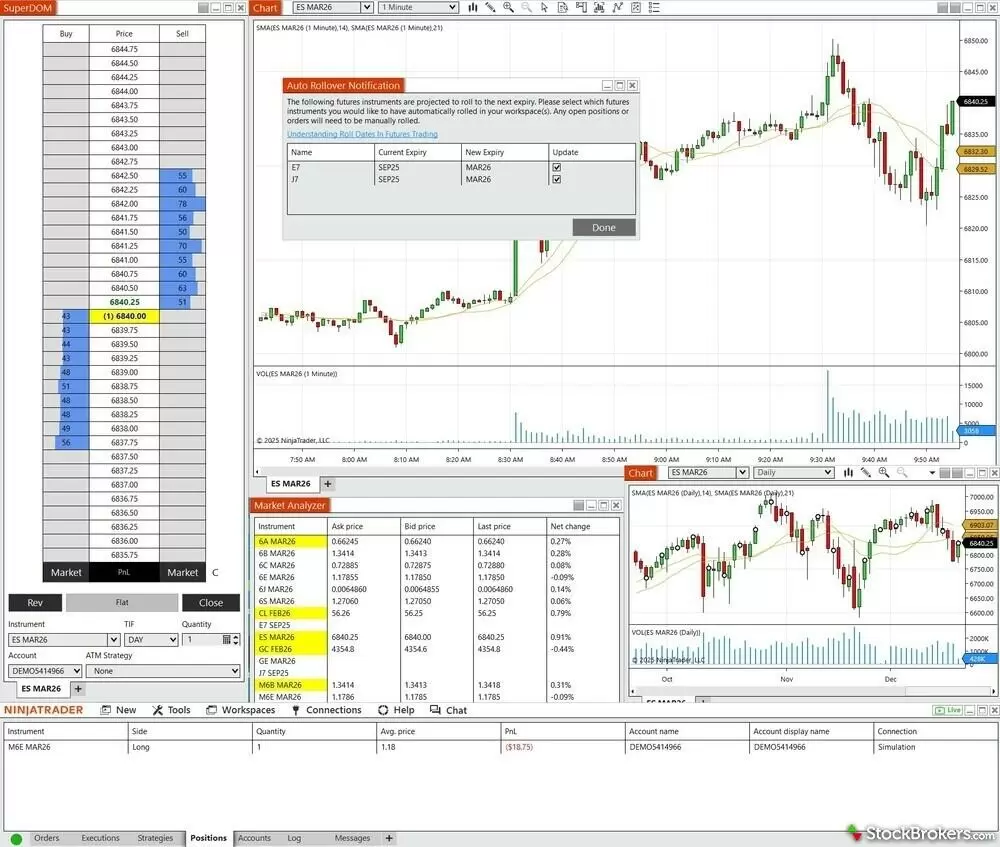
The NinjaTrader 8 desktop platform features a modular, fully customizable workspace. This layout highlights the flagship SuperDOM (left) for one-click order entry, running alongside advanced charting for the E-mini S&P 500. A critical feature for futures maintenance is the Auto Rollover Notification (center popup), which alerts traders when it is time to switch open positions to the next contract expiry date. The Market Analyzer window (bottom) allows for real-time tracking of quotes and net changes across multiple instrument lists.
Important note for Mac users:
NinjaTrader 8 (the advanced desktop software) does not run natively on macOS. To use the full desktop platform, you must use Windows virtualization software like Parallels. If you do not want to use Parallels, your only option is the NinjaTrader Web platform (or Tradovate), which runs in your browser but lacks the advanced custom indicators and Strategy Analyzer found in the desktop version.
Charts: Charting includes more than 30 drawing tools, one of which I found particularly useful: the Risk-Reward tool. It lets you visualize a trade by plotting stop-loss and take-profit levels as red and green horizontal lines, based on a predefined ratio. For example, 1.5:1 would mean 1.5 units of profit for every unit of risk. Order management is also straightforward, with a convenient Flatten Everything button that acts as a Close All command and even provides audio cues to confirm that orders have been filled.
SuperDOM: The integrated SuperDOM and Order Flow+ suite allow traders to visualize market depth and volume profiles, and they stand out immediately upon logging in. Algorithmic traders can automate strategies using NinjaScript or access developer tools via the REST API, with the option to publish apps to the NinjaTrader Ecosystem for community use. For TradingView users, a $9.99 per month add-on enables direct order routing from TradingView charts to a NinjaTrader brokerage account, with Level I CME data included. CQG Desktop is also supported for professional-grade order routing at $0.25 per contract.
NinjaTrader Ecosystem: I was impressed by the sheer number of community-built add-ons available in the NinjaTrader Ecosystem, where users share custom indicators, scripts, and automated strategies, either for free or via paid subscriptions. It reminded me of the MQL5 Marketplace for MetaTrader, though the layout and design are quite different. Navigation was intuitive, making it easy to browse and sort through trading tools and indicators.
Tradovate brand: NinjaTrader users can also access the Tradovate platform using the same login credentials, eliminating the need for a separate account. Because Tradovate is powered by the same engine, it offers nearly identical features, along with matching commissions and margin requirements. Tradovate is part of the NinjaTrader Group.
| Feature |
NinjaTrader
|
|---|---|
| Proprietary trading platform | Yes |
| Mobile Trading | Yes |
| Demo accounts | Yes |
| API access | Yes |
| TradingView | Yes |
| CQG | Yes |
| MetaTrader 5 | No |
Mobile trading apps
NinjaTrader’s iOS and Android apps offer a clean, minimalist interface with real-time quotes, charting, and order entry. While research and news are notably absent, there’s still plenty to like for futures trading on the go. Having reviewed nearly 100 brokerage mobile apps in the global industry over the past decade, I was impressed by how much functionality NinjaTrader packs into such a simple layout. With only three main navigation tabs, the app still provides detailed access to watchlists, charts, and SuperDOM functionality.
Mobile charts: Selecting a contract from your watchlist or a predefined list opens a chart for that instrument. The charts are flexible, offering multiple chart types, granular timeframes, access to more than 100 indicators, and buy and sell buttons. While open trades are visible on the chart, I found drag-to-modify order adjustments somewhat awkward. A small arrow appears, requiring you to tap and step the order up or down rather than freely drag it. By comparison, order modification is much smoother in the SuperDOM, where dragging works as expected, though the same arrow appears if you tap instead. Overall, the mobile charting experience is more than capable for most traders and technical enthusiasts, and it met my expectations.
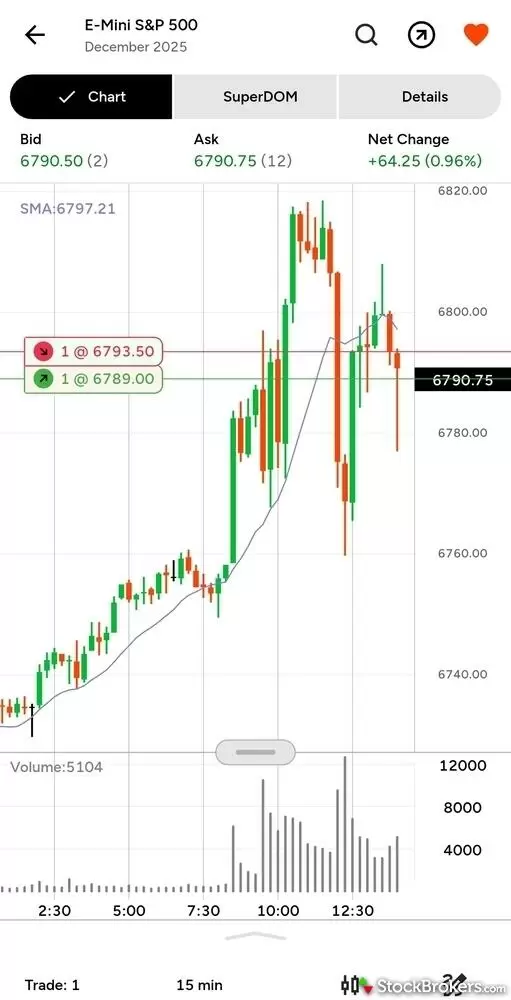
The NinjaTrader Mobile app (shown here on Android) provides a clean, responsive interface for managing active futures trades on the go. This E-Mini S&P 500 chart demonstrates the platform's visual trading capabilities, displaying working Buy (green) and Sell (red) limit orders directly on the price screen. Traders can quickly switch between views using the top navigation tabs while utilizing standard technical tools like the Simple Moving Average (SMA) and volume histogram.
Predefined lists: The app includes nearly a dozen predefined lists organized by asset class, covering futures contracts across indexes, micros, crypto, financials, currencies, energies, metals, grains, meats, and soft commodities. You can also see open positions directly within your watchlists, clearly indicating whether you’re long or short a given contract.
Trade ticket: The trade ticket offers solid versatility, supporting multiple order types, including bracket orders and trailing stop-losses. I also found it easy to access from nearly any screen via the small arrow icon next to the favorites heart.
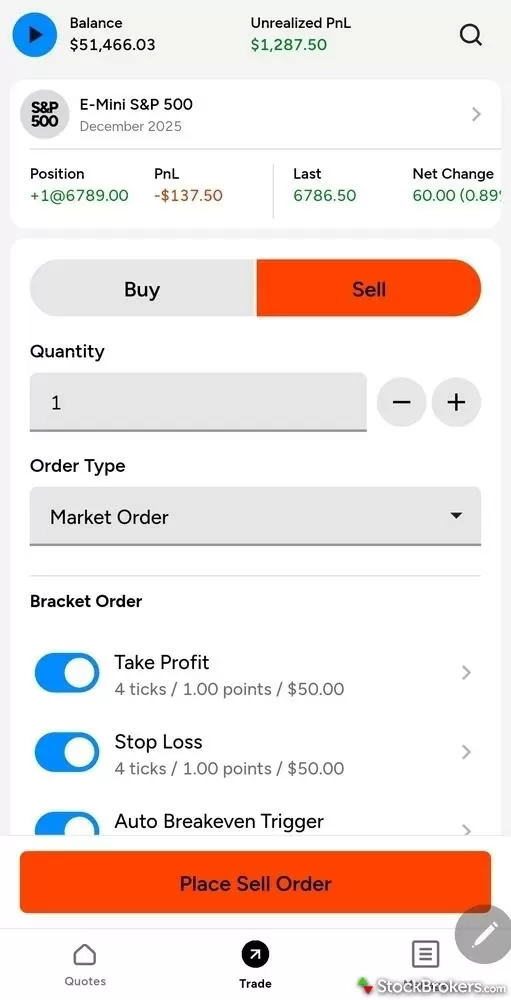
The NinjaTrader Mobile trade ticket delivers robust risk management tools directly from the order entry screen. This layout displays a Market Sell order for the E-Mini S&P 500, where the trader has activated a Bracket Order strategy. Critical for active risk control, the Take Profit and Stop Loss toggles are enabled and pre-calculated at 4 ticks ($50.00) per side. Additionally, the Auto Breakeven Trigger (bottom) allows for automated trade management, ensuring stops move to breakeven once a specific profit target is hit.
Risk Manager: The integrated Risk Manager lets you set predefined rules such as daily and weekly profit and loss limits, with the option to lock trading once those thresholds are reached. I found these controls helpful for encouraging discipline and reflective of the better aspects of prop trading technology, which aims to improve a trader’s chances of passing evaluations. That said, it’s important to understand that losses are still possible, even with these safeguards enabled. These tools are only one part of a broader risk framework, and choosing the right values depends on your risk tolerance and trading goals. Overall, I was glad to see this feature included and believe the Risk Manager can be effective when used as part of a well-defined trading strategy.
Research
NinjaTrader delivers research through in-platform news headlines, supplemented by market analysis from its in-house team and content partners. This material is also featured in livestreamed events that are syndicated on the company’s YouTube channel.
Order Flow+: The NinjaTrader platform excels in technical analysis, with sophisticated charting and market depth features such as the Order Flow+ suite, a $59 monthly add-on. By applying volume delta to candle charts, Order Flow+ helps traders spot changes in sentiment. These same tools are used by NinjaTrader analysts in their live video sessions, where technical setups are discussed in the context of upcoming and recent economic events.
News headlines: Alongside daily live streams and a library of video tutorials focused on technical indicators and trading strategies, NinjaTrader also integrates news headlines from RTT News and Investing.com directly into the platform. I also appreciated the inclusion of client sentiment data through the Pulse tool, which nicely complements the broader research offering.
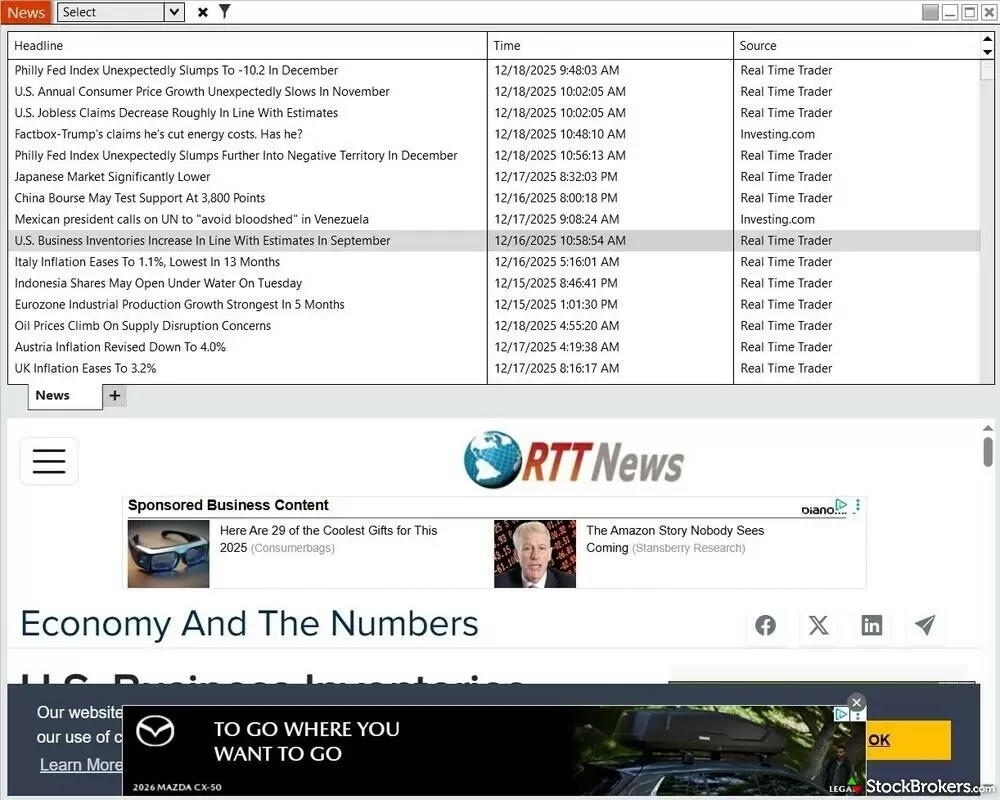
The NinjaTrader 8 desktop platform integrates fundamental research via its dedicated News window. This interface aggregates real-time headlines from sources like RTTNews and Investing.com, allowing traders to track key economic indicators such as inflation data and jobless claims. As shown in the bottom pane, selecting a headline loads the full article within an embedded browser; however, because it renders the original source page, the reading experience is often cluttered with third-party banner ads.
While NinjaTrader provides timely headlines, it lacks the depth of fundamental and macroeconomic research typically found at full-service brokers. Its focus remains on self-directed futures traders rather than research-driven investors. Overall, the research offering has a strong foundation, with clear opportunities to grow through additional fundamental analysis and more diverse written content.
Education
NinjaTrader provides a well-rounded set of educational resources for futures traders, including video content, blog articles, a support knowledge base, and a community-driven Discord server. For beginners, there are multiple getting-started guides, such as its “Introduction to Futures Trading,” alongside more than 400 other archived articles on NinjaTrader’s blog.
Educational resources: NinjaTrader publishes several daily or weekly live video series, including The Sunday Open, Trade the Open, and Trade the Close which blend research and educational themes in an engaging, high-quality format. It also provides recorded introductory tutorials for beginners, such as Develop the Trader in You. Other practical resources, such as futures contract rollover dates, link directly to related information on the CME website.
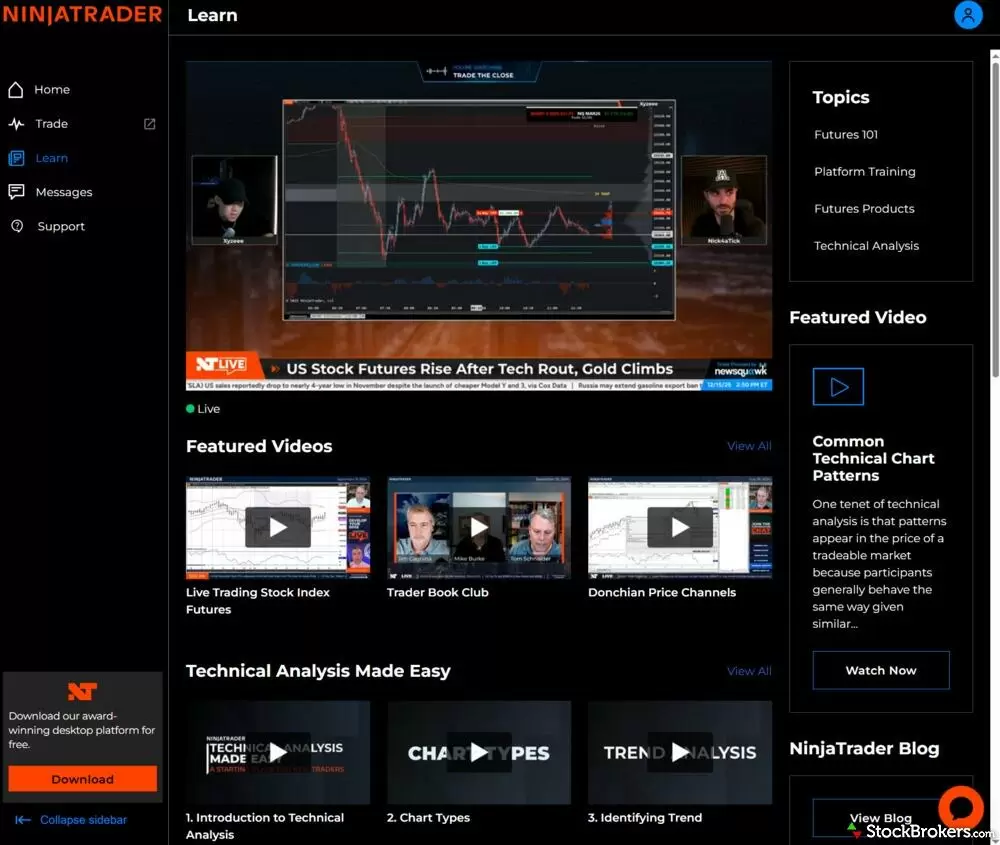
The NinjaTrader Web education portal anchors its offering with daily live streams, providing real-time market analysis and trade ideas directly within the platform. In this view, a live broadcast covers US Stock Futures and Gold, featuring chart analysis from industry experts. The organized dashboard also provides on-demand access to curated video libraries, ranging from Futures 101 and Platform Training to advanced Technical Analysis series and the "Trader Book Club."
AI Tools: NinjaTrader’s AI-powered chatbot, through a partnership with Ada, leverages generative AI and, in my experience, delivered thoughtful answers across a broad range of questions. Rather than relying on generic responses, it handled technical and educational queries with useful depth.
Arena: NinjaTrader also operates the “Arena,” where traders can compete in risk-free simulated trading contests that promote learning and community engagement. Depending on the event, participants may earn real cash prizes or account credits. Unlike prop trading evaluations, there are no entry fees to participate.
Overall, NinjaTrader offers a strong educational support system with plenty of high-quality content. A logical next step would be the introduction of dedicated courses with quizzes and progress tracking, which could help elevate the offering to a more university-grade learning experience.
Final thoughts
NinjaTrader stands out as a top-tier platform for active futures traders who prioritize powerful tools, flexible pricing, and granular contract sizing. Its appeal is strengthened by a growing, community-driven ecosystem, thousands of third-party add-ons, and a consistent stream of in-house research and educational video content.
With a powerful desktop platform, complemented by browser-based and mobile apps, plus integration with TradingView and CQG, traders have multiple ways to access the futures markets to suit different styles and workflows. While a limited range of supported futures exchanges are important considerations, NinjaTrader delivers excellent value and cutting-edge technology for those focused primarily on U.S. futures markets. Traders who want options on futures alongside their futures trading will need a broker like Interactive Brokers or tastytrade, since NinjaTrader's brokerage handles futures only.
| Feature |
NinjaTrader
|
|---|---|
| Overall |
|
| Trading costs |
|
| Range of Markets |
|
| Mobile Trading Apps |
|
| Research |
|
| Education |
|
Read next

We tested dozens of platforms to find the eight best stock trading apps for 2026. Compare top picks like Schwab and Fidelity for every investing style.
Jessica Inskip August 06, 2026
We tested the 5 best futures trading platforms of 2026. Compare commissions, margin rates, and tools for beginners and active traders. Find the right platform for you.
Jessica Inskip September 17, 2026
Find the best penny stock brokers. Compare Fidelity, Firstrade, Schwab, E*TRADE, and TradeStation for OTC access, fees, and tools.
Jessica Inskip August 02, 2026
Discover the best stock brokers of 2026. Compare Schwab, Fidelity, Interactive Brokers, E*TRADE, and more to find the top trading platform for your needs.
Jessica Inskip August 06, 2026
We tested the best options trading platforms for 2026. Compare tastytrade, Fidelity, IBKR, E*TRADE & Schwab on tools, fees, and picks for beginners.
Jessica Inskip September 09, 2026
Discover the best day trading platforms. Compare IBKR, Schwab, Fidelity, E*TRADE, and TradeStation for speed, tools, and margin rates.
Jessica Inskip August 03, 2026
Start investing with ease. Explore the best beginner-friendly trading platforms with low fees, great education, and intuitive apps.
Jessica Inskip August 06, 2026Popular stock broker reviews
Read our Interactive Brokers review and see why it's a top choice for active traders with low costs, cutting-edge platforms, and global reach.
Jessica Inskip July 31, 2026
Read our Merrill Edge Self-Directed review and see how it combines powerful investing tools, robust research, and integrated banking benefits.
Jessica Inskip September 25, 2026
Ally Invest scores 3/5 in our 2026 review. See how its $0 stock trades, $0.50 options, strong fixed income tools, and Ally Bank integration stack up.
Jessica Inskip September 14, 2026
Read our TradeStation review and discover why its pro-level tools, deep customization, and options focus make it a top choice for active traders.
Jessica Inskip September 24, 2026
Read our Charles Schwab review to learn why its platforms, research, and investor resources make it one of the top-ranked brokerages.
Jessica Inskip September 21, 2026
Our eToro review rates the social investing platform 3.0/5. Stock and ETF trades cost $0, crypto trades carry a 1% fee, and the minimum deposit is $50.
Jessica Inskip September 25, 2026
Read our Firstrade review and see why it’s a top choice for options traders, offering $0 contract fees, robust tools, and a growing feature set.
Jessica Inskip May 04, 2026
Read our tastytrade review and discover why it’s the top choice for options traders, with low fees, advanced tools, and a seamless platform.
Jessica Inskip September 21, 2026
Read our J.P. Morgan Self-Directed Investing review and discover its strengths in research, planning tools, and integration for Chase clients.
Jessica Inskip May 15, 2026
Read our Public.com review to learn how its intuitive platform and community-driven features help simplify investing for first-time traders.
Jessica Inskip September 18, 2026
Read our Webull review and discover its commission-free trading, sleek platforms, paper trading tools, and fractional shares.
Jessica Inskip September 18, 2026
Fidelity charges $0 stock and ETF trades and won #1 for Research and Education in 2026. See our tested review of its fees, platforms, IRAs, and apps.
Jessica Inskip September 17, 2026
Read our Robinhood review and see why it’s a top pick for beginners, with a sleek mobile app, zero commissions, and standout educational tools.
Jessica Inskip September 03, 2026
Read our 2026 E*TRADE review to see how powerful research, versatile platforms, and diverse investments make it a top choice for all investors.
Jessica Inskip September 14, 2026About NinjaTrader
NinjaTrader was founded in 2003 and began as a trading technology developer before expanding into a fully regulated futures brokerage under the NinjaTrader Group. The platform has earned a strong reputation over the years and is trusted by more than 800,000 traders and investors. In 2025, NinjaTrader became part of Kraken, a leading global cryptocurrency exchange. NinjaTrader and its affiliated brands, including Tradovate and Kraken, operate as a registered Futures Commission Merchant (FCM) with the Commodity Futures Trading Commission (CFTC) and are overseen by the National Futures Association (NFA).
About the Editorial Team
Steven Hatzakis is the Global Director of Online Broker Research for ForexBrokers.com. Steven previously served as an Editor for Finance Magnates, where he authored over 1,000 published articles about the online finance industry. Steven is an active fintech and crypto industry researcher and advises blockchain companies at the board level. Over the past 20 years, Steven has held numerous positions within the international forex markets, from writing to consulting to serving as a registered commodity futures representative.
Jeff Anberg is a Senior Editor at StockBrokers.com. Along with years of experience in media distribution at a global newsroom, Jeff has a versatile knowledge base encompassing the technology and financial markets. He is a long-time active investor and engages in research on emerging markets like cryptocurrency. Jeff holds a Bachelor’s Degree in English Literature with a minor in Philosophy from San Francisco State University.
Joey Shadeck is the Content Strategist and Research Analyst for StockBrokers.com. He holds dual degrees in Finance and Marketing from Oakland University, and has been an active trader and investor for close to 10 years. An industry veteran, Joey obtains and verifies data, conducts research, and analyzes and validates our content.