 Charles Schwab
 Fidelity
 Interactive Brokers
 E*TRADE
 Webull
 TradeStation
 tastytrade
 eToro
eToro Trading 212
 Interactive Investor
 IG
IG Interactive Brokers
 XTB
XTB Hargreaves Lansdown
 Saxo
Saxo Charles Stanley Direct
 CIBC Investor's Edge
 Interactive Brokers
 Moomoo
 Questrade
 Qtrade
 TD Direct Investing
 Wealthsimple
 Finviz
 Stock Rover
 Seeking Alpha
 StockHero
 TipRanks
 TrendSpider
 Trade Ideas
 TraderSync
 TradingView
 Tradervue
 TradeZella
Best Trading Apps in Canada for 2026

Written by Colin Graves
Contributing Writer

Fact-checked by Joey Shadeck
Research Analyst

Edited by Hannah Smith
Staff Editor
Colin GravesContributing Writer
Colin Graves is a Winnipeg-based financial writer and former banker with more than eight years of experience covering investments, brokerages, and personal finance.

 Why you can trust us
Led by Jessica Inskip, Director of Investor Research, the StockBrokers.com research team collects thousands of data points across hundreds of variables. We evaluate features important to every kind of investor, including beginners, casual investors, passive investors, and active traders. We carefully track data on margin rates, trading costs, and fees to rate stock brokers across our proprietary testing categories.
Our researchers open personal brokerage accounts and test all available platforms on desktop, web, and mobile for each broker reviewed on StockBrokers.com. Learn more about how we test.
More and more Canadian investors are trading stocks and exchange-traded funds (ETFs) on their mobile devices. So when choosing a broker, it’s no longer enough to do a high-level comparison. Depending on how much you trade and the features you use, the mobile experience can matter just as much as pricing, since that’s where many people are placing their trades.
For this guide, I focused specifically on the mobile trading platforms of six popular Canadian brokers, evaluating each based on its usability, feature set, technical performance, and pricing. While some brokers, such as Questrade and Interactive Brokers, offer multiple mobile platforms, I stuck to their standard apps. These are the tools that the majority of self-directed investors use day-to-day, and they provide the most accurate look at the experience you can expect.
Qtrade is the best overall stock trading app in Canada, with commission-free trades and the most capable mobile charting I tested. TD Direct Investing is the best big-bank app, and Wealthsimple is the easiest app for beginners.
Best Stock Trading Apps in Canada in 2026
To choose the best trading apps in Canada, I evaluated the primary mobile trading platforms of each Canadian brokerage, comparing pricing, account features, ease of use, and trading and research tools. Based on my hands-on testing, the following apps deliver the best overall experience for Canadian investors.
- Minimum Deposit: $0
- Stock/ETF Trade Fee: $0.00
- Mutual Fund Trade Fee: $0.00
Qtrade offers a single mobile app, but it's clean, modern, and packed with enough tools to satisfy most traders. After logging in with facial recognition, I land on an account summary with my portfolio allocation, top positions, major index performance, and the latest market news, with stock search one click away. The advanced charting is among the most capable I've seen on a mobile app, with seven chart types and at least 20 indicators. Qtrade supports six order types, including trailing stops, and moved to commission-free stock and ETF trading in October 2025. It doesn't yet support fractional shares or custom stock alerts. Read full review
- Commission-free trading
- Quick and easy account opening
- Visually appealing mobile trading app
- No forex, CFD, crypto, or futures trading
- No dedicated platform for advanced traders
- No support for fractional share trading
- Minimum Deposit: $0
- Stock/ETF Trade Fee: $9.99
- Mutual Fund Trade Fee: $0.00
When it comes to trading features, the TD app is one of the strongest I've used. It's fully integrated with WebBroker, TD Direct Investing's web trading platform, and includes a customizable home screen, free real-time snap quotes, and access to company profiles, market news, and detailed analyst ratings. It supports six order types: Market, Limit, Stop Market, Stop Limit, Trailing Stop Market, and Trailing Stop Limit. Unlike Questrade and Qtrade, you can set custom stock alerts in the app. The catch is pricing, at $9.99 per trade plus a waivable $25 quarterly admin fee on most registered accounts. Read full review
- Polished platform with seamless bank investing
- Clear, wide-ranging education (articles, videos)
- Free real-time market data
- Advanced Dashboard lacks depth versus top competitors
- $9.99 stock trades; options $9.99 + $1.25/contract
- $25 quarterly maintenance fee unless waived
- Minimum Deposit: $0
- Stock/ETF Trade Fee: $0.00
- Mutual Fund Trade Fee: $9.95
Questrade offers two mobile trading apps, both available for iOS and Android. The two apps serve different traders. Questmobile is built for everyday investors who want a simple, intuitive mobile trading experience, while Edge Mobile is built for advanced traders who need deeper charting, more order types, and greater customization. Among the apps I tested, Questmobile ranks well for casual investors, though advanced traders may prefer the depth of Interactive Brokers or TD Direct Investing. For research, Questmobile leans on TipRanks Sentiment Analysis and Seeking Alpha's Bulls Say, Bears Say. Read full review
- Commission-free trading
- No account or inactivity fees
- Commission-free fractional trading
- Must pay for Questrade Plus to set up custom alerts
- Steep trading fee of $9.95 for mutual funds
- Limited educational content
- Minimum Deposit: $0
- Stock/ETF Trade Fee: $0.00
- Mutual Fund Trade Fee: N/A
Wealthsimple's mobile app is the most beginner-friendly one I tested. With one click I can search thousands of Canadian and U.S. stocks and ETFs, and cryptocurrencies through a separate account. Trades are commission-free, and the app supports fractional shares plus recurring purchases on a weekly, biweekly, or monthly schedule. Research tools are limited, and a U.S.-denominated account costs $10 per month. Read full review
- No fee trading on stocks, ETFs, and options
- Quick and easy account opening process
- Offers a simple trading platform
- No advanced trading platform or research tools
- $10/monthly fee for a USD account if you hold under $100,000
- Limited investment offering
- Minimum Deposit: $0
- Stock/ETF Trade Fee: $1.00
- Mutual Fund Trade Fee: $8.00
IBKR Mobile is clearly built for intermediate and advanced traders, and it isn't optimized for Canadian investors. The markets screen lets me switch between U.S., European, Asian, and FX markets, and the research runs deep, with a stock screener, heatmaps, detailed analyst ratings, short-selling tools, and advanced charts. The average investor will likely find the interface intimidating. IBKR doesn't offer zero-commission trades in Canada, but pricing is competitive, with minimum orders as low as $1.00 on Canadian stocks and ETFs. Read full review
- 170+ markets to trade.
- IBKR Desktop platform has institutional power and intuitive usability.
- Industry-leading margin rates and competitive interest yields.
- Density of features requires a significant time investment.
- Educational content skips over the basics for true beginners.
- Certain tools lack the curated context needed.
- Minimum Deposit: $0
- Stock/ETF Trade Fee: $1.49
- Mutual Fund Trade Fee: N/A
Moomoo Canada is a global brokerage that entered the Canadian market in 2023, offering active traders commission-competitive access to stocks, ETFs, and U.S. options. Its downloadable desktop and mobile platforms are packed with advanced charting, professional-grade options tools, and free Level 2 U.S. market data. Registered account options are limited, and it doesn't support fractional shares, but for active self-directed traders, Moomoo delivers one of the most capable platforms in Canada. Read full review
- Powerful desktop and mobile platforms
- No CAD/USD conversion fee
- Free Level 2 U.S. market data
- Limited registered account types
- No fractional shares
- No forex, futures, or Canadian options
Winners Summary
1. Qtrade Direct Investing – Best overall trading app in Canada
Qtrade is my top pick for the best overall mobile trading app for 2026. It was a toss-up, because my second choice, TD Direct Investing, offers a couple of key features that Qtrade doesn’t – namely, the ability to trade fractional shares and set custom alerts. However, Qtrade gets the nod for its lower pricing and more intuitive design. Qtrade is owned by Aviso Wealth and acts as the self-directed trading arm for many credit union partners across Canada. But anyone can open an account and trade on the platform.
Mobile platform features: Unlike some other brokerages, Qtrade only offers one mobile trading platform. However, it’s clean and modern, and packed with enough features and tools to satisfy most traders.
First, the design. After quickly logging in using facial recognition, you arrive at your account summary page, which lists your accounts, portfolio allocation, top positions, the current performance of major market indices, and the latest market news. From there, you can access the stock symbol search bar with a single click.
Qtrade presents you with a wealth of data on the security details screen. Buy and Sell buttons are prominently displayed, and as you scroll, you’ll find detailed market data and news, charting, and analyst insights. You can even switch to advanced charts with a single click. The advanced charting is among the most robust I’ve seen on any mobile app. I counted seven chart types and at least 20 indicators. And you won’t run out of order types. Qtrade supports six in total on its mobile app, including market, limit, stop market, stop limit, trailing stop market, and trailing stop limit.
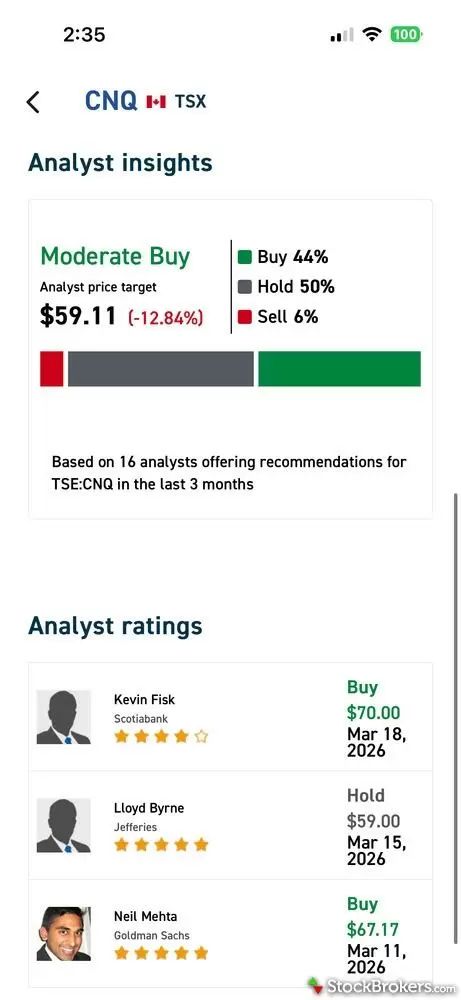
By scrolling further down the Security Details screen, you’ll get Qtrade’s Analyst Insights. It offers a clear summary of buy/sell/hold ratings, price targets, and recent analyst calls. Not all mobile trading apps offer this much detail.
There are a couple of drawbacks. Qtrade doesn’t yet support fractional share trades, and you can’t set custom stock alerts. Both Wealthsimple and TD Direct Investing, and Questrade to a lesser degree, offer fractional shares. Adding these features will only bolster Qtrade’s position.
Colin's take:
"While it lacks fractional shares and custom alerts, Qtrade’s move to commission-free trading puts it ahead of the big banks and right alongside low-cost competitors like Questrade and Wealthsimple."
Colin Graves
Contributing Writer
Pricing: In October 2025, Qtrade became the latest Canadian brokerage to move to a commission-free trading model. You can now buy and sell thousands of stocks and ETFs with no fees, narrowing the gap with Questrade and putting additional pressure on the higher-priced big bank brokers.
2. TD Direct Investing – Best bank trading app
TD Direct Investing is Canada’s leading bank brokerage, and its mobile trading app is the best big bank app I’ve used. In fact, if it weren’t for TD's ridiculously high trading fees, it might have taken top spot in this ranking.
Mobile platform features: TD customers use the same app to trade stocks and do their day-to-day banking. It sounds complicated, but it’s rather ingenious, if you ask me, because it allows you to manage all of your banking and self-directed investing in a single view, and transfer funds to and from with ease.
As an investing app, the TD App is pretty powerful. It’s not quite as clean and modern as offerings from Wealthsimple and Questrade, but it’s fairly easy to navigate. When it comes to trading tools, you can choose from six order types, but the standout feature is support for fractional shares on thousands of Canadian and U.S. equities. This allows you to trade in partial shares, lowering the barrier to entry for expensive stocks such as Alphabet, Amazon, or Apple. It also adds efficiency, because you can place trades by dollar amount instead of leaving leftover cash sitting uninvested.
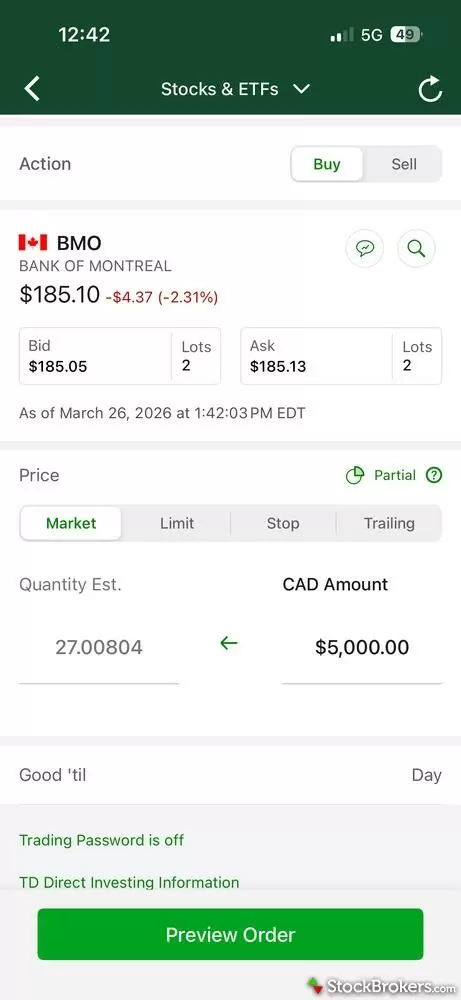
The TD App supports fractional shares, making it easy to invest a specific dollar amount instead of worrying about share price. Simply enter a dollar value, and it calculates the number of shares for you. This is extremely useful for expensive stocks and for keeping your portfolio fully invested without leftover cash sitting idle.
The TD App’s market data and research tools are also impressive. When you look up a stock, you’ll find plenty of information at a glance, including charting, key statistics, option chain data, analyst ratings, and market news. Two types of advanced charts, mountain and candlestick, are available for viewing in the app.
Two areas that could be improved, besides the high trading fees, would be the addition of a recurring investments feature that allows you to schedule the purchase of individual stocks, which Wealthsimple offers in its mobile app. And, placing the stock search bar on the home screen. Finding it shouldn’t feel like a scavenger hunt.
Pricing: TD Direct Investing charges a flat fee of $9.99 per stock and ETF trade, and $9.99 + $1.25 per contract for options trades, making it one of the most expensive trading platforms in Canada. In addition, it charges a $25 quarterly administration fee on most of its registered accounts, though the fee is waivable. One recent change is that you can now choose from around 100 select commission-free ETFs from various fund companies, including Vanguard, iShares, and, of course, TD.
3. Questrade - Best for free trades
Questrade is my top pick for Canadian brokerage for 2026, but while its standard mobile app, Questmobile, is simple and easy to use, it lacks the functionality of our top picks from Qtrade and TD.
Mobile platform features: Questmobile is Questrade’s main trading app. It does offer a separate app for advanced traders, called Questrade Edge Mobile, but I won’t cover it in this review. When you first log in to Questmobile, you’ll notice how clean and simple it looks. And it is very easy to navigate. With a single click, you can search for stocks to trade or discover symbols by sector, top gainers, most active, best rated, and more. For research, Questrade relies on two very helpful third-party tools: TipRanks Sentiment Analysis and Bulls Say, Bears Say, from Seeking Alpha. Both allow you to gain quick insight into individual stocks. And like most investing apps, you can easily create and manage multiple watchlists.
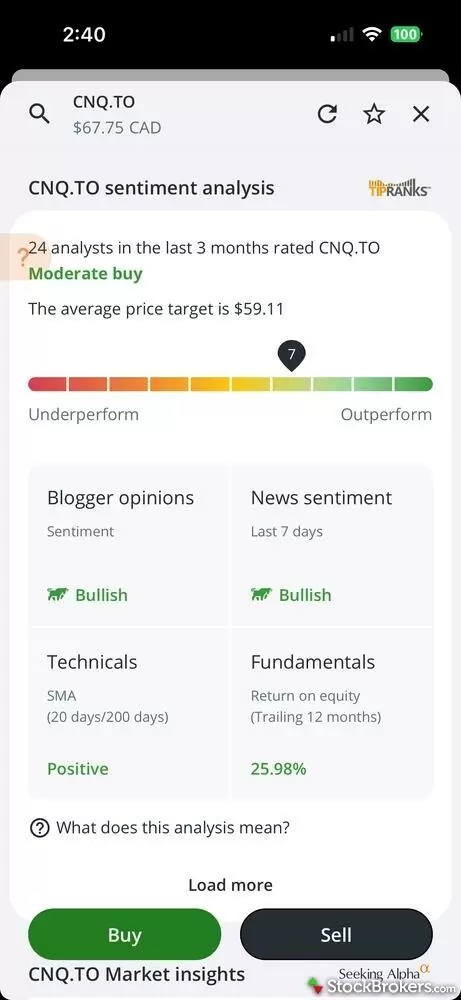
Questrade incorporates third-party tools like TipRanks to give you a quick read on market sentiment. Instead of digging through multiple sources, you get a consolidated view of analyst ratings, price targets, and sentiment indicators, all in one place.
But while Questmobile is a solid app, it has some shortcomings. It only offers two order types (market and limit), you can’t set custom alerts, and there are no advanced charts. It supports fractional shares and recurring investment purchases, but only on U.S. stocks. Hopefully, Questrade will include Canadian stocks before long.
Pricing: Questrade is a low-cost leader among Canadian brokers. In addition to commission-free trading for stocks, ETFs, and options, it doesn’t charge any account administration fees. Even Qtrade still charges admin fees for U.S.-registered accounts and Trust accounts.
4. Wealthsimple – Best for beginners
If you’re a new investor in search of a beginner-friendly trading app, look no further than Wealthsimple. Canada’s leading robo-advisor also offers a self-directed investing platform, with a highly intuitive mobile trading app. With one click, you can search for thousands of Canadian and U.S. stocks and ETFs, as well as cryptocurrencies, though you’ll need to open a separate account to trade crypto.
Trades are commission-free, making Wealthsimple a price leader among Canadian brokers. A couple of things I love about the mobile app: it supports fractional shares, and you can set up recurring purchases for stocks. Unfortunately, research tools are limited, and you must pay a $10 monthly fee if you want to add a U.S.-denominated account.
But if you’re a new trader just looking to invest in Canadian stocks and ETFs, Wealthsimple might be the easiest way to do it.
5. Interactive Brokers (IBKR) – Best for professional traders
IBKR is a truly global trading platform that is open to Canadian investors. No other Canadian broker provides the same amount of access to international and forex markets. IBKR has several trading platforms, but I’m covering IBKR Mobile for the purpose of this guide.
IBKR's primary mobile trading app is clearly designed for intermediate and advanced traders, and it's not optimized for Canadian investors. While it’s highly capable and packed with features, the average investor will likely find its user interface intimidating. Its markets screen lets you switch between U.S., European, Asian, and FX markets. There are too many research tools to mention here, but they include a robust stock screener, heatmaps, detailed analyst ratings, short-selling tools, advanced charts, and economic and technical insights.
IBKR doesn't offer zero-commission trades in Canada, but its pricing is very competitive, with minimum orders as low as $1.00 for Canadian stocks and ETFs.
6. Moomoo - Best for active traders
Moomoo launched in Canada in 2023 and offers one of the most feature-rich mobile apps I’ve tested. It’s built for active traders, with tools that go beyond what most of the other apps in this guide offer.
Mobile platform features: The Moomoo app supports eight order types, including Limit-If-Touched and Market-If-Touched, along with advanced charting, analyst ratings, and market news. You can set custom alerts, something you can’t do on the Qtrade or Questrade apps. Building and editing watchlists is easy. Alongside the trading tools, the app carries a heavy layer of social and promotional content, including community discussions, badges, and frequent notifications.
Drawbacks: Moomoo doesn’t support fractional shares. Its registered account lineup is also limited to TFSAs, RRSPs, and spousal RRSPs, so you can’t open an FHSA, RESP, RRIF, or any locked-in retirement plans.
Pricing: Moomoo doesn’t offer commission-free trading. It uses a per-share pricing model with minimum per-order charges, plus a platform fee on stock and ETF trades. Its fees run higher than zero-commission apps like Wealthsimple, Qtrade, and Questrade, but lower than the big bank brokers. Moomoo doesn’t charge account or inactivity fees, and it doesn’t charge a foreign exchange fee when converting between Canadian and U.S. dollars.
Other Canadian trading apps I tested
7. CIBC Investor’s Edge – Best for educational tools
CIBC Investor’s Edge offers a single mobile trading app, CIBC Mobile Wealth. I find it easy to navigate, and it offers most of the features you would expect from a big-bank broker. You can trade thousands of stocks, ETFs, and options contracts, and access advanced charts. In fact, its charting capability is quite impressive for a mobile app. I’m also impressed by the educational resources available to traders. You can quickly link to articles and videos on a range of topics, from investing basics and trading tutorials to portfolio strategies and stock, ETF, and options insights.
Unfortunately, very little stands out about CIBC Mobile Wealth. Research tools are almost non-existent beyond charts and market news; it doesn’t support fractional shares, and unlike with the TD App, you can’t manage your banking and trading in the same app.
When it comes to pricing, Investor’s Edge is cheaper than the other bank brokers, but at $6.95 per trade, it lags behind the zero-commission platforms like Questrade and Wealthsimple.
Canadian stock trading apps compared
Here's how the six apps stack up on the details that matter most day-to-day: mobile app rating, trading fees, fractional share support, and platform availability. Use it to narrow your shortlist before reading the full reviews.
| Company | Mobile App | Stock/ETF Trade Fee | Fractional Shares (Stocks) | Android App | iPhone App |
 Interactive Brokers Interactive Brokers
|
N/A | $1.00 | Yes | Yes | Yes |
 Qtrade Direct Investing Qtrade Direct Investing
|
|
$0.00 | No | Yes | Yes |
 TD Direct Investing TD Direct Investing
|
|
$9.99 | Yes | Yes | Yes |
 Questrade Questrade
|
|
$0.00 | Yes | Yes | Yes |
 Wealthsimple Wealthsimple
|
|
$0.00 | Yes | Yes | Yes |
 Moomoo Canada Moomoo Canada
|
|
$1.49 | No | Yes | Yes |
StockBrokers.com Review Methodology
Why you should trust us
Colin Graves, a contributing writer for StockBrokers.com, has over eight years of experience covering investments and Canadian brokerage platforms. Before becoming a full-time writer, Colin spent over two decades in the banking industry, including 15 years as a people manager with a Top 10 North American financial institution. He has completed both the Canadian Securities (CSC) and the Professional Financial Planning (PFPC) courses and has appeared in leading Canadian personal finance publications such as MoneySense, Money.ca, MapleMoney, and The College Investor.
Blain Reinkensmeyer, co-founder of StockBrokers.com, has been investing and trading for over 25 years. After having placed over 2,000 trades in his late teens and early 20s, he became one of the first in digital media to review online brokerages. Today, Blain is widely respected as a leading expert on finance and investing, specifically the U.S. online brokerage industry. Blain has been quoted in The New York Times, The Wall Street Journal, Forbes, and Fast Company, among others. Blain created the original scoring rubrics for StockBrokers.com and oversees all testing and rating methodologies.
How we tested
- We used our own brokerage accounts for testing.
- We collected hundreds of data points across the brokers we review.
- We tested each online broker's website, desktop platforms, and mobile app, where applicable.
- We maintained strict editorial independence; brokers cannot pay for inclusion or a higher rating.
Our research team meticulously collected data on every feature of importance to a wide range of customer profiles, including beginners, casual investors, passive investors, and active traders. We carefully track variables like margin rates, trading costs, fees, and platform features and use them to help rate brokers across a range of categories measuring ease of use, range of investments, education, and more.
At StockBrokers.com, our reviewers use a variety of computing devices to evaluate platforms and tools. Our reviews and data collection were conducted using the following devices chosen to reflect the everyday hardware our readers are likely to be using rather than top-tier configurations: iPhone SE running the latest iOS version, MacBook Pro M1 with 8 GB RAM running the current MacOS, and a Dell Vostro 5402 laptop i5 with 8 GB RAM running Windows 11 Pro.
Each broker was evaluated and scored on over 60 different variables across six key categories for Canadian investors: Range of Investments, Platforms & Tools, Mobile Trading, Education, Ease of Use, and Overall. Learn more about how we test.
Read next
Explore further guidance on trading in Canada.
- Qtrade Review
- Questrade Review
- Best Canadian Brokerage Firms in 2026
- Wealthsimple Review
- Interactive Brokers Review
- Best Forex Brokers in Canada for 2026
- TD Direct Investing Review
- CIBC Investor's Edge Review
About the Editorial Team
Colin Graves is a Winnipeg-based financial writer with more than eight years of experience covering investments and brokerages. A former banking exec who managed over $1B in assets, he holds CSC and PFPC credentials. His work appears in MoneySense, Money.ca, MapleMoney, and more.
Joey Shadeck is the Content Strategist and Research Analyst for StockBrokers.com. He holds dual degrees in Finance and Marketing from Oakland University, and has been an active trader and investor for close to 10 years. An industry veteran, Joey obtains and verifies data, conducts research, and analyzes and validates our content.
Hannah Smith is a Staff Editor at StockBrokers.com. With a background in SEO and years of experience in digital media, Hannah is focused on creating high-quality, data-driven content that helps investors make informed decisions. With a master's degree in English from North Carolina State University, she brings a strong foundation in writing, research, and editorial strategy to her work.