 Charles Schwab
 Fidelity
 Interactive Brokers
 E*TRADE
 Webull
 TradeStation
 tastytrade
 eToro
eToro Trading 212
 Interactive Investor
 IG
IG Interactive Brokers
 XTB
XTB Hargreaves Lansdown
 Saxo
Saxo Charles Stanley Direct
 CIBC Investor's Edge
 Interactive Brokers
 Moomoo
 Questrade
 Qtrade
 TD Direct Investing
 Wealthsimple
 Finviz
 Stock Rover
 Seeking Alpha
 StockHero
 TipRanks
 TrendSpider
 Trade Ideas
 TraderSync
 TradingView
 Tradervue
 TradeZella
Best Brokers for User Experience

Written by Jessica Inskip
Director of Investor Research

Edited by Jeff Anberg
Senior Editor

Fact-checked by Joey Shadeck
Research Analyst
Jessica InskipDirector of Investor Research
Jessica Inskip is Director of Investor Research at StockBrokers.com, bringing 15 years of experience in brokerage and trading strategy. Jessica focuses on investor education and brokerage industry research.


 Why you can trust us
Led by Jessica Inskip, Director of Investor Research, the StockBrokers.com research team collects thousands of data points across hundreds of variables. We evaluate features important to every kind of investor, including beginners, casual investors, passive investors, and active traders. We carefully track data on margin rates, trading costs, and fees to rate stock brokers across our proprietary testing categories.
Our researchers open personal brokerage accounts and test all available platforms on desktop, web, and mobile for each broker reviewed on StockBrokers.com. Learn more about how we test.
Even the most robust tools and product lineups fall flat if a platform is frustrating to use. A strong user experience is about more than good design, it’s about how smoothly everything works when you actually log in and invest. Can you find what you need without digging? Do tools feel connected instead of scattered? Ultimately, great UX reduces friction so you can spend less time navigating and more time investing.
For this guide, I looked at how brokerage platforms function in everyday use. That means evaluating navigation, layout, customization, and how well features work together across web and mobile. The brokers that stood out didn’t just offer powerful tools, they made those tools intuitive, approachable, and easy to grow into.
Best Brokers for User Experience
To determine which brokers truly deliver the best user experience, I spent time actively using each platform the way real investors do. That meant opening accounts, placing trades, building watchlists, exploring research, adjusting settings, and moving between web and mobile to see how well everything stayed in sync. The brokers below consistently stood out for making everyday investing feel seamless rather than complicated.
- Minimum Deposit: $0.00
- Stock Trades: $0.00
- Options (Per Contract): $0.65
For most investors, the search for a great broker ends with Charles Schwab. Retaining the #1 Overall ranking in 2026, Schwab continues to set the industry standard. The broker uniquely balances scale with sophistication, offering both simplified mobile tools and the professional-grade thinkorswim platform. From buying a first fractional share to managing a multimillion-dollar estate, Schwab provides a platform tailored to every need, serving as the definitive operating system for modern wealth. Read full review
- thinkorswim is the industry benchmark for professional-grade trading and charting.
- Best in Class Research features actionable daily updates and deep fundamental data.
- Top-tier education with webinars, videos, and courses.
- No spot crypto trading (limited to ETFs and futures).
- "Stock Slices" (fractional shares) are limited to S&P 500 companies.
- Base margin rates are significantly higher than dedicated low-cost competitors.
- Minimum Deposit: $0.00
- Stock Trades: $0.00
- Options (Per Contract): $0.65
Fidelity is a value-driven online broker offering $0 trades, industry-leading research, excellent trading tools and an easy-to-use mobile app. Read full review
- Excellent research and mobile app
- Top-notch education
- Decades of reliable client service
- No dedicated mobile app for active trading
- Minimum Deposit: $0.00
- Stock Trades: $0.00
- Options (Per Contract): $0.65
Merrill Edge and its parent, Bank of America, make for a well-rounded offering, with $0 trades, robust research, reliable customer service; and its Stock Stories and Fund Stories are an industry standout. There are some gaps in investment offerings, including crypto and futures. Read full review
- Integration with Bank of America’s Preferred Rewards program.
- The Options Strategy Assistant blends education with execution.
- Tax Resource Center and Retirement Income Portfolios maximize savings and income.
- No cryptocurrency, futures, or fractional shares available for trading.
- Trading options on the mobile app is a frustrating experience.
- The MarketPro platform lacks the polish required for active trading.
- Minimum Deposit: $0.00
- Stock Trades: $0.00
- Options (Per Contract): $0.65
Interactive Brokers is a go-to choice for professionals because of its institutional-grade desktop trading platform, high-quality trade executions and low margin rates. Read full review
- 170+ markets to trade.
- IBKR Desktop platform has institutional power and intuitive usability.
- Industry-leading margin rates and competitive interest yields.
- Density of features requires a significant time investment.
- Educational content skips over the basics for true beginners.
- Certain tools lack the curated context needed.
- Minimum Deposit: $0.00
- Stock Trades: $0.00
- Options (Per Contract): $0.65
With two distinct platforms (E*TRADE Web and Power E*TRADE) the broker effectively serves both the "set-it-and-forget-it" investor and the high-volume derivatives trader. Whether you aim to construct a long-term retirement portfolio or deploy complex options strategies, E*TRADE provides a sophisticated, dependable environment that grows with your ambition. Read full review
- High-quality experience for both passive investors and active traders.
- Access to Morgan Stanley’s deep market analysis and interactive reports.
- Excellent bond resource center and a user-friendly ladder tool.
- Base margin rates, starting at over 12%, are significantly higher than top competitors.
- Spot crypto trading is limited to Bitcoin, Ethereum, and Solana, and those assets are held at zerohash rather than at E*TRADE.
Top picks for user experience
1. Charles Schwab - Best broker for user experience
| Company | Overall | Minimum Deposit | Stock Trades | Options (Per Contract) |
 Charles Schwab Charles Schwab
|
|
$0.00 | $0.00 | $0.65 |
Charles Schwab delivers one of the most thoughtfully designed investing experiences on the market, especially for investors who want everything to work together seamlessly. From the moment you log in the platform feels cohesive and intentional. Information is surfaced when it’s needed, not buried behind layers of menus, and key actions like trading, researching, or managing your account are always easy to find. Schwab doesn’t just give you tools; it guides you through how and when to use them.
A platform that adapts to you: Schwab excels at customization without overwhelming the user. Watchlists sync across devices, position pages can be tailored with everything from dividend data to margin requirements, and dashboards surface relevant insights automatically. For active traders, Schwab’s thinkorswim platform adds an entirely separate, professional-grade experience with advanced charting, options analytics, backtesting, and deep customization. For everyone else, the flagship Schwab app strikes an excellent balance between power and simplicity.
Jessica's take:
"Schwab nails the balance between clarity and depth. The flagship app keeps market insights easy to follow, while thinkorswim gives active traders the flexibility and power they need. It’s not effortless, but the education and customization make it worth the learning curve."
Jessica Inskip
Director of Investor Research
Education and research, built in: One of Schwab’s biggest strengths is how naturally education and research are woven into the experience. Contextual explanations appear directly inside trade tickets, quotes, and market views, making it easier to understand what you’re seeing without leaving the page. Market updates, podcasts, research reports, and learning paths are integrated across platforms, helping investors stay informed without feeling overwhelmed.

Schwab’s value investing course offers a deep dive into the fundamentals of analyzing stocks, making it ideal for long-term, self-directed investors. This introductory screen explores the basics of fundamental analysis—like P/E ratios, earnings reports, and intrinsic value—to help investors identify undervalued opportunities.
Who Schwab is best for: Schwab is ideal for investors who value clarity, structure, and long-term flexibility. Beginners benefit from guided education and intuitive design, while advanced traders can graduate into thinkorswim without switching brokers. With a broad range of investments, strong account support, and an experience that genuinely reduces friction, Schwab sets the standard for user experience in 2026.
2. Fidelity - Best user experience for position management
| Company | Overall | Minimum Deposit | Stock Trades | Options (Per Contract) |
 Fidelity Fidelity
|
|
$0.00 | $0.00 | $0.65 |
Fidelity’s user experience starts strong with a widgetized landing page that makes it easy to understand your financial picture at a glance. From market performance to account balances and goals, everything is surfaced clearly without feeling overwhelming. The layout is consistent across web and mobile, which makes moving between devices feel seamless rather than disruptive.
Portfolio views that adapt to you: The positions page is a top feature for Fidelity. You can toggle between views designed for different investing styles like income, performance, or fund-focused, and quickly access details like tax lots, wash sales, margin requirements, and dividend information. Setting up or managing dividend reinvestment is straightforward, and the scannable design makes it easy to understand what’s happening in your portfolio without digging through menus.
Thoughtful tools for active investors: Fidelity’s Active Trader Pro platform and Trader+ mobile mode offer deeper functionality while remaining approachable. Charting is modern and easy to configure, options chains are highly customizable, and multi-leg options trades are clearly constructed with net Greeks and probability-of-profit tools on desktop. While there’s no backtesting tool and drawing tools are limited, the overall workflow feels intentional and well-supported.
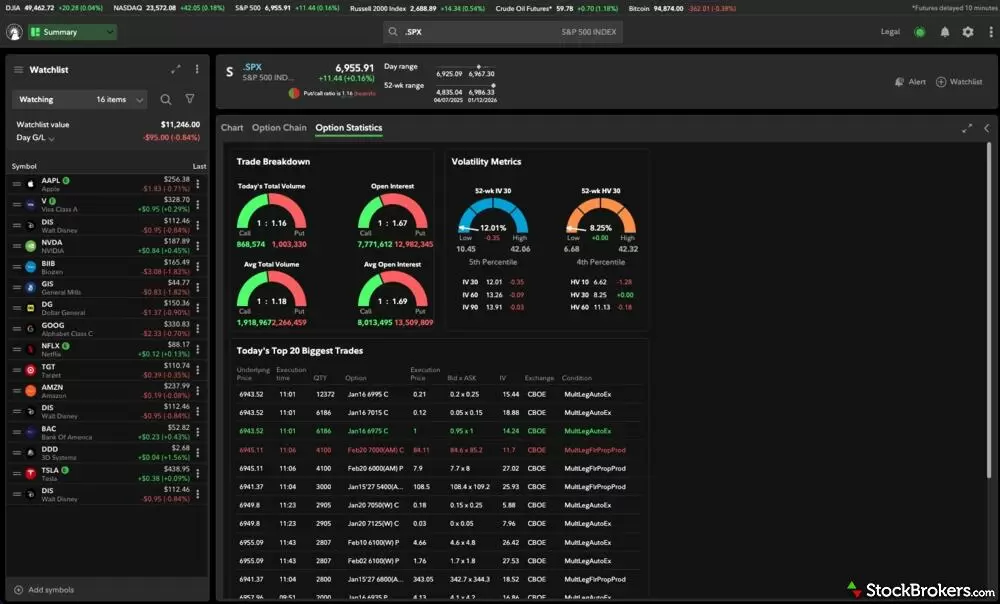
Fidelity’s trading dashboard brings everything together in one place. Here, I’ve linked SPY across all widgets for a seamless view. You can dive into options statistics, volatility indices, and my personal favorite: the trade breakdown activity, which gives great insight into how traders are positioning.
Education and usability baked in: Fidelity does an excellent job weaving education and research throughout the experience instead of isolating it. Short-form insights in the Discover tab, contextual explanations, and integrated research help users learn as they go. Combined with strong account management tools and broad investment offerings, Fidelity delivers a user experience that scales comfortably from beginner to long-term, engaged investor.
3. Merrill Edge Self-Directed - Best bank and brokerage user experience
| Company | Overall | Minimum Deposit | Stock Trades | Options (Per Contract) |
 Merrill Edge Merrill Edge
|
|
$0.00 | $0.00 | $0.65 |
Merrill Edge’s biggest user-experience win is how cohesive it feels across Bank of America and Merrill. Whether you log in from the bank app, a benefits portal, or directly through Merrill, the experience stays familiar with same navigation, same design language, same “where do I click?” instincts. That consistency removes a ton of friction if you’re the type of investor who wants everything in one place.
Strong “guided” design for real-life investors: Merrill is at its best when it anticipates what you’re trying to accomplish and gives you a clean path to do it. The web landing page’s Dynamic Insights dashboard is basically a command center. It organizes your world around the questions investors ask: how am I doing, how are my positions doing, and how is the market doing. On mobile, the watchlist upgrades are a great example of this same mindset, surfacing timely nudges like new research reports, rating changes, 52-week highs, and upcoming ex-dates without you having to find them yourself.
Education and research feel baked in: Merrill does an excellent job integrating contextual education throughout the platform with hover-over definitions, tooltips, and an embedded glossary, so you can learn while you’re doing. Research is also placed where it matters: Dynamic Insights, stock/fund story experiences, and streaming reports that are easy to scan (and even searchable by symbol on mobile). If you like staying informed without drowning in tabs, Merrill gets this right.

Merrill’s Options Strategy Assistant blends education with real-world application in a way that’s genuinely helpful. After selecting a covered call on QQQ with 30 days to expiration, you can clearly see the projected outcomes along with key metrics like net Greeks. It’s a great example of how strategy education and trading tools can work hand-in-hand to build investor confidence.
Where it falls short for power traders: Merrill Edge MarketPro is feature-rich, but it can feel clunky, and the mobile options experience is a weak spot, especially the options chain and multi-leg execution. Desktop MarketPro at least offers a lot of customization with 26 widgets, strong charting with Trading Central event markers, portfolio analysis, and even basic backtesting. But, this is a better fit for investors who value guidance, research, and a unified ecosystem more than rapid-fire trading workflows.
4. Interactive Brokers - Best user experience for professional and active traders
| Company | Overall | Minimum Deposit | Stock Trades | Options (Per Contract) |
 Interactive Brokers Interactive Brokers
|
|
$0.00 | $0.00 | $0.65 |
Interactive Brokers (IBKR) is built for investors who want to stay closely connected to the markets. The desktop experience stands out with its Daily Lineup, which delivers a concise snapshot of global markets, analyst activity, earnings, and economic events in one place.
Powerful tools for active traders: IBKR’s options and portfolio tools are advanced. The OptionsTrader workflow recognizes strategies as you build them, while risk and portfolio analytics make it easy to evaluate exposure, run scenarios, and benchmark performance without leaving the platform.
Mobile depth without compromise: The flagship mobile app doesn’t feel watered down. You get a robust options chain, advanced order types, and meaningful customization. There is a learning curve, but for investors who want control and flexibility, IBKR delivers a surprisingly usable experience.
5. E*TRADE from Morgan Stanley - Best compelling visuals
| Company | Overall | Minimum Deposit | Stock Trades | Options (Per Contract) |
 E*TRADE E*TRADE
|
|
$0.00 | $0.00 | $0.65 |
E*TRADE shines with its Power E*TRADE Pro platform, which offers robust charting, advanced options tools, and thoughtful data visualization. Features like earnings analysis with implied moves, probability-based risk/reward snapshots, and drag-and-drop multi-leg options make the experience approachable for newer options traders.
Intuitive design with smart integrations: I appreciated how seamlessly E*TRADE ties market data, calendars, and trade ideas together. The economic and earnings calendars are particularly useful, letting you drill into events and even build trades directly from those views. Charts are easy to customize with indicators, though drawing tools are limited.
Best for stock-focused investors: While the flagship mobile app isn’t ideal for options trading, it excels at stock research and portfolio monitoring. Overall, E*TRADE delivers a polished, data-forward experience that balances power with usability.
Read next
- Best Stock Trading Apps for 2026
- Best Paper Trading Apps & Platforms for 2026
- Best Brokerage Accounts for 2026
- Best Futures Trading Platforms for 2026
- Best Options Trading Platforms for 2026
- Best Day Trading Platforms and Apps for 2026
- Best Brokers for Penny Stock Trading of 2026
- Best Trading Platforms for Beginners in 2026
More guides
Find the best crypto trading platform for 2026. We rank eToro, Fidelity, Interactive Brokers, Webull, and Robinhood on fees, security, and coin selection.
Steven Hatzakis May 27, 2026
Find the best Roth IRA accounts. Fidelity, Schwab, and E*TRADE lead with low fees, smart investing tools, and retirement planning support.
Andrea Coombes April 27, 2026
Discover the best stock brokers of 2026. Compare Schwab, Fidelity, Interactive Brokers, E*TRADE, and more to find the top trading platform for your needs.
Jessica Inskip August 06, 2026
Explore the best international brokers for U.S. investors. Compare Interactive Brokers, Charles Schwab, and Fidelity for global stock trading access.
Jessica Inskip May 22, 2026
Start investing with ease. Explore the best beginner-friendly trading platforms with low fees, great education, and intuitive apps.
Jessica Inskip August 06, 2026
Find the top bank brokerages. From Merrill Edge to Ally, discover brokers that combine banking, investing, and rewards in one account.
Jessica Inskip April 16, 2026
Practice investing risk-free with the best paper trading platforms. Compare Webull, Schwab, Interactive Brokers, E*TRADE, and more.
Jessica Inskip July 24, 2026
Find top U.S. forex brokers. From tastyfx to OANDA, explore platforms with strong regulation, great tools, and user-friendly trading.
Steven Hatzakis May 29, 2026
Discover the best day trading platforms. Compare IBKR, Schwab, Fidelity, E*TRADE, and TradeStation for speed, tools, and margin rates.
Jessica Inskip August 03, 2026
We tested the best options trading platforms for 2026. Compare tastytrade, Fidelity, IBKR, E*TRADE & Schwab on tools, fees, and picks for beginners.
Jessica Inskip September 09, 2026
Find the best penny stock brokers. Compare Fidelity, Firstrade, Schwab, E*TRADE, and TradeStation for OTC access, fees, and tools.
Jessica Inskip August 02, 2026
Find the best brokerage for high-net-worth investors. Compare Fidelity, Schwab, Merrill, and more for premium services and tailored investment tools.
Jessica Inskip January 27, 2026
We tested the 5 best futures trading platforms of 2026. Compare commissions, margin rates, and tools for beginners and active traders. Find the right platform for you.
Jessica Inskip September 17, 2026
Find the best rollover IRA accounts. Compare Fidelity, Schwab, and E*TRADE for easy transfers, low fees, and smart retirement investing tools.
Andrea Coombes May 15, 2026
Discover the best brokers for trade execution. Compare Fidelity, Interactive Brokers, and more for price improvement, speed, and transparency.
Jessica Inskip May 22, 2026
Find the best IRA accounts. Compare Fidelity, Schwab, Merrill Edge, E*TRADE, & J.P. Morgan for retirement planning, fees, tools, and account flexibility.
Jessica Inskip March 31, 2026
Interactive Brokers and Fidelity lead our 2026 ranking of the best free stock trading platforms, tested on the true cost of $0 commissions and hidden fees.
Jessica Inskip September 02, 2026Popular stock broker reviews

Read our Public.com review to learn how its intuitive platform and community-driven features help simplify investing for first-time traders.
Jessica Inskip September 17, 2026
Read our Robinhood review and see why it’s a top pick for beginners, with a sleek mobile app, zero commissions, and standout educational tools.
Jessica Inskip September 03, 2026
Read our Webull review and discover its commission-free trading, sleek platforms, paper trading tools, and fractional shares.
Jessica Inskip August 10, 2026
Read our J.P. Morgan Self-Directed Investing review and discover its strengths in research, planning tools, and integration for Chase clients.
Jessica Inskip May 15, 2026
Fidelity charges $0 stock and ETF trades and won #1 for Research and Education in 2026. See our tested review of its fees, platforms, IRAs, and apps.
Jessica Inskip September 17, 2026
Read our TradeStation review and discover why its pro-level tools, deep customization, and options focus make it a top choice for active traders.
Jessica Inskip September 11, 2026
Ally Invest scores 3/5 in our 2026 review. See how its $0 stock trades, $0.50 options, strong fixed income tools, and Ally Bank integration stack up.
Jessica Inskip September 14, 2026
Read our tastytrade review and discover why it’s the top choice for options traders, with low fees, advanced tools, and a seamless platform.
Jessica Inskip May 04, 2026
Read our Interactive Brokers review and see why it's a top choice for active traders with low costs, cutting-edge platforms, and global reach.
Jessica Inskip July 31, 2026
Read our Charles Schwab review to learn why its platforms, research, and investor resources make it one of the top-ranked brokerages.
Jessica Inskip September 08, 2026
Read our Firstrade review and see why it’s a top choice for options traders, offering $0 contract fees, robust tools, and a growing feature set.
Jessica Inskip May 04, 2026
Read our Merrill Edge Self-Directed review and see how it combines powerful investing tools, robust research, and integrated banking benefits.
Jessica Inskip May 04, 2026
Read our 2026 E*TRADE review to see how powerful research, versatile platforms, and diverse investments make it a top choice for all investors.
Jessica Inskip September 14, 2026
Read our eToro review to explore its interactive platform, built-in discussions, and tools for crypto and stock investing.
Jessica Inskip May 20, 2026About the Editorial Team
Jessica Inskip is Director of Investor Research at StockBrokers.com, bringing 15 years of experience in brokerage and trading strategy. A former FINRA-licensed rep, she held Series 7, 63, 66, and 4 licenses. Jessica focuses on investor education and brokerage industry research, appears regularly on CNBC, Bloomberg, The Schwab Network, Fox Business, and Yahoo! Finance, and hosts the Market MakeHer podcast.
Jeff Anberg is a Senior Editor at StockBrokers.com. Along with years of experience in media distribution at a global newsroom, Jeff has a versatile knowledge base encompassing the technology and financial markets. He is a long-time active investor and engages in research on emerging markets like cryptocurrency. Jeff holds a Bachelor’s Degree in English Literature with a minor in Philosophy from San Francisco State University.
Joey Shadeck is the Content Strategist and Research Analyst for StockBrokers.com. He holds dual degrees in Finance and Marketing from Oakland University, and has been an active trader and investor for close to 10 years. An industry veteran, Joey obtains and verifies data, conducts research, and analyzes and validates our content.