 Charles Schwab
 Fidelity
 Interactive Brokers
 E*TRADE
 Webull
 TradeStation
 tastytrade
 eToro
eToro Trading 212
 Interactive Investor
 IG
IG Interactive Brokers
 XTB
XTB Hargreaves Lansdown
 Saxo
Saxo Charles Stanley Direct
 CIBC Investor's Edge
 Interactive Brokers
 Moomoo
 Questrade
 Qtrade
 TD Direct Investing
 Wealthsimple
 Finviz
 Stock Rover
 Seeking Alpha
 StockHero
 TipRanks
 TrendSpider
 Trade Ideas
 TraderSync
 TradingView
 Tradervue
 TradeZella
Moomoo Canada Review

Written by Colin Graves
Contributing Writer

Edited by Hannah Smith
Staff Editor

Fact-checked by Joey Shadeck
Research Analyst
Colin GravesContributing Writer
Colin Graves is a Winnipeg-based financial writer and former banker with more than eight years of experience covering investments, brokerages, and personal finance.

I’ve been reviewing Canadian online brokerages for years, and it’s rare for a new platform to surprise me, but Moomoo Canada did. I spent several weeks testing its desktop and mobile trading platforms, funding an account, placing trades, exploring its trading and research tools, and comparing it with the biggest names in Canadian investing. Despite only launching in Canada in 2023, Moomoo has built a polished and feature-rich platform.
Moomoo isn’t trying to be everything to everyone. Its charting, research tools, customizable trading workspaces, and options capabilities make it a strong choice for active self-directed investors. However, its limited selection of registered account types, lack of fractional share trading, and dense interface make it a less compelling option for beginners or investors who want a single brokerage to meet all of their long-term investing needs.
-
Minimum Deposit:
$0 -
Stock/ETF Trade Fee:
$1.49 -
Mutual Fund Trade Fee:
N/A
| Fees | |
| Range of Investments | |
| Mobile App | |
| Web Platform | |
| Education | |
| Ease of Use |
 Why you can trust us
Led by Jessica Inskip, Director of Investor Research, the StockBrokers.com research team collects thousands of data points across hundreds of variables. We evaluate features important to every kind of investor, including beginners, casual investors, passive investors, and active traders. We carefully track data on margin rates, trading costs, and fees to rate stock brokers across our proprietary testing categories.
Our researchers open personal brokerage accounts and test all available platforms on desktop, web, and mobile for each broker reviewed on StockBrokers.com. Learn more about how we test.
Table of Contents
Pros and cons
PROS
- Competitive pricing on Canadian and U.S. stocks and ETFs.
- Modern desktop trading platform.
- Free research tools.
- Free paper trading account.
CONS
- Limited account types; no FHSA, RRIF, RESP.
- Limited investment offerings (no mutual funds, bonds, GICs, forex, etc.).
- Doesn’t offer fractional shares.
My top takeaways for Moomoo Canada in 2026:
- Moomoo is a global brokerage that has served the Canadian market since 2023. It focuses on Stock, ETF, and options trading.
- Moomoo Canada doesn’t charge a foreign exchange fee when converting Canadian and U.S. dollars in your account, making it an attractive option for Canadians who want to buy and sell U.S.-listed stocks.
- Moomoo Canada offers a free paper trading account with access to $1MM CAD in virtual cash.
- Moomoo doesn’t offer a web-based trading app in Canada, but its mobile and downloadable desktop platforms are packed with features and easy to navigate.
Moomoo Canada fees
Moomoo Canada’s trading fees are higher than those of zero-commission brokers such as Questrade, Qtrade, and Wealthsimple. However, they remain competitive and are much lower than the big bank brokerages, which charge as much as $9.99 per stock and ETF trade. Moomoo operates on a per-share pricing model with minimum per-order charges, and unlike most bank brokers, it doesn’t charge annual account or inactivity fees. Unfortunately, Moomoo Canada doesn't offer fractional shares.
Stocks, ETFs, and options: When trading Canadian-listed stocks and ETFs priced over $1.00, you’ll pay $0.0149 CAD per share (min. $0.49 CAD per trade), plus a platform fee of $0.01 CAD per share (min. $1.00 CAD per order). When trading U.S.-listed equities over $1.00, you’ll pay $0.001 USD per share (min. $0.99 USD per trade), plus a platform fee of $0.0005 USD per share (min. $1.00 USD per order). The per-share fee is lower for equities priced at or below $1.00 per share.
You can trade U.S. stock and index options through Moomoo Canada, but Canadian options trading is not currently available. Pricing for U.S. options is as follows: $0.65 per contract, min. $1 per order. Moomoo doesn't charge any exercise/assignment or currency exchange fees.
Margin rates: Moomoo Canada’s borrowing rates are based on the Prime rate and are among the lowest in the industry, even lower than Qtrade, Questrade, and Wealthsimple. At the time of writing, Moomoo charges the following:
| Currency | Margin rate (%) |
| Canadian | 0 < $100,000: Prime + 0% = 4.45% ≥ $100,000: Prime - 0.6% = 3.85% |
| U.S. | 0 < $100,000: Prime + 0% = 6.75% ≥ $100,000: Prime - 0.6% = 6.15% |
By comparison, Questrade’s standard margin rates, also based on the Prime rate, are currently 8.70% and 11.25% for Canadian- and U.S.-dollar non-registered accounts, respectively.
Account and inactivity fees: Moomoo Canada doesn't charge account administration fees on its registered accounts, which include TFSAs, RRSPs, and spousal RRSPs. It also doesn't charge inactivity fees.
Platform fee: As mentioned above, Moomoo Canada charges a platform fee on all stock and ETF trades in addition to the standard commission. According to Moomoo, this platform fee “supports our ongoing investment in research and development, enabling continuous improvements in our technology and an exceptional trading experience.” This is something to keep in mind if you’re deciding between Moomoo Canada and a zero-commission brokerage like Wealthsimple or Questrade.
| Feature |
 Moomoo Canada Moomoo Canada
|
|---|---|
| Minimum Deposit | $0 |
| Inactivity fees | $0 |
| Stock/ETF Trade Fee | $1.49 |
| Mutual Fund Trade Fee | N/A |
| Bond Trade Fee | N/A |
| FX Currency Conversion Fee | 0.00 |
| Penny Stock Fee (OTC) | N/A |
| Account closure fee | $0 |
Range of investments
While not surprising for a global brokerage that only arrived in Canada in 2023, Moomoo disappoints for its narrow range of investment options and account types. You can buy and sell all Canadian stocks listed on the Toronto Stock Exchange, as well as 7,000 stocks listed on the major U.S. exchanges. You can also access over 5,000 Canadian and U.S.-listed ETFs, as well as U.S. options. And any uninvested cash sitting in your margin or cash accounts will earn you 2% APY through Moomoo’s Cash Sweep program, something most brokerages don’t offer.
While it supports some of the most popular account types, such as the TFSA and RRSP, you can’t open a First Home Savings Account (FHSA), Registered Education Savings Account (RESP), Registered Retirement Income Fund (RRIF), or any locked-in retirement plans or non-personal accounts. I’m hoping they will add more of these accounts to their product offering in the near future.
| Feature |
Moomoo Canada
|
|---|---|
| Bond trading | No |
| CFD trading | No |
| Crypto trading | No |
| ETF trading | Yes |
| Forex trading | No |
| Fractional Shares (Stocks) | No |
| Recurring investments | No |
| Futures trading | No |
| Options trading | Yes |
| Margin trading | Yes |
| Mutual Funds | No |
| Penny (OTC) stocks | No |
| Stock trading (CA) | Yes |
| Stock trading (U.S.) | Yes |
| Stock trading (Global) | No |
Mobile trading app
Moomoo Canada’s mobile app, which is available on both iPhone and Android devices, is one of the most engaging (and potentially distracting) trading apps I’ve tested. Alongside charting and market data are community discussions, promotional campaigns, rewards, and frequent notifications. The experience feels very gamified. For example, as you engage with the app, depositing funds or placing your first trade, you earn badges that you can choose to share with the community and add to your profile.

Moomoo incorporates gamification by rewarding users with digital badges for completing milestones, such as making their first deposit or placing their first trade. Some investors may enjoy the added sense of progression; others may find the game-like elements unnecessary for a trading platform.
Stock quote pages include investor comments, and you can like and follow, or even join in on the discussion. If you can look past all of the promotion and social content, you’ll find a very powerful and intuitive mobile trading platform.

Moomoo integrates social features directly into the mobile investing experience. Every stock has its own community feed where users can post comments, share opinions, follow other investors, and react to posts without leaving the app.
When it comes to mobile trading tools, you can choose from eight different order types, including “Limit-If-Touched” and “Market-If-Touched” orders. There is advanced charting, analyst ratings, and plenty of market news available. It’s also incredibly easy to create and edit watchlists, and you can set custom alerts, something you can’t do with Questrade’s Questmobile or the Qtrade app.
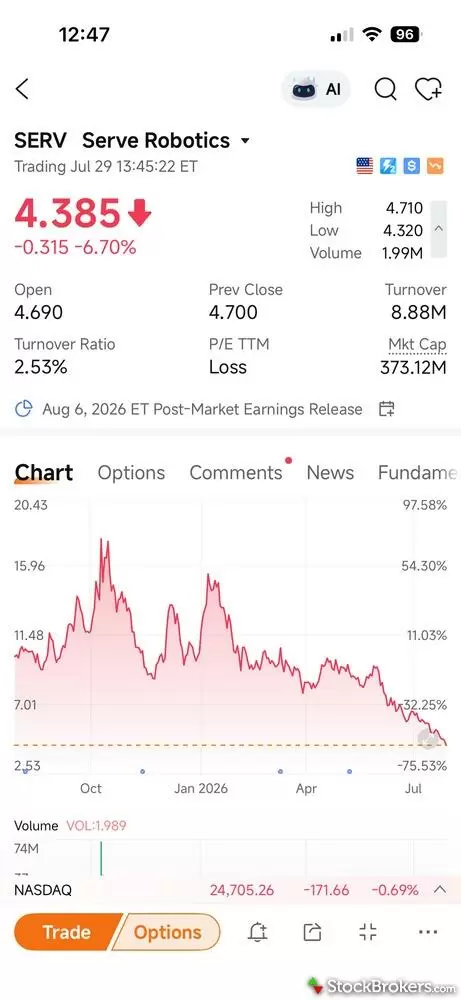
Moomoo's mobile quote pages pack an impressive amount of information into a single screen. Investors can quickly view key market data, interactive charts, upcoming earnings dates, options, company news, community discussions, and research tabs, making it easy to analyze a stock without jumping between multiple pages.
| Feature |
Moomoo Canada
|
|---|---|
| iPhone App | Yes |
| Android App | Yes |
Trading Platforms
Unlike most Canadian brokerages, Moomoo Canada doesn’t offer a web-based trading platform. I was so surprised by this that I called their customer support to confirm. Instead, investors can trade through its mobile app or download the Moomoo desktop app for Windows or Mac. I tested the desktop platform on my MacBook Pro, and I found it to be one of the most capable I’ve used.
For such an in-depth trading platform, I found it surprisingly easy to navigate. The left-hand navigation menu is a thing of beauty. It keeps the platform's key features, such as watchlists, markets, portfolio, custom workspaces, paper trading, stock screeners, Moomoo AI, and the community feed, clearly organized and accessible with a single click. I didn’t have to hunt through menus to find what I needed. One omission is the lack of fractional share trading. With competitors like TD Direct Investing, Wealthsimple, and Questrade now offering this feature, it feels like a miss.
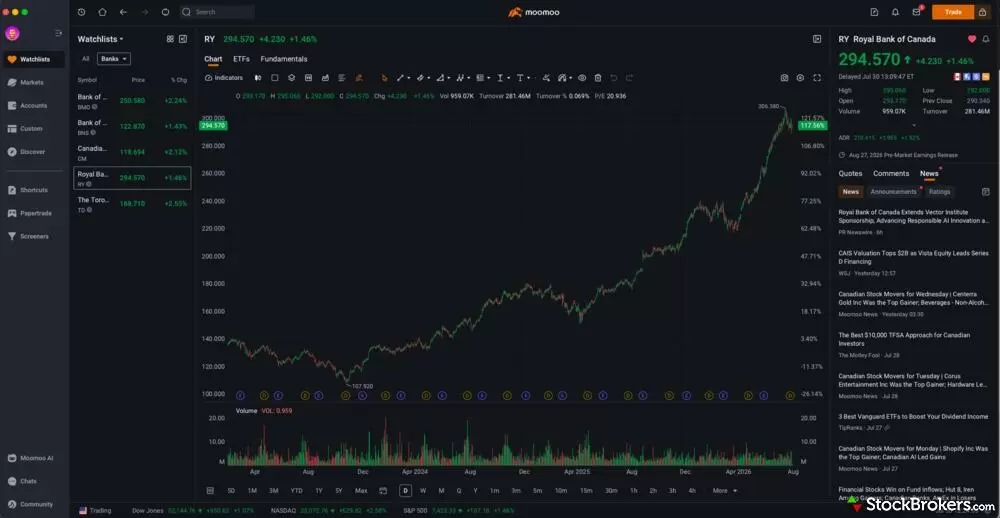
Moomoo's desktop platform makes it easy to move between research and trading without digging through menus. Watchlists, charts, company fundamentals, news, and quote data are all accessible from a single screen, while the clean left-hand navigation provides one-click access to features like markets, screeners, paper trading, and portfolio management.
Trading tools: The desktop platform includes several advanced trading tools. Investors have access to free Level 2 U.S. market data with up to 60 levels of real-time market depth. When it comes to charting, there are over 100 technical indicators, 50 drawing tools, and an impressive eight order types. Options tools, such as multi-leg strategy support, a strategy builder, a profit and loss calculator, and an options screener, are fully integrated. It’s probably too much for beginners, but should satisfy experienced active traders.
Customizable workspaces: Moomoo allows you to build trading layouts that align with your trading style. It includes several pre-built workspace templates, including ActiveTrader, Options Trader, Portfolio Tracker, Multi-Chart, and Ladder, but you can also create your own layout by adding and arranging widgets such as charts, watchlists, order entry panels, and news feeds. The screenshot below shows the pre-built multi-chart layout.
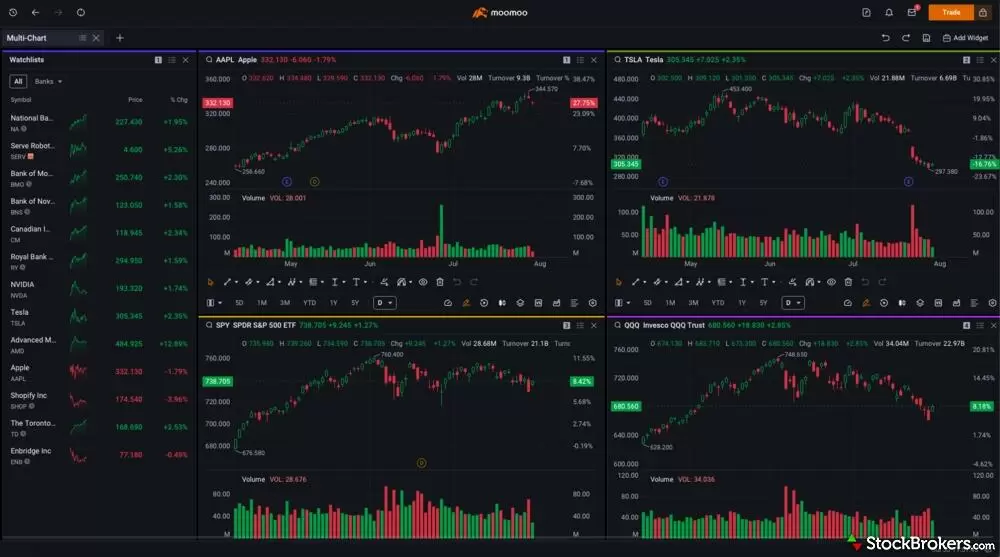
Moomoo's desktop platform includes several pre-built workspace templates designed for different trading styles. This Multi-Chart layout lets investors monitor multiple securities simultaneously while keeping a watchlist visible, making it easy to compare price movements and spot trading opportunities without constantly switching between charts.
| Feature |
Moomoo Canada
|
|---|---|
| Desktop Trading Platform | Yes |
| Web Trading Platform | No |
| Stock Alerts | Yes |
| Charting - Indicators / Studies | 100 |
| Research - Stocks | Yes |
| Research - CFDs | No |
| Research - Mutual Funds | No |
| Research - ETFs | Yes |
| Research - Bonds | No |
| Trade Journal | No |
| Paper Trading | Yes |
| Screener | Yes |
Education
Moomoo has an impressive Learning Centre you can access from the website and mobile trading apps. It combines articles and video content, some of which are set up as multi-lesson courses that you can move through at your own pace. I was surprised by the amount of educational content on the website, especially Canadian-specific content.
For example, I counted over 40 educational pieces related to TFSAs alone. I haven’t seen anything close to that number from any Canadian brokerage I’ve tested. Under the Strategies & Insights tab, you’ll find content on everything from Canadian stocks and RRSPs to technical analysis, trading strategies, and even trading psychology.
| Feature |
Moomoo Canada
|
|---|---|
| Education (Stocks) | Yes |
| Education (ETFs) | Yes |
| Education (Mutual Funds) | No |
| Education (Retirement) | No |
| Webinars | No |
| Videos | Yes |
| Interactive Learning - Quizzes | No |
| Courses | Yes |
Final thoughts
My overall impression of Moomoo Canada is very positive. I was surprised by how polished it is, especially considering it’s only been in the Canadian market for three years. Both the desktop and mobile apps are packed with features and deliver an intuitive, in-depth trading experience. From a usability standpoint, it might be the best platform I’ve tested in recent memory. I loved how easy it was to manage watchlists and custom alerts, transfer between Canadian and U.S. dollars, and customize trading workspaces. If you’re an active trader looking for access to stocks, ETFs, and options, Moomoo Canada is a serious contender.
That said, it won’t be the right fit for everyone. Registered account options are limited to TFSAs and RRSPs, which is a significant drawback if you want one brokerage to handle all of your investing needs. I also wouldn’t recommend it for beginners, who may find the sheer number of features and tools overwhelming. A zero-commission, beginner-friendly platform like Wealthsimple is probably a better place to start. The lack of support for fractional shares isn’t a deal breaker, but it’s a feature I would like to see added. I also get the sense that Moomoo Canada isn’t focused on expanding into fixed-income investing anytime soon. However, if it can broaden its account lineup, particularly by adding the FHSA, RRIFs, and locked-in retirement accounts, it has the potential to become a formidable competitor to top Canadian brokerages like Questrade, Wealthsimple, and TD Direct Investing.
Moomoo Star Ratings
| Feature |
Moomoo Canada
|
|---|---|
| Overall |
|
| Fees |
|
| Range of Investments |
|
| Mobile App |
|
| Web Platform |
|
| Education |
|
| Ease of Use |
|
StockBrokers.com Review Methodology
Why you should trust us
Colin Graves, a contributing writer for StockBrokers.com, has over eight years of experience covering investments and Canadian brokerage platforms. Before becoming a full-time writer, Colin spent over two decades in the banking industry, including 15 years as a people manager with a Top 10 North American financial institution. He has completed both the Canadian Securities (CSC) and the Professional Financial Planning (PFPC) courses and has appeared in leading Canadian personal finance publications such as MoneySense, Money.ca, MapleMoney, and The College Investor.
Blain Reinkensmeyer, co-founder of StockBrokers.com, has been investing and trading for over 25 years. After having placed over 2,000 trades in his late teens and early 20s, he became one of the first in digital media to review online brokerages. Today, Blain is widely respected as a leading expert on finance and investing, specifically the U.S. online brokerage industry. Blain has been quoted in The New York Times, The Wall Street Journal, Forbes, and Fast Company, among others. Blain created the original scoring rubrics for StockBrokers.com and oversees all testing and rating methodologies.
How we tested
- We used our own brokerage accounts for testing.
- We collected hundreds of data points across the brokers we review.
- We tested each online broker's website, desktop platforms, and mobile app, where applicable.
- We maintained strict editorial independence; brokers cannot pay for inclusion or a higher rating.
Our research team meticulously collected data on every feature of importance to a wide range of customer profiles, including beginners, casual investors, passive investors, and active traders. We carefully track variables like margin rates, trading costs, fees, and platform features and use them to help rate brokers across a range of categories measuring ease of use, range of investments, education, and more.
At StockBrokers.com, our reviewers use a variety of computing devices to evaluate platforms and tools. Our reviews and data collection were conducted using the following devices chosen to reflect the everyday hardware our readers are likely to be using rather than top-tier configurations: iPhone SE running the latest iOS version, MacBook Pro M1 with 8 GB RAM running the current MacOS, and a Dell Vostro 5402 laptop i5 with 8 GB RAM running Windows 11 Pro.
Each broker was evaluated and scored on over 60 different variables across six key categories for Canadian investors: Range of Investments, Platforms & Tools, Mobile Trading, Education, Ease of Use, and Overall. Learn more about how we test.
Read next
Explore further guidance on trading in Canada.
- Best Trading Apps in Canada for 2026
- Best Canadian Brokerage Firms in 2026
- CIBC Investor's Edge Review
- Wealthsimple Review
- TD Direct Investing Review
- Best Forex Brokers in Canada for 2026
- Interactive Brokers Review
- Questrade Review
- Qtrade Review
About Moomoo
Moomoo is a global brokerage that expanded into the Canadian market in 2023 under the name Moomoo Financial Canada Inc. (MFCI). Founded in Silicon Valley in 2018, Moomoo focuses on stock, ETF, and options trading, and serves over 30 million users worldwide. MFCI is a member of the Canadian Investor Protection Fund (CIPF) and is regulated by the Canadian Investment Regulatory Organization (CIRO).
About the Editorial Team
Colin Graves is a Winnipeg-based financial writer with more than eight years of experience covering investments and brokerages. A former banking exec who managed over $1B in assets, he holds CSC and PFPC credentials. His work appears in MoneySense, Money.ca, MapleMoney, and more.
Hannah Smith is a Staff Editor at StockBrokers.com. With a background in SEO and years of experience in digital media, Hannah is focused on creating high-quality, data-driven content that helps investors make informed decisions. With a master's degree in English from North Carolina State University, she brings a strong foundation in writing, research, and editorial strategy to her work.
Joey Shadeck is the Content Strategist and Research Analyst for StockBrokers.com. He holds dual degrees in Finance and Marketing from Oakland University, and has been an active trader and investor for close to 10 years. An industry veteran, Joey obtains and verifies data, conducts research, and analyzes and validates our content.