 Charles Schwab
 Fidelity
 Interactive Brokers
 E*TRADE
 Webull
 Robinhood
 TradeStation
 tastytrade
 eToro
eToro Trading 212
 Interactive Investor
 IG
IG Interactive Brokers
 XTB
XTB Hargreaves Lansdown
 Saxo
Saxo Charles Stanley Direct
 CIBC Investor's Edge
 Interactive Brokers
 Moomoo
 Questrade
 Qtrade
 TD Direct Investing
 Wealthsimple
 Finviz
 Stock Rover
 Seeking Alpha
 StockHero
 TipRanks
 TrendSpider
 Trade Ideas
 TraderSync
 TradingView
 Tradervue
 TradeZella
StockHero Review

Written by David Rodeck
Contributing Writer

Edited by Hannah Smith
Staff Editor

Fact-checked by Joey Shadeck
Research Analyst
David RodeckContributing Writer
David Rodeck is a financial writer based in New York City. He specializes in making investing, trading, and retirement planning understandable.

StockHero specializes in helping users design, test, and run their own trading bots. I built several bots, experimented with bot strategies created by other users, and tested the platform's other investment research tools, including the AI chat.
StockHero is easy to use and engaging, allowing you to launch your first bot in just 5 minutes. There isn't too much beyond the bots, though, and I do wonder if the platform's fun design could encourage overtrading. Here's what I experienced during my StockHero review.
-
Free version:
Yes -
Monthly Pricing:
$49.99/mo -
Annual Pricing:
$499.99/yr
| Ease of Use | |
| Features | |
| Cost |
StockHero pros and cons
PROS
- Build, test, and run up to 50 active trading bots at once.
- Rent bots built by other users, with win rate and popularity shown in the Marketplace.
- 14-day free Lite trial, plus a no-ads free plan with paper trading.
- Launches your first ai stock trading bot in minutes.
CONS
- Only 14 broker connections, many in beta or crypto-only. The free trial connects to TradeStation only.
- AI chatbot covers market info only. It doesn’t help build bots.
- Research and charting tools are basic compared with competitors.
- Bright, gamified design that can feel unserious.
Overall summary
| Feature |
 StockHero StockHero
|
|---|---|
| Overall |
|
| Features |
|
| Ease of Use |
|
| Cost |
|
| Free version | Yes |
| Monthly Pricing | $49.99/mo |
| Annual Pricing | $499.99/yr |
Cost and plans
StockHero offers three tiers of paid subscriptions. StockHero pricing includes roughly a 20% discount when you pay annually rather than monthly.
- Lite: $49.99 per month, $499.99 per year
- Premium: $99.99 per month, $999.99 per year
- Professional: $159.99 per month, $1,599.99 per year
The more you pay, the more features you unlock, most notably the ability to run more bots at once.
There is a free 14-day trial for the Lite plan, but not for the Premium or Professional plans. You can also test much of the platform with some restrictions by signing up for a free account.
In addition to the platform fee, users may pay to rent bot strategies developed by others. I was surprised by how expensive some were, ranging from roughly $200 to $800 per bot per year, though it makes sense that successful strategies are able to demand a high price.
Higher-tier plans include some Marketplace strategies for free, helping justify the added subscription cost.
Free plan
I was able to get started within a minute simply by providing my first name, email, and a password. I was impressed by how accessible the free platform was. I didn't encounter a single pop-up ad or anything else that degraded the experience. It felt like StockHero was confident enough in its tools to offer a free demonstration without trying to make money elsewhere.
As a free user, you can create and backtest your own trading bot, then use paper money to see how it performs over time. You do need a paid subscription to put the bots into action with real money, and free users cannot access features like the AI chat or full Marketplace details of available bots to rent.
Still, I appreciated being able to try so much for free, especially when some competing bot platforms don't even offer a free trial.
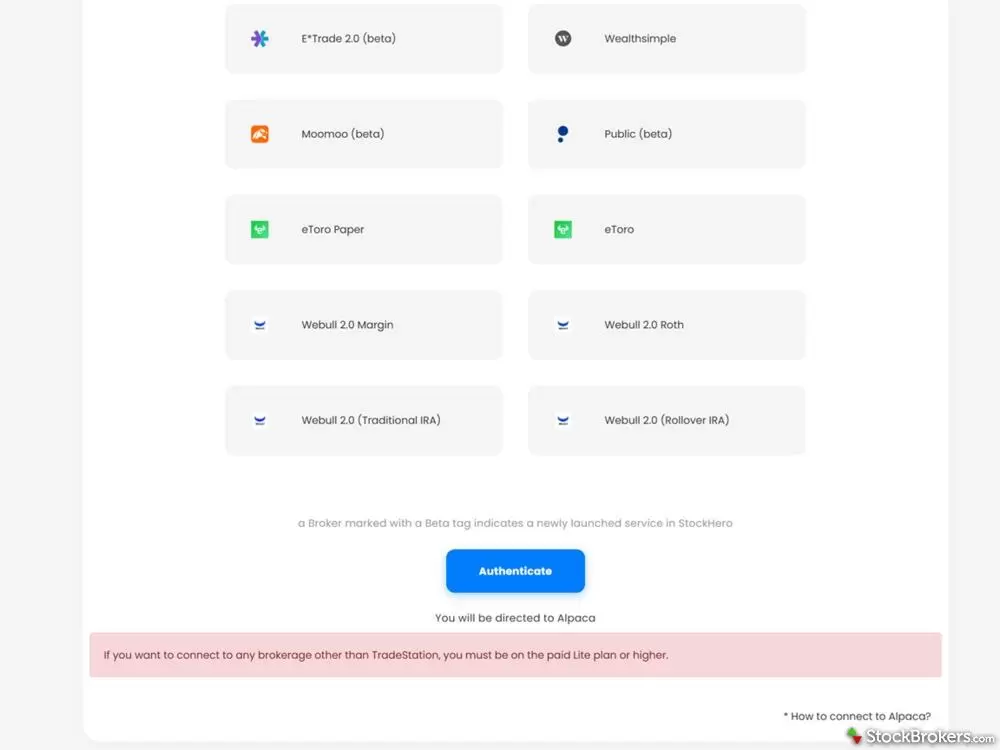
StockHero allows you to create and backtest your own trading bot using paper money, but if you want to start trading with real money you need a paid subscription.
Lite
A Lite plan lets you put your trading bots into action, with one active bot during the free trial and up to two once you've paid. I would blow past that limit quickly if I were serious about using StockHero, given how easy it is to develop and rent different bots.
Paid Lite users also get free access to Sigma Series Fast, StockHero's top-performing strategy of 2025. So if you only operate with one or two bots, at least you get a proven option to work with. However, you are not able to rent any other strategies from the Marketplace.
During the free trial, you can only connect to TradeStation. Once you pay for Lite, however, you can connect to all supported brokerages.
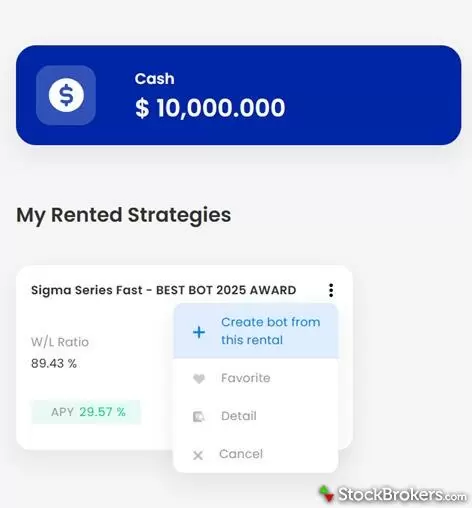
Renting a bot on StockHero takes just a few steps: review the Marketplace strategy, rent it for a month up to a year, then set it loose on your chosen investment.
Premium
Premium lets you run up to 15 bots at a time, which I feel is a good benchmark for serious investors. You gain access to more advanced trading strategies, including dollar-cost averaging (DCA), where a StockHero bot can gradually build a position through multiple purchases rather than you manually investing everything at once.
With this account, you can now rent other Marketplace bots. During my StockHero review in August 2026, they were running a promotion where new Premium subscribers received four additional advanced bot strategies for free.
I think the upgrade is worth the price solely for the extra bots. StockHero also offers additional investment research, advanced backtesting, and an AI chat, but I felt these only added a little extra value compared to upgrading the bots.
Professional
StockHero's most expensive Professional plan allows up to 50 bots at a time. They can now trade during extended hours and check for trading opportunities as often as every one or five minutes, versus every 15 minutes on the lower-tier plans.
You also get SMS/WhatsApp trade notifications rather than relying solely on email. I'd appreciate it if I had a bot managing a substantial portfolio, since I sometimes overlooked email notifications when my bots became active during the trading day.
At the time of my review, new Professional annual subscribers would get free access to all existing and future Marketplace bot strategies so they don't have to rent them. If I were upgrading, I'd first check whether my target strategies are included in Premium before springing for Professional.
Features
Custom trading bots
StockHero's platform is primarily built to design and support its trading bots. In fact, that's the first thing it walks you through as a new user, helping you launch a basic bot that trades Apple.
I appreciated how easy it was to design a strategy. You pick an investment, then StockHero walks you through parameters for when and how the bot can trade, entry and exit conditions, and whether it should close trades at the end of each day or keep them open until reaching a target. You can start with paper money, then connect a supported broker so your bots can trade your actual portfolio. StockHero earned a spot in our ranking of the best AI trading bots as the easiest platform for building and launching a bot without code.
I recorded the full setup, from the free signup through building my own bot on Tesla and running a backtest.
While the StockHero bots were easy to set up, I would have liked more on-screen guidance explaining what I was doing and whether the strategy actually made sense.
For example, StockHero lets you choose technical indicators like Relative Strength Index (RSI) and Moving Average Convergence Divergence (MACD) as entry conditions, but doesn’t have a built-in explanation of what each indicator does or when it might make sense to use it. It would also have been helpful to get more feedback after backtesting on whether a strategy was worth using, something TrendSpider does much better.
I set up several bots for investments, including Apple, Tesla, and Bitcoin, and let them get to work. I actually forgot about them until I started receiving emails about trades they were entering and exiting. At first, that was a little spooky, but I appreciated how quickly you could build your own army of robot investors. It was by far the fastest I've been able to launch active trading bots.
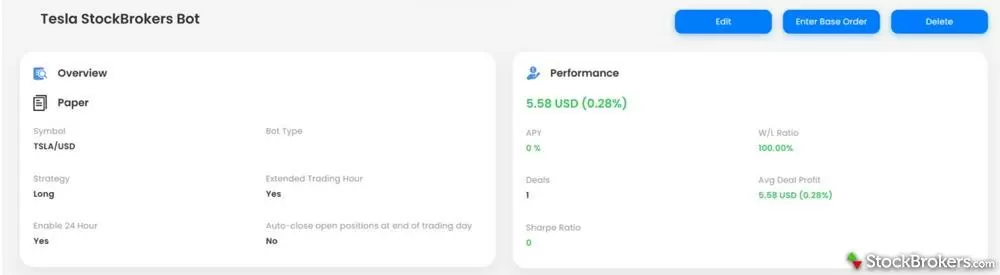
Once launched, a StockHero bot trades on its own, entering and exiting positions automatically until it hits your target or the trading day ends.
Backtesting and charting
Before you launch a bot, you can backtest how your strategy would’ve performed historically. Past performance doesn’t guarantee future results, but I appreciated being able to test periods ranging from the past day to the last five years.
The backtesting tools also double as a basic charting feature, allowing you to add trendlines, identify patterns, and take notes on past performance. It's nowhere near as full a charting platform as TradingView. For example, you can only work off one chart at a time. Still, it adds a little DIY functionality.
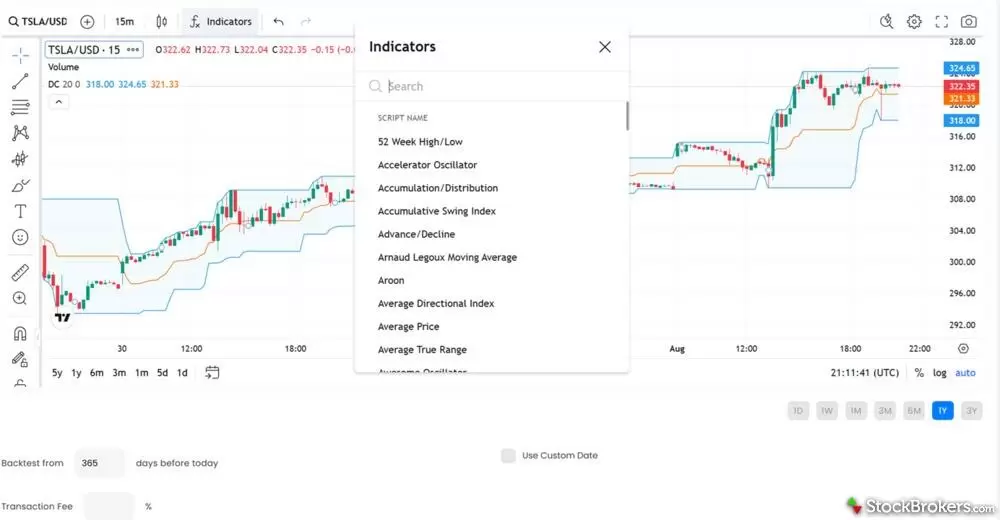
StockHero's charting doubles as its backtesting tool, letting you add trendlines, spot patterns, and take notes on past performance.
Bot marketplace
If you don't want to build your own bots, you can rent strategies designed by other traders. You can review each bot's strategy, win rate, track record, and popularity. StockHero also uses green and red indicators to show which investments a bot has performed best or worst with.
If there's one you like, you can rent it for a month up to a year. I tested the bot included with my Lite subscription and liked how easy it was to implement. I basically just had to say, "Focus on this stock or crypto," and it would get to work.
Naturally, you can’t see the exact strategy behind a rented bot, so you need some faith that it will continue to deliver. I can see the appeal of that convenience, but I also wonder whether it encourages investors to put too much trust in someone else's strategy rather than thinking things through what makes sense for them. Then again, that's only one step beyond trusting your portfolio to a bot.
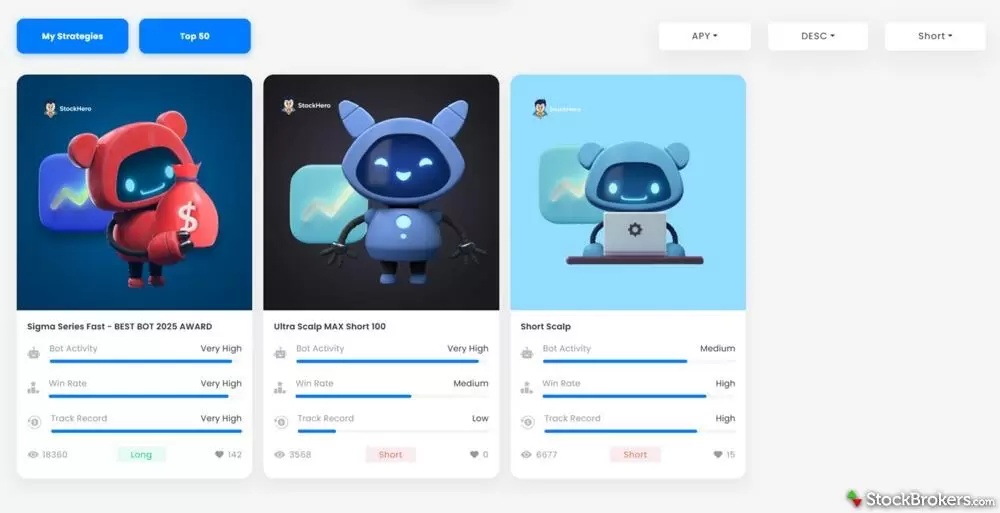
StockHero's bot Marketplace lets you compare strategies, win rates, and track records, then rent the one you like for a month up to a year.
AI chatbot
StockHero offers an AI chatbot, but I found it rather basic. It focuses on market trends and analysis of specific investments or companies.
I did enjoy the detailed reports, but I would have liked an AI assistant that could help build the bots themselves. StockHero wants no part of that. Typing the word "bot" into the StockHero AI chat actually flags it as a banned word and shuts the whole thing down, which I found hilarious.
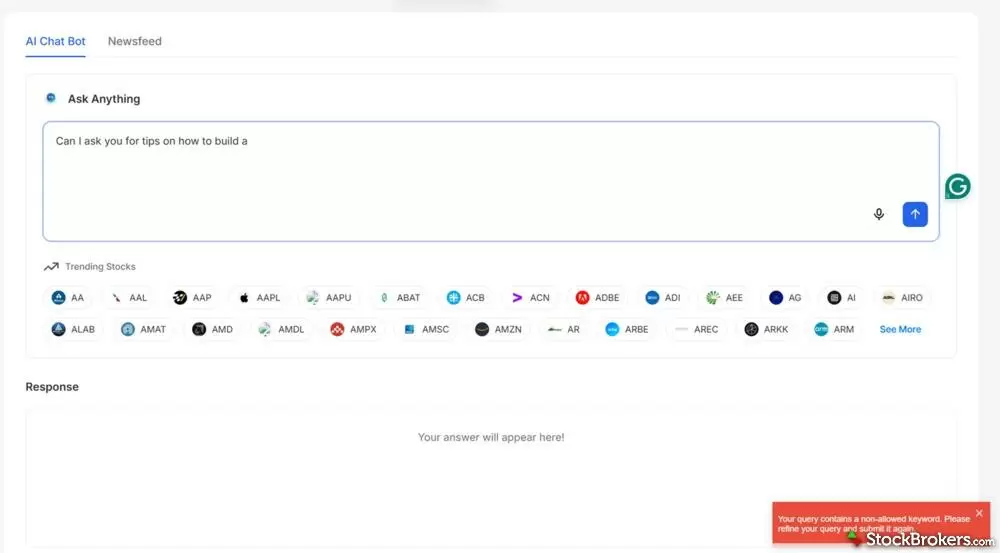
StockHero's AI chat flags "bot" as a banned word and shuts down, refusing to help with the platform's main feature.
Market research and reports
StockHero provides some market research for paid subscribers, including sentiment analysis, analyst ratings, key financial metrics, daily news reports, and market recaps for target investments.
These tools felt more like an afterthought compared with the bots, but they're there if needed.
Ease of use
StockHero is easy to use. Everything was laid out clearly, and I had little trouble finding my way around. You can run everything through the web platform or the StockHero app for Android and Apple.
The bright color scheme was inviting, and I appreciated the tip boxes and popups throughout. They were helpful for navigating the platform itself, though I wish StockHero had added a little more built-in guidance for creating the bots. Customer support is available through email, live chat, WhatsApp, and Telegram, along with an FAQ and educational materials.
I did find it peculiar that the AI chatbot wouldn’t answer questions about StockHero itself, especially about bots. I suspect that may be because the company doesn’t want its AI providing guidance on individual trading strategies so users blame them for poor performance.
The design is so bright and engaging that it reminded me of Robinhood, making trading feel more like a video game than a serious endeavor. That's great for ease of use, but I do wonder whether StockHero could use a few more brakes before users launch strategies. It was almost too easy.
One issue was connecting my broker. I couldn’t connect my Robinhood account directly and was told to contact support for help. It looks like they are still figuring out the connections for many popular brokers.
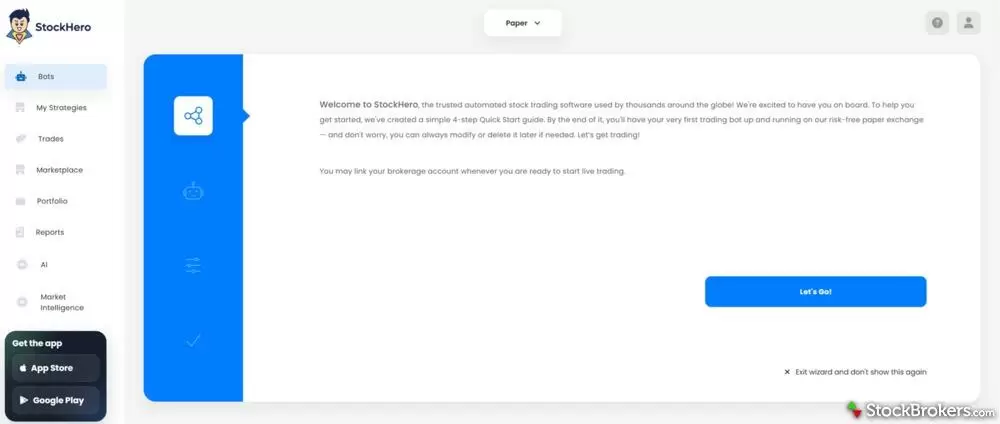
StockHero walks you into the platform right after signup, no pop-up ads or paywalls before you can start building a bot.
Final thoughts
StockHero proves you don't have to be a coder to create trading bots. I found it offers one of the most user-friendly ways to launch custom bots, especially if you build off rented strategies from others. I would have liked more feedback on whether a bot was actually worth launching, but adding those controls would also make the process more complicated.
If you want a more intensive bot design process, consider TrendSpider. Its AI tools can help refine strategies and identify weak setups before you launch them. If you're a more DIY investor, TradingView offers a much wider range of tools, including up to 800 active alerts on its Premium plan, so you can monitor opportunities and decide when to trade yourself rather than leaving it to a bot.
FAQs
Is StockHero legit?
Yes, StockHero is legit. It is a paid platform for designing custom trading bots and using strategies developed by other investors. That doesn’t mean every bot will make money, and StockHero doesn’t guarantee performance. However, the premise itself is legit.
Can StockHero place trades automatically?
Yes. Paid StockHero users can connect their bots to a supported brokerage account, and the bots will automatically execute trades based on the set entry and exit conditions.
What AI tools does StockHero offer?
StockHero has an AI chatbot that explains general market conditions and specific investments. It doesn’t help users design bots or provide guidance on their personal trading strategies, though.
What brokers does StockHero support?
StockHero lists 14 supported brokerage connections, with several still in beta. Options for U.S. investors include TradeStation, Webull, E*TRADE, Tradier, Alpaca, and Moomoo. There is also Robinhood, but for crypto only.
StockBrokers.com Review Methodology
Why you should trust us
David Rodeck, a contributing writer for StockBrokers.com, has over a decade of writing experience specializing in investing, trading, and retirement planning. Before becoming a full-time writer, David was a financial advisor and passed the Series 6 and CFP exams. He has written for AARP, Kiplinger Magazine, Forbes Advisor, and Investopedia.
Blain Reinkensmeyer, co-founder of StockBrokers.com, has been investing and trading for over 25 years. After having placed over 2,000 trades in his late teens and early 20s, he became one of the first in digital media to review online brokerages. Today, Blain is widely respected as a leading expert on finance and investing, specifically the U.S. online brokerage industry. Blain has been quoted in The New York Times, The Wall Street Journal, Forbes, and Fast Company, among others. Blain created the original scoring rubrics for StockBrokers.com and oversees all testing and rating methodologies.
How we tested
- We used paid trading tool accounts for testing.
- We collected dozens of data points across the tools we review.
- We tested each tool’s website, desktop platforms, and mobile app, where applicable.
- We maintained strict editorial independence; trading tools cannot pay for a higher rating.
Our researchers thoroughly test a wide range of popular trading tools' features, such as trading journals and screeners, charting providers, and educational resources. We also evaluate the overall design of each tool’s mobile experience and look for a fluid user experience moving between mobile and desktop tools.
At StockBrokers.com, our reviewers use a variety of devices to evaluate trading tools. Our reviews and data collection are conducted using the following devices: iPhone SE running iOS 17.5.1, MacBook Pro M1 with 8 GB RAM running the current MacOS, and a Dell Vostro 5402 laptop i5 with 8 GB RAM running Windows 11 Pro.
Each trading tool was evaluated and scored across three key categories: Ease of Use, Features, and Cost. Learn more about how we test.
Trading tools tested in 2026
We tested 11 trading tools and service providers for stock traders in 2026:
Read next
Read our Tradervue review and discover its powerful trade analysis tools, detailed reports, and active community for improving your investment strategies.
David Rodeck August 18, 2026
Discover if TrendSpider is right for you in this in-depth review. Explore its AI trading bots, chart tools, pricing plans, and how it compares to alternatives like TradingView and StockHero.
David Rodeck July 28, 2026
Read our Trade Ideas review to see how Holly AI and Money Machine deliver daily AI-powered trading strategies, backtesting, and real-time market scans.
Steven Hatzakis June 15, 2026
Read our TraderSync review to see how this AI-powered trading journal helps track trades, spot patterns, and improve performance for active traders.
David Rodeck August 14, 2026Trading tool guides
We tested the best trading journals of 2026. Tradervue, TraderSync, TradeZella, Stonk Journal and Trademetria compared, plus free trading journal templates and how to keep a journal that improves your trading.
David Rodeck August 25, 2026
The best free stock screeners of 2026, tested on filters, data and speed. TradingView, Finviz, Yahoo Finance, Stock Rover and more, plus the paid screeners worth upgrading to.
Blain Reinkensmeyer September 14, 2026
TradingView, StockCharts and Yahoo Finance offer the best free stock charts in 2026. We compare the top free charting websites on indicators, data, free vs paid tiers and how to read a chart.
Blain Reinkensmeyer June 04, 2026
Download a free trading journal spreadsheet in Excel or Google Sheets to track profits, losses, and lessons learned. Build better trading habits today.
Blain Reinkensmeyer September 17, 2026
Learn to trade stocks step by step: open a broker account, practice with a simulator, and place your first trade. A beginner's guide from a 25-year trader.
Blain Reinkensmeyer August 26, 2026
We tested the best AI trading bots and AI stock trading platforms for 2026. Compare Trade Ideas, StockHero, TrendSpider and broker-built AI tools on price, strategies and risk.
Steven Hatzakis September 18, 2026Other guides
The best brokerage accounts of 2026, tested by our team. Compare Schwab, Fidelity, Interactive Brokers, E*TRADE and more online stock brokers on fees, platforms and research.
Jessica Inskip August 06, 2026
Fidelity, E*TRADE, and Schwab top our 2026 list of trading platforms and apps for beginners, with $0 minimums, $0 stock trades, and built-in education.
Jessica Inskip October 15, 2026
We tested the 5 best futures trading platforms of 2026. IBKR wins overall, and TradeStation has the lowest day-trade margins we found. Compare commissions, margins, and micros.
Jessica Inskip October 05, 2026
Discover the best brokers for trade execution. Compare Fidelity, Interactive Brokers, and more for price improvement, speed, and transparency.
Jessica Inskip October 12, 2026
Find the best Roth IRA accounts. Fidelity, Schwab, and E*TRADE lead with low fees, smart investing tools, and retirement planning support.
Andrea Coombes October 28, 2026
Find the best crypto trading platform for 2026. We rank eToro, Fidelity, Interactive Brokers, Webull, and Robinhood on fees, security, and coin selection.
Steven Hatzakis May 27, 2026
The best brokerage accounts with checking and the best banks for investing in 2026. Merrill Edge, J.P. Morgan, Ally, Fidelity and E*TRADE compared on cash management, debit cards, rewards and investing tools.
Jessica Inskip April 16, 2026
Find the best penny stock brokers. Compare Fidelity, Firstrade, Schwab, E*TRADE, and TradeStation for OTC access, fees, and tools.
Jessica Inskip August 02, 2026
Explore the best international brokers for U.S. investors. Compare Interactive Brokers, Charles Schwab, and Fidelity for global stock trading access.
Jessica Inskip May 22, 2026
The best free stock trading platforms and commission-free apps for 2026. Interactive Brokers, Fidelity, Ally, J.P. Morgan and E*TRADE tested on the true cost of $0 trades, hidden fees and how free brokers make money.
Jessica Inskip September 02, 2026
Find the best IRA accounts. Compare Fidelity, Schwab, Merrill Edge, E*TRADE, & J.P. Morgan for retirement planning, fees, tools, and account flexibility.
Jessica Inskip March 31, 2026
Practice trading risk-free with the best paper trading apps and simulators of 2026. Compare Webull, Schwab thinkorswim, Interactive Brokers, E*TRADE and TradeStation, plus how paper trading works.
Jessica Inskip July 24, 2026
Find top U.S. forex brokers. From tastyfx to OANDA, explore platforms with strong regulation, great tools, and user-friendly trading.
Steven Hatzakis May 29, 2026
The best day trading platforms and apps for 2026. Interactive Brokers, Schwab thinkorswim, Fidelity, E*TRADE and TradeStation tested on execution speed, Level 2 data, hotkeys, margin rates and the pattern day trader rule.
Jessica Inskip October 05, 2026
Find the best brokerage for high-net-worth investors. Compare Fidelity, Schwab, Merrill, and more for premium services and tailored investment tools.
Jessica Inskip January 27, 2026
Find the best rollover IRA accounts. Compare Fidelity, Schwab, and E*TRADE for easy transfers, low fees, and smart retirement investing tools.
Andrea Coombes October 28, 2026
We tested 14 brokers with real accounts. See the best options trading platforms for beginners, low fees and advanced traders, with contract fees compared.
Jessica Inskip September 09, 2026About the Editorial Team
David Rodeck is a financial writer based in New York City. He specializes in making investing, trading, and retirement planning understandable. David’s work has appeared in AARP, Kiplinger, Forbes Advisor, and Investopedia. Before writing full-time, David was a financial advisor and passed the Series 6 and CFP exams.
Hannah Smith is a former Staff Editor at StockBrokers.com. With a background in SEO and years of experience in digital media, Hannah is focused on creating high-quality, data-driven content that helps investors make informed decisions. With a master's degree in English from North Carolina State University, she brings a strong foundation in writing, research, and editorial strategy to her work.
Joey Shadeck is the Content Strategist and Research Analyst for StockBrokers.com. He holds dual degrees in Finance and Marketing from Oakland University, and has been an active trader and investor for close to 10 years. An industry veteran, Joey obtains and verifies data, conducts research, and analyzes and validates our content.