 Charles Schwab
 Fidelity
 Interactive Brokers
 E*TRADE
 Webull
 TradeStation
 tastytrade
 eToro
eToro Trading 212
 Interactive Investor
 IG
IG Interactive Brokers
 XTB
XTB Hargreaves Lansdown
 Saxo
Saxo Charles Stanley Direct
 CIBC Investor's Edge
 Interactive Brokers
 Moomoo
 Questrade
 Qtrade
 TD Direct Investing
 Wealthsimple
 Finviz
 Stock Rover
 Seeking Alpha
 StockHero
 TipRanks
 TrendSpider
 Trade Ideas
 TraderSync
 TradingView
 Tradervue
 TradeZella
Moomoo Review

Written by Jessica Inskip
Director of Investor Research

Edited by Jeff Anberg
Senior Editor

Reviewed by Blain Reinkensmeyer
Managing Partner
Jessica InskipDirector of Investor Research
Jessica Inskip is Director of Investor Research at StockBrokers.com, bringing 15 years of experience in brokerage and trading strategy. Jessica focuses on investor education and brokerage industry research.


I have spent my career inside brokerage firms with an emphasis on options, and my takeaway after testing Moomoo in 2026 is simple. It is an excellent options trading app but a very thin brokerage. I built a call spread off the chain in the app, and the ticket showed me max profit and max loss before I confirmed it. Then I opened the NVDA chain on the website and found it stripped of every Greek. The app and the website are two very different products, and the gap between them is the story of this review.
Moomoo is best suited for the active, analytical trader who wants an options trading app with institutional-grade data. Commissions are $0 on stocks and options alike, and margin is a flat 6.8% at every balance tier. What you give up is the account layer: Moomoo supports individual cash and margin accounts, and nothing else. Come here for the commission-free pricing and advanced options tools, but know your retirement money will need to be parked at a different broker.
-
Minimum Deposit:
$0.00 -
Stock Trades:
$0.00 -
Options (Per Contract):
$0.00
| Range of Investments | |
| Mobile Trading Apps | |
| Advanced Trading | |
| Research | |
| Education | |
| Ease of Use | |
| Customer Service | N/A |
Check out StockBrokers.com's picks for the best stock brokers in 2026.
 Why you can trust us
Led by Jessica Inskip, Director of Investor Research, the StockBrokers.com research team collects thousands of data points across hundreds of variables. We evaluate features important to every kind of investor, including beginners, casual investors, passive investors, and active traders. We carefully track data on margin rates, trading costs, and fees to rate stock brokers across our proprietary testing categories.
Our researchers open personal brokerage accounts and test all available platforms on desktop, web, and mobile for each broker reviewed on StockBrokers.com. Learn more about how we test.
Table of Contents
Pros and cons
PROS
- Mobile options chain shows five Greeks, implied volatility, and gamma exposure by strike
- $0 stock trades, $0 options contracts, and a $0 minimum deposit
- Flat 6.8% margin rate at every balance tier
CONS
- No IRAs; individual cash and margin accounts only
- No mutual funds, bonds, Treasuries, futures, or forex
- Website account menu is two items; management happens in the app
My top takeaways for Moomoo in 2026:
- Options-first analytics: The mobile chain carries five Greeks, implied volatility, and a gamma exposure view with the flip point marked, the level where dealer hedging stops cushioning a move and starts amplifying it. That is data I would otherwise pull from a paid analytics platform.
- Three surfaces, one product: The app ranks individual analysts by price-target success rate and re-quotes the whole chain as spreads; the desktop platform carries 194 indicators and 55 drawing tools; the website's options chain has no Greeks, no implied volatility, and 15-minute delayed quotes.
- A library, not a curriculum: Moomoo Lessons has real depth, with 2M views on Options Strategies Explained alone, but nothing tracks your progress, no quiz checks it, and the Earnings Report Forecast page was still previewing Apple's fiscal 2023 third quarter when I visited.
- Cheap in, costly out: Stocks, options contracts, exercise, assignment, and OTC trades are all $0 with no minimum deposit, but a partial or full account transfer out runs $75. Index options are also an exception at $0.50 per contract.
- Clean up the screener: The filters themselves are good, but the results are polluted with junk quotes showing four-figure percentage moves, and the four filter groups a fundamental investor most wants are gated behind a Premium tag.
Range of Investments
Individual cash and margin accounts are the entire registration lineup, and that single fact decides whether Moomoo can be your only brokerage. If you are building a financial life across several stages, it cannot be. If your retirement money already lives elsewhere and you want a sharp taxable trading account beside it, the picture improves quickly.
What you can trade
Stocks, ETFs, and options are the core, with OTC and penny stocks supported, fractional shares on both stocks and ETFs, and IPO access on the calendar. The absences are broad and worth reading slowly. There are no mutual funds, no corporate or municipal bonds, no Treasuries and no access to Treasury auctions, no brokerage CDs, no futures, no futures options, and no forex. Crypto exists but not inside the brokerage account, and prediction market contracts are made available through a separate exchange; both have their own sections below.
Account types, and what is not here
I went to Moomoo's own Help Center to check, and the answer is blunt: Moomoo Financial supports individual cash and margin accounts only. There is no traditional IRA, no Roth, no rollover, SEP, SIMPLE, inherited, or custodial IRA. There is no 529, no custodial account for a child, no trust, no estate, no LLC, no investment club, and no business account, and the account you do open carries no beneficiary designation. International accounts are offered as well. A broker with no retirement account is out of the running for a large share of the investors we write for, and that is worth stating plainly rather than working around.
How you can invest
Self-directed is the only mode. I checked for a managed alternative and there is none: no robo-advisor, no goals-based portfolios, no wealth management, and no advisor services of any kind, so nobody here is going to build you an allocation or rebalance it. Recurring investments work on both stocks and ETFs, which covers dollar-cost averaging, but there is no DRIP, the standing instruction that turns each dividend back into shares automatically. Extended-hours and 24-hour overnight order types are both supported. Short selling and margin are available; direct market routing is not, so you cannot choose the venue your order goes to. This range serves the self-directed trader whose taxable account is the whole account, and anyone whose plan involves a retirement account, a child's account, or a professional managing any of it will need a second firm.
Moomoo fees
Commissions
Stock trades cost $0, options contracts cost $0, and opening an account costs $0. Options exercise and assignment are also $0, which is worth pausing on, because those are the charges that quietly shave a winning long call at brokers that levy them. OTC and penny stock trades are $0 as well, so the pricing does not punish you for trading outside the listed exchanges. The only exception is index options at $0.50 per contract.
Broker-assisted trading is available at $10 per trade.
Margin rates and account fees
Margin ran a flat 6.8% at the time of my testing, and flat is the operative word. The rate was 6.8% under $25,000 and 6.8% above $1 million, with the five published tiers in between all landing on the same number. A $2,000 balance and a $2 million balance borrow at identical cost, a real advantage for the small account and a fair question for the large one.
Where Moomoo does charge you is on the way out. A partial account transfer out costs $75 and a full account transfer out costs $75. That makes an ACAT transfer, the automated process that moves securities between firms, the single largest line item on the schedule.
Mobile trading apps
The app is the product, and its options chain is the reason to open the account. The one thing the review ticket will not show you is net Greeks, the combined risk of every leg in a position rather than each leg on its own.
Looking at the mobile order ticket
Moomoo keeps pending orders on the order ticket screen rather than behind a separate status view. StockBrokers.com co-founder Blain Reinkensmeyer placed a limit buy and a market sell to show how it works.
Getting around a very dense app
Moomoo's app opens to your watchlist rather than a marketing feed, and that choice alone tells you it was built by and for active traders. You'll find at a glance each share's price, a sparkline, and a color-coded percent change per symbol, with an index ticker pinned to the bottom. Five bottom tabs, a consistent sub-tab pattern, and a quick-switch sheet that hops between symbols without leaving the quote meant I rarely had to hunt.
Density is the caveat. Some paths run three levels deep, I could not set positions as my default landing page, and a branded share sheet fires every time you take a screenshot and cannot be switched off. The watchlist runs five display modes up to a custom view built from a searchable field library, with four color schemes including colorblind-friendly options, though no event-driven flags ride on the list itself.
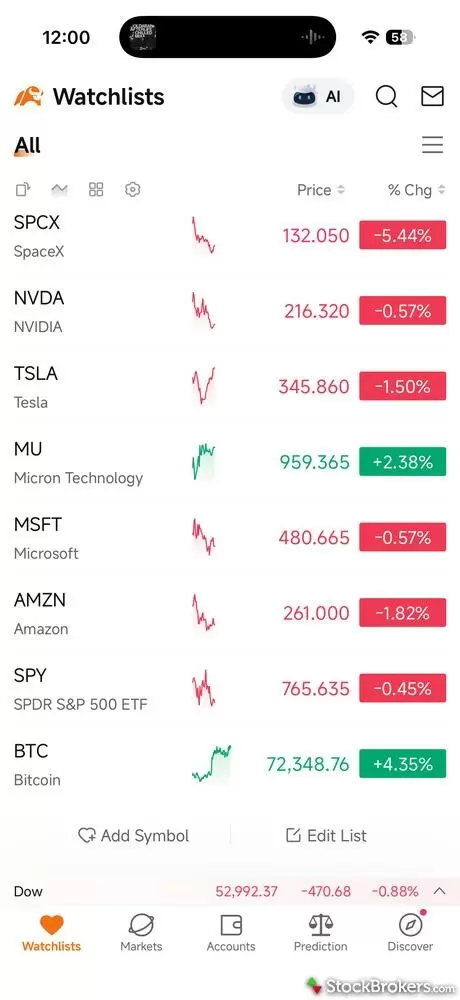
The primary watchlist view on the Moomoo mobile app. It provides essential stock information at a glance: price, a sparkline, and a color-coded percent change per symbol, with an index ticker pinned to the bottom.
Quote pages for the data-hungry
Quote pages reward someone who wants everything, and the stock page is a masterclass in progressive disclosure, revealing depth a layer at a time. Live price carries the corresponding futures quote, so overnight sentiment is baked in before you scroll, while a Market Chatter ticker streams headlines beneath it. Fundamentals shows estimates against actuals with beat tags, the expected earnings move, and a Wall Street Forecast whose price-target fan chart ranks individual analysts by their success rate, so you know whose target to weight. Smart Money adds institutional ownership charted against price and insider activity, and the ETFs tab surfaces every related single-stock ETF.
On the Markets tab, the Moomoo AI assistant earns its place. I asked for support and resistance levels, and it returned a structured table with the basis for each level and citations in roughly 40 seconds. The gaps are narrow but real, with no daily view of the 11 GICS sectors, the standard classification for tracking rotation, and no streaming live TV.
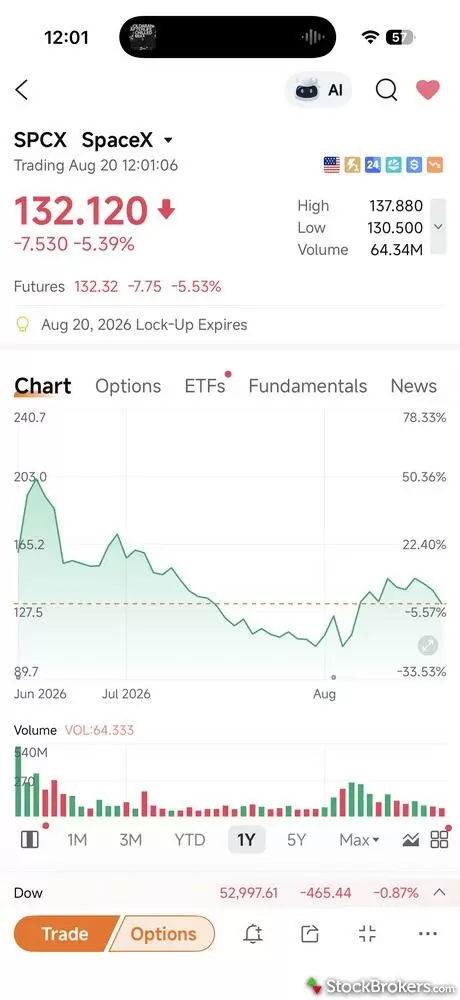
The Moomoo mobile app shows a clean chart with tabs for the options chain, ETFs, Fundamentals, and News. Up top is the AI assistant to request customized information and views.
Options order entry on mobile
This is one of the best options chains I have used on a phone. Its straddle view shows bid and ask including sizes, a call/put volume ratio bar, weeklies tagged with a W, and the underlying's live price marked in-line, with reorderable columns and a list view carrying the expected move per expiration. The Analysis sub-tab is the kicker with gamma exposure by strike with the flip point marked, volume by strike, and an unusual activity feed. Selecting a call showed me max profit, breakeven, and max loss at the mid before the ticket even opened, and when I hit buy Moomoo surfaced a reminder explaining margin recalculation for in-the-money options near expiration.
The review screen repeats that math on the confirmation itself, so you decide with the numbers in front of you. Choosing Vertical Spread re-quoted the whole chain as spreads with net bid and ask, one of 13 strategies at the chain level, and my 300/305 call spread pre-filled both legs with a net debit limit and flagged expiration risk on review. Newer spread traders can let the Strategy tab recommend structures from an outlook and a target price, with profit probabilities and payoff diagrams. If you are the trader who reads the chain, checks the flows, and wants the why behind every move, this app was built for you.
Advanced trading platforms
Charting on the desktop platform
The desktop platform is called Moomoo, the same name as the app, and it is built for the active trader who wants a full charting and execution workspace on a real screen. It runs on both Windows and Mac, and it is the only Moomoo-built way to trade on a computer. There is no browser-based Moomoo platform. The workaround is the third-party TradingView integration, which places U.S. stock and options orders from a browser using your Moomoo account. Charting comes with 194 indicators and studies, 55 drawing tools, and 191 study customizations, with custom studies, custom date ranges, stock overlays, corporate events plotted on the chart, automated analysis, chart notes, and your own historical trades displayed against price. However, three absences will register with anyone arriving from a full active-trader platform. You cannot adjust a trade directly on the chart, build a custom time bar, or save a chart profile, so you'll have to keep rebuilding each time.
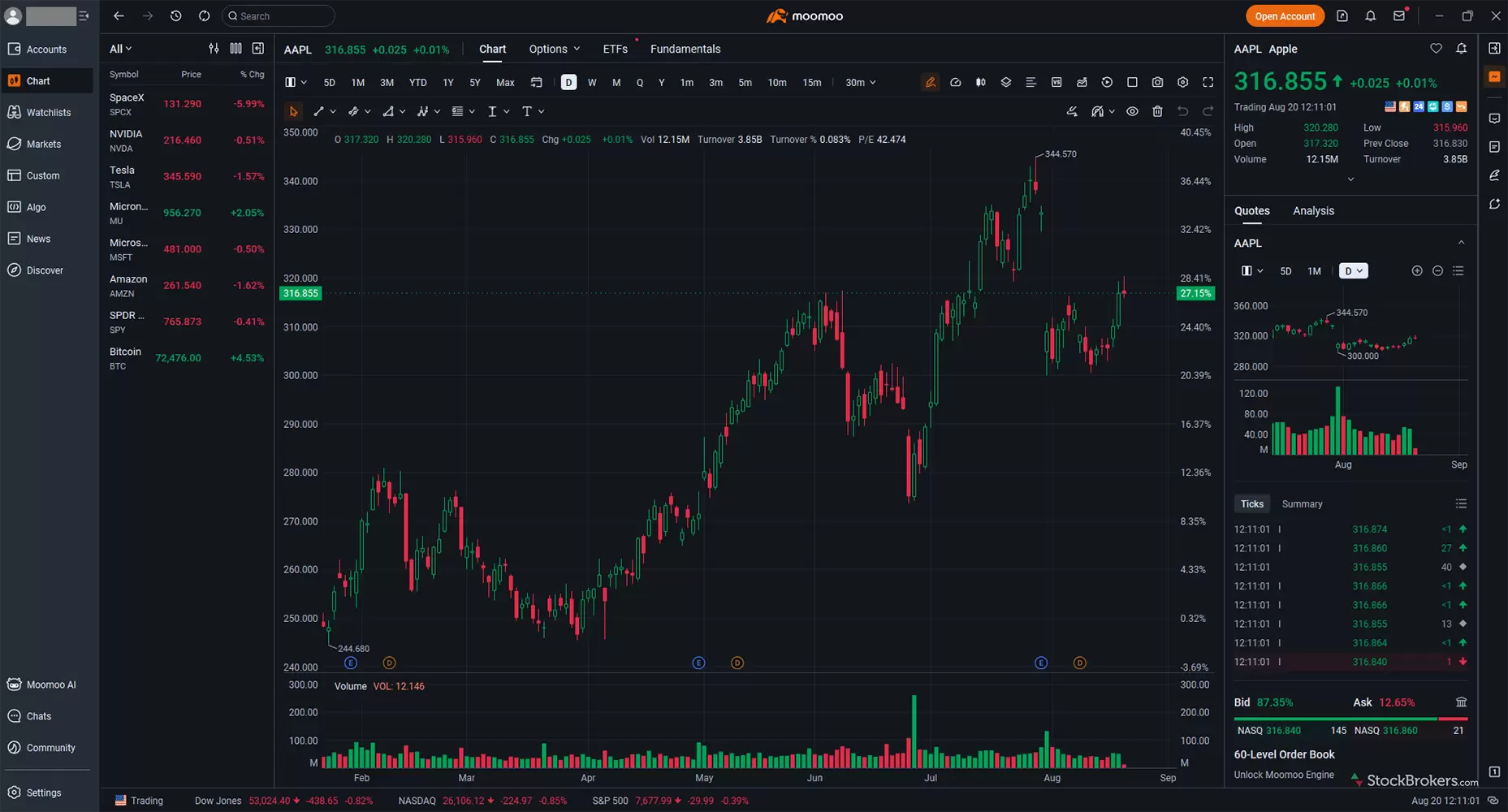
The full chart view of AAPL on the Moomoo desktop trading platform. The app comes loaded with most of the indicators you'll ever need.
Options tools and paper trading
Options tooling on the desktop covers exactly the analysis the mobile review ticket leaves out. Options P&L charts, a strategy net Greeks tool, an options statistics tool, and an options strategy builder are all present. Paper trading is included, and so is trade idea backtesting in both standard and advanced form, alongside technical analysis trade ideas. That combination is the on-ramp I would point a new desktop user toward. Build the structure in the strategy builder, check it against the net Greeks tool, and run it in paper trading before it costs you anything.
Execution, workflow, and what is missing
On execution, the platform covers the active trader basics without extending past them. Ladder trading, Level 2 quotes showing the resting bids and offers behind the best price, streaming time and sales, trade hot keys, and a short locator for finding borrowable shares are all supported, the trade ticket displays margin impact, the positions view pairs options against their underlying, and the watchlist carries 90 total fields.
The workflow gaps are what a serious trading desk would notice. There is no trade journal, no tax-lot selection on the ticket, which is the ability to pick which specific shares you are selling, and no wash sale indicator in the positions view, the flag that tells you a loss will be disallowed. This means tax management must be exported out of the platform to a spreadsheet or other tool. That positions view also omits event designations and margin requirements, and there is no portfolio correlation tool. None of that gets in the way of finding a trade or placing one. However all of it gets in the way of what comes after when reviewing your own trade history, choosing which shares to sell at tax time, and tracking the risk in what you already hold.
Research
Research at Moomoo has a split personality, and which half you get depends on which asset you're exploring. The equity data is deep and unusually well visualized, the website's ETF and options pages are too thin to work from, and there is no planning layer anywhere.
Stock research and detailed quotes
Equity research is the strongest thing here. Running NVDA through the detailed quote page, the header alone expanded to roughly twenty fields, and the Overview tab's Orderflow section split net inflow against outflow by XL, L, M, and S order sizes with an intraday trend line. Retail platforms rarely give away order-size flow data. Financials built revenue, EPS, and EBIT forecast charts on 40 analyst estimates explicitly sourced from S&P, and rendered the balance sheet as bar charts rather than a lifted table.
Jessica's take
"The business stats and data are AMAZING for analysis. Looking at AAPL's revenue breakdown, I can see iPhone makes up 49.58% of rev. I can also track smartphone and chip market share trends, gross margins, and shipments with YoY growth charts. This is a great hidden gem!"
Jessica Inskip
Director of Investor Research
Opinion data thins fast. The Analysis tab gave me 37 analysts at Strong Buy and a 12-month price target averaging 309.94 against a max of 500, and then it stops. Detailed Ratings, the module carrying named-analyst track records, resolves on the web page to a button reading Download APP. There are zero downloadable research reports on the website, and forward P/E is absent even though forward estimates plainly exist in the system. Anonymous community posts and some clearly AI-generated infographics render beneath the licensed newswire headlines at equal visual weight, which editorially makes me twitch.
ETF and fund research
The website's ETF page fails on the one number that matters most. I pulled QQQ and got the same expandable panel the stock pages use, which is the problem, because the fields are equity fields: P/E (Static) read 0.00 and P/B read 1.00, placeholders rather than information. Expense ratio, AUM, NAV, holdings, and even the index the fund tracks were nowhere on it, those are only available on the mobile app. Dear Moomoo: one Holdings and Fees tab would transform this page. The app fixes almost all of that, which makes the web version harder to excuse, because its Fund tab carries Morningstar ratings, a peer-comparison radar scoring risk against the category, top holdings with weightings, and expense ratio and management fee listed separately. Discovery stays browse-first on both surfaces, with no way to screen by expense ratio, AUM, or yield. You browse Moomoo's shelves; you do not build your own.
Options and fixed income research
Options research is split by which app you use, and the website half is not a research tool. I opened the NVDA chain and the bones were fine with weeklies as tabs, a straddle view, ITM and OTM filters, bid and ask with size, and a header aggregating 1.32M call contracts against 906.43K puts. What is missing is everything an options trader reads a chain for, namely Greeks, implied volatility, and volume and open interest columns, and the quotes carry a 15-minute delay flagged right on the page. Fine for a quick strike check between meetings, but I would not analyze a trade on it. Web idea generation is rankings and headlines, with no IV rank screener, which sorts contracts by how expensive their volatility looks against its own history, and no way to filter by delta or premium. Fixed income research is a rates overview and nothing more.
Screeners, calendars, and market coverage
Screening is broader than I expected from a free web platform, and its own data undermines it. Filters run across quote, technical, and fundamental panes, with real indicators like RSI and MACD rather than a percent-change box. Two things stop me relying on it. The Efficiency, Growth, Cash Flow, and Per Share groups all carry a Premium tag, so the growth screen a fundamental investor most wants sits behind a gate. And the hygiene is poor since my default results led with 0.0001 penny stocks showing +9,900% moves, and the recommended P/B Ratio Less Than 1 screen topped out with a +999,900% mover. A beginner could mistake that noise for opportunity. Clean up the junk quotes and this is a legitimately good toolkit.
Everything around the screener is better. A persistent left rail carrying Watchlist, Paper Trade, Screener, Heat Map, and Institutional Tracker follows you through the quote center, though tools open in new tabs whether you want them to or not. That Institutional Tracker gives you Berkshire, ARK, and a ranked 13F table, the quarterly filing disclosing what large managers hold. The Heat List ranks the equities driving the market by popularity and links out to timely pieces, with a curated "What's going on with SpaceX Today?" article sitting there when I visited. Earnings coverage renders as a month grid where CoreWeave's +112% revenue against a -90% EPS was the tension I want surfaced. The economic tab had 775 items queued and no splits calendar anywhere, and it offers no context at all: date, event, previous, consensus, actual, a subjective importance star, nothing more.
Headlines interleave Bloomberg, Barron's, MarketWatch, and Dow Jones wires with Moomoo's own columns, including a Macro Moover CPI preview titled "Low Vol, High Stakes" the morning I checked, while the Videos tab carries Bloomberg TV clips and Moo Live streams. Free Barron's and Bloomberg inside a brokerage is not nothing. What is missing is a house view, and I simply could not get a real pulse on the broader markets here. No Treasury pulse sits on the markets page, the Sectors tab is really a list of industries, and no sector performance data exists. You can take the temperature of equities, and that is not a holistic view. If you're trying to understand the whole market, this is not the place. If you're researching a single company, it very much is.
Education
Courses for the self-directed learner
The education serves the self-directed investor who learns by watching, and almost nobody else. It lives in a hub called Lessons, organized like a course catalog across Options, Stocks, Perspectives for macro, Moomoo Tutorials, and Strategies and Insights, each shelf carrying view counts, with Options Strategies Explained alone showing 2M views. The macro shelf is the part I would defend to anyone: Macro Mastery, Understanding the Power of the Fed, and Key Economic Indicators That Matter are the courses I wish more brokerages put in front of beginners before their first trade. Individual courses are structured, but nothing connects them, with no path, no level tags, no progress tracking, and no quizzes. This is a video library, not a curriculum. One distinct miss is that the Earnings Report Forecast previews on display when I visited in August 2026 were for Apple's and Tesla's fiscal 2023 third quarters, three years stale. Either refresh it or retire it.
Options education: quantity over clarity
Options is where this education is most extensive and where I judge hardest. The track runs Option: From Basics to Mastery into From Mastery to Professional, then adds How to Navigate Earnings Season with Options and Advanced Options Trading Strategies, a real progression from what a call is to multi-leg thinking, and pairing that earnings course with the earnings calendar on the same platform is smart sequencing. If you are learning options for the first time, though, this is not where I would send you. There is quantity, but the quality does not match it. I found no inaccuracies, but I found the content to be jargon-heavy and thin on the graphics and worked examples that make a first concept land well. The larger miss is the application test I apply to every broker: does a course teach you something and then let you do it? Here it does not. Nothing routes you into paper trading a strategy while you learn it, a strange gap when Moomoo ships paper trading for free.
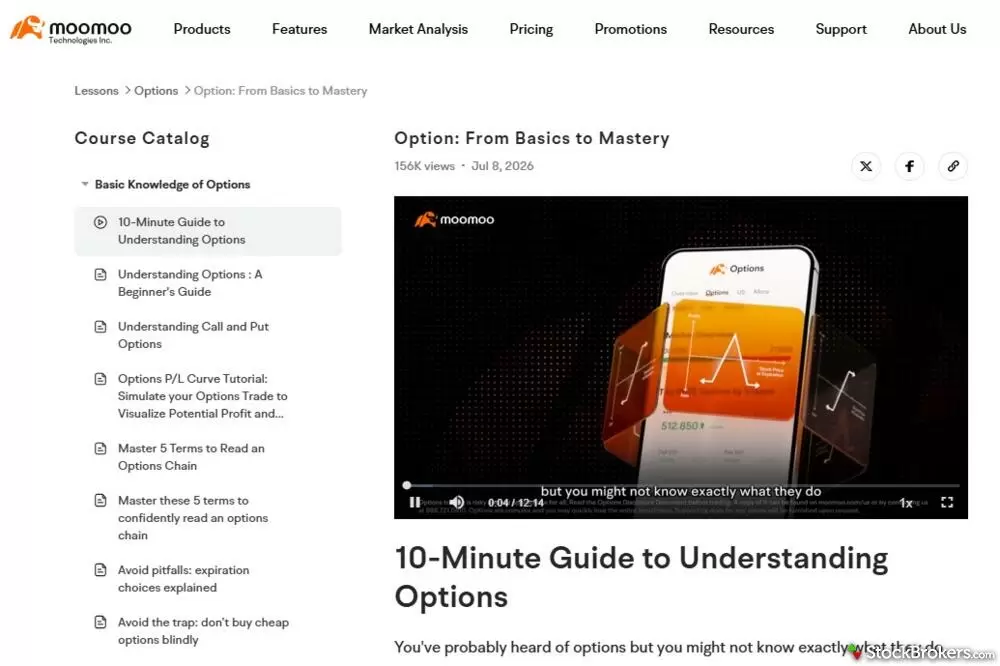
Moomoo's website provides a course catalog that includes a large quantity of courses on trading options from beginner to professional.
Thin on stocks, scattered across the site
The stocks shelf is noticeably thinner, running Trade Stocks with Moomoo: Step by Step at 842K views and a Beginner's Guide to Technical Analysis at 88K views. Much of that is platform tutorial dressed as education, teaching you how to place the trade rather than how to evaluate the company. Fundamental-analysis content exists, but no track teaches you to read an income statement, which is striking when the Financials tab on Moomoo's own quote pages surfaces exactly that data. This is fine for the brand-new investor learning the mechanics, but the buy-and-hold investor who wants to understand what they own will outgrow it in a weekend. My other gripe is that education is scattered. The courses sit under Resources, the branded commentary that actually teaches (Options Newsman and Macro Moover) sits under Market Analysis & Trading News, and nothing cross-links any of it. You have to already know where things live. If you came looking for stock market education, look elsewhere, then come back for the macro lessons.
Ease of use
The website is a storefront and a research terminal, not a place to manage your account. The homepage is a promotional billboard done competently, with a rotating hero pushing the deposit bonus, up to $1,000 in NVDA stock plus 8.1% APY when I visited to write this review, and four honest quick links for What we offer, Stock market today, Fees and commissions, and Why Moomoo. I was logged in and still saw that page, which tells me the bulk of this platform lives in the desktop app rather than the website. The working surface, the quote center, is one click away under Market Analysis, and once you are inside it the site becomes a real research tool. My issue is the ratio: nearly every page frames Deposit and Download before it frames the product. The front door sells; the rooms behind it are better than the door suggests.
Account maintenance: When logged in on the website, the avatar menu holds exactly two items, Account Info and Log Out. That is the entire account-maintenance surface of the web experience. Deposits route to a separate funding portal at funding.us.moomoo.com, and everything else, transfers, statements, settings, and account upgrades, lives in the app. If you work on a desktop the way I do, that is a real limitation rather than a preference.
Taxes and planning: there is no tax resource center. The closest equivalent is a set of Help Center FAQs covering when 1099 forms become available and how to reach your tax documents, which handles retrieval and nothing else. No tax-loss harvesting education, no wash-sale content, and no calculators. Pair that with the absent personal finance tools and a pattern emerges. Moomoo will help you place a trade and analyze a stock, but it will not help you plan anything.
Moomoo crypto review
Moomoo does not offer crypto trading inside your brokerage account. It offers it through Moomoo Crypto Inc., a separate affiliated entity that requires its own account, and cryptocurrencies held there are not SIPC protected, a carve-out Moomoo discloses plainly instead of burying it. I would read that distinction twice before funding anything, because it matters more than any of the product details. The securities in your Moomoo brokerage account carry standard protection, and the coins sitting beside them in the same app do not.
What you get: More than 50 coins at $0 commission with a transparent 0.49% transaction fee applied to each trade's dollar value, trading around the clock apart from a daily 17:00 to 17:05 ET maintenance window, crypto courses in the Lessons hub, and a real crypto news feed, with CoinDesk's Crypto Daybook running in it when I checked. I went looking for the catch in that pricing and found it disclosed rather than hidden in a spread, which is the way I prefer a crypto fee to be handled.
Who it is for: The limits are the first thing I check in a crypto product, and for Moomoo it means this offering is only for the buy-and-hold investor. This is spot only, with no margin, no leverage, and no staking. The trader who wants to earn yield on a coin should look elsewhere and will not be surprised to hear it. The stocks-first investor who wants bitcoin, ether, or solana exposure inside the app they already use, sized as a slice of a portfolio rather than the point of one, is exactly who this was built for.
Moving coins off the platform: On-chain withdrawals are supported to both personal wallets and exchange wallets, so self-custody is possible here. Moomoo names MetaMask, Ledger, and Trezor as personal wallet examples and Coinbase, Kraken, and Bybit as exchange examples. Two rules shape how you use it. A personal wallet address must sit on your whitelist for more than 24 hours before you can send to it. An exchange address only works if that exchange is on Moomoo's supported list, which is a Travel Rule requirement. Withdrawals are generally processed by 6:00 PM ET on the third business day, counting the submission day as day one, and each withdrawal carries a fixed on-chain fee. Coins bought today become available to withdraw at 9:15 AM ET the following day. The feature is rolling out gradually, so not every account has it yet.
Moomoo prediction markets
Prediction market contracts are offered here through Kalshi, a CFTC-regulated exchange, with trading handled inside the Moomoo app. Every contract is binary, trading between $0.01 and $0.99 and settling at either $1.00 or zero, which means the price is literally the market's probability estimate. You can hold a contract to settlement, and Moomoo says an earlier exit at the prevailing market price may also be possible. I read Moomoo's own FAQ on the mechanics, and it teaches that beat well. Explaining a product before selling it is rare enough to note.
On the web: The browser side is a discovery surface rather than a detailed quote page. A Find Events board carries live probabilities by category, running Trending, Sports, Crypto, Elections, Economics, Politics, and Entertainment among others, alongside 24-hour volume rankings. It is clean and current, and I watched a Wisconsin governor primary market and a golf championship market update side by side. What you cannot do from a browser is drill into a contract's price history or its order book, because the contract-level quote, chart, and order ticket all live in the app.
Who should trade these: The economics-data markets are the interesting half. Contracts on CPI prints and Fed decisions give a macro trader a clean way to express a one-number view, which is awkward to express through equities or options. Know what you are holding, though. These are binary contracts with limited liquidity, and are disclosed as such. For an investor, this is entertainment-adjacent risk capital, not long-term portfolio construction, and Moomoo does not pretend otherwise.
Final thoughts
-
Minimum Deposit:
$0.00 -
Stock Trades:
$0.00 -
Options (Per Contract):
$0.00
| Range of Investments | |
| Mobile Trading Apps | |
| Advanced Trading | |
| Research | |
| Education | |
| Ease of Use | |
| Customer Service | N/A |
Check out StockBrokers.com's picks for the best stock brokers in 2026.
Moomoo is a trading app with a brokerage attached, and once you accept that framing it is easy to say who it is for. If you are an active options trader who wants gamma exposure by strike and order flow by order size on a phone, and you are content to pay nothing to trade and $75 to leave, this is a good place to work, and the free tier keeps handing you things other brokers gate, like the Institutional Tracker's 13F table which is the kind of tool other brokerages either paywall or skip. If you need an IRA, a custodial account for a child, a bond ladder, a tax resource center, or a person to call, Moomoo has none of those and is not close to having them.
My honest recommendation if you're comfortable managing multiple brokers is to split the difference: keep the retirement money at a full-service firm and use Moomoo for the taxable trading account, where its analytics and aggressive pricing actually pay for themselves.
Moomoo Star Ratings
| Feature |
 Moomoo Moomoo
|
|---|---|
| Overall |
|
| Range of Investments |
|
| Mobile Trading Apps |
|
| Advanced Trading |
|
| Research |
|
| Customer Service | N/A |
| Education |
|
| Ease of Use |
|
StockBrokers.com Review Methodology
Why you should trust us
Jessica Inskip is Director of Investor Research at StockBrokers.com, bringing 15 years of experience in brokerage and trading strategy. A former FINRA-licensed rep, she held Series 7, 63, 66, and 4 licenses. Jessica focuses on investor education and brokerage industry research, appears regularly on CNBC, Bloomberg, The Schwab Network, Fox Business, and Yahoo! Finance, and hosts the Market MakeHer podcast.
Blain Reinkensmeyer, co-founder of StockBrokers.com, has been investing and trading for over 25 years. After having placed over 2,500 trades in his late teens and early 20s, he became one of the first in digital media to review online brokerages. Today, Blain is widely respected as a leading expert on finance and investing, specifically the U.S. online brokerage industry. Blain has been quoted in The New York Times, The Wall Street Journal, Forbes, and Fast Company, among others. Blain created the original scoring rubrics for StockBrokers.com and oversees all testing and rating methodologies.
How we tested
- We used our own brokerage accounts for testing.
- We collected thousands of data points across the brokers we review.
- We tested each online broker's website, desktop platforms, and mobile app, where applicable.
- We maintained strict editorial independence; brokers cannot pay for inclusion or a higher rating.
Our research team meticulously collected data on every feature of importance to a wide range of customer profiles, including beginners, casual investors, passive investors, and active traders. We carefully track variables like margin rates, trading costs, fees, and platform features and use them to help rate brokers across a range of categories measuring ease of use, range of investments, research, education, and more.
At StockBrokers.com, our reviewers use a variety of computing devices to evaluate platforms and tools. Our reviews and data collection were conducted using the following devices chosen to reflect the everyday hardware our readers are likely to be using rather than top-tier configurations: iPhone SE running the latest iOS version, MacBook Pro M1 with 8 GB RAM running the current MacOS, and a Dell Vostro 5402 laptop i5 with 8 GB RAM running Windows 11 Pro.
Each broker was evaluated and scored on over 200 different variables across seven key categories: Range of Investments, Platforms & Tools, Research, Mobile Trading, Education, Ease of Use, and Overall. Learn more about how we test.
Trading platforms tested in 2026
We tested 14 online trading platforms in 2026:
Read next
Read our TradeStation review and discover why its pro-level tools, deep customization, and options focus make it a top choice for active traders.
Jessica Inskip September 24, 2026
Our Robinhood review tests $0 stock and options trades, #1-ranked prediction markets, and AI agent trading, plus where its website research falls short.
Jessica Inskip October 01, 2026
Read our Webull review and discover its commission-free trading, sleek platforms, paper trading tools, and fractional shares.
Jessica Inskip September 18, 2026
Read our tastytrade review and discover why it’s the top choice for options traders, with low fees, advanced tools, and a seamless platform.
Jessica Inskip September 21, 2026More Guides

We tested the 5 best futures trading platforms of 2026. Compare commissions, margin rates, and tools for beginners and active traders. Find the right platform for you.
Jessica Inskip September 17, 2026
Practice investing risk-free with the best paper trading platforms. Compare Webull, Schwab, Interactive Brokers, E*TRADE, and more.
Jessica Inskip July 24, 2026
Interactive Brokers and Fidelity lead our 2026 ranking of the best free stock trading platforms, tested on the true cost of $0 commissions and hidden fees.
Jessica Inskip September 02, 2026
We tested the best options trading platforms for 2026. Compare tastytrade, Fidelity, IBKR, E*TRADE & Schwab on tools, fees, and picks for beginners.
Jessica Inskip September 09, 2026
Find the best IRA accounts. Compare Fidelity, Schwab, Merrill Edge, E*TRADE, & J.P. Morgan for retirement planning, fees, tools, and account flexibility.
Jessica Inskip March 31, 2026
Find the best brokerage for high-net-worth investors. Compare Fidelity, Schwab, Merrill, and more for premium services and tailored investment tools.
Jessica Inskip January 27, 2026
Find the best penny stock brokers. Compare Fidelity, Firstrade, Schwab, E*TRADE, and TradeStation for OTC access, fees, and tools.
Jessica Inskip August 02, 2026
Discover the best brokers for trade execution. Compare Fidelity, Interactive Brokers, and more for price improvement, speed, and transparency.
Jessica Inskip May 22, 2026
Find the best Roth IRA accounts. Fidelity, Schwab, and E*TRADE lead with low fees, smart investing tools, and retirement planning support.
Andrea Coombes April 27, 2026
Find top U.S. forex brokers. From tastyfx to OANDA, explore platforms with strong regulation, great tools, and user-friendly trading.
Steven Hatzakis May 29, 2026
Find the top bank brokerages. From Merrill Edge to Ally, discover brokers that combine banking, investing, and rewards in one account.
Jessica Inskip April 16, 2026
Discover the best stock brokers of 2026. Compare Schwab, Fidelity, Interactive Brokers, E*TRADE, and more to find the top trading platform for your needs.
Jessica Inskip August 06, 2026
Start investing with ease. Explore the best beginner-friendly trading platforms with low fees, great education, and intuitive apps.
Jessica Inskip August 06, 2026
Find the best rollover IRA accounts. Compare Fidelity, Schwab, and E*TRADE for easy transfers, low fees, and smart retirement investing tools.
Andrea Coombes May 15, 2026
Find the best crypto trading platform for 2026. We rank eToro, Fidelity, Interactive Brokers, Webull, and Robinhood on fees, security, and coin selection.
Steven Hatzakis May 27, 2026
Discover the best day trading platforms. Compare IBKR, Schwab, Fidelity, E*TRADE, and TradeStation for speed, tools, and margin rates.
Jessica Inskip August 03, 2026
Explore the best international brokers for U.S. investors. Compare Interactive Brokers, Charles Schwab, and Fidelity for global stock trading access.
Jessica Inskip May 22, 2026About Moomoo
Moomoo, a subsidiary of Hong Kong-domiciled Futu Holdings Limited, is a global fintech company that was founded in 2018. Its headquarters are in Palo Alto, California. Shareholders include founder Leaf Hua Li, Tencent Holdings, Matrix Partners, and Sequoia Capital.
The broker-dealer behind the Moomoo app is Moomoo Financial Inc., a member of both FINRA and SIPC. Its brokerage accounts are limited to individual cash and margin registrations, per Moomoo's own Help Center, and it supports trading in U.S. stocks, ETFs, and options along with 7 international markets. Cryptocurrency is handled through Moomoo Crypto Inc., a separate affiliated entity, and prediction market contracts trade on Kalshi, a CFTC-regulated exchange.
About the Editorial Team
Jessica Inskip is Director of Investor Research at StockBrokers.com, bringing 15 years of experience in brokerage and trading strategy. A former FINRA-licensed rep, she held Series 7, 63, 66, and 4 licenses. Jessica focuses on investor education and brokerage industry research, appears regularly on CNBC, Bloomberg, The Schwab Network, Fox Business, and Yahoo! Finance, and hosts the Market MakeHer podcast.
Jeff Anberg is a Senior Editor at StockBrokers.com. Along with years of experience in media distribution at a global newsroom, Jeff has a versatile knowledge base encompassing the technology and financial markets. He is a long-time active investor and engages in research on emerging markets like cryptocurrency. Jeff holds a Bachelor’s Degree in English Literature with a minor in Philosophy from San Francisco State University.
Blain Reinkensmeyer has 25 years of trading experience with over 2,500 trades placed during that time. He heads research for all U.S.-based brokerages on StockBrokers.com and is respected by executives as the leading expert covering the online broker industry. Blain’s insights have been featured in the New York Times, Wall Street Journal, Forbes, and the Chicago Tribune, among other media outlets.