 Charles Schwab
 Fidelity
 Interactive Brokers
 E*TRADE
 Webull
 TradeStation
 tastytrade
 eToro
eToro Trading 212
 Interactive Investor
 IG
IG Interactive Brokers
 XTB
XTB Hargreaves Lansdown
 Saxo
Saxo Charles Stanley Direct
 CIBC Investor's Edge
 Interactive Brokers
 Moomoo
 Questrade
 Qtrade
 TD Direct Investing
 Wealthsimple
 Finviz
 Stock Rover
 Seeking Alpha
 StockHero
 TipRanks
 TrendSpider
 Trade Ideas
 TraderSync
 TradingView
 Tradervue
 TradeZella
Robinhood Review

Written by Jessica Inskip
Director of Investor Research

Edited by Jeff Anberg
Senior Editor

Reviewed by Blain Reinkensmeyer
Managing Partner
Jessica InskipDirector of Investor Research
Jessica Inskip is Director of Investor Research at StockBrokers.com, bringing 15 years of experience in brokerage and trading strategy. Jessica focuses on investor education and brokerage industry research.


Robinhood made investing feel simple, and after a year of steady upgrades it still does, but with more depth underneath. Pull up Apple's stock page and an AI summary explains the day's price move, clearly marked as not investment advice. Build an options trade and the app charts what you could make or lose before you place it, and the markets tab now shows the sector and economic data I asked for in my last review.
Robinhood is a good fit for the investor who does most of their investing on a phone, learns along the way, and wants an occasional event contract without a second account. Mobile options, ETF quote pages, and prediction markets are its strengths, and on convenience it is my top pick over Kalshi for casual prediction market bets. Research on the website lags, with no landing page or economic calendar, and event contracts cannot be traded there.
Phone-first options traders and retirement savers taking advantage of the IRA match can make Robinhood their main account, while investors who research before buying should treat it as a second brokerage account rather than their first.
-
Minimum Deposit:
$0.00 -
Stock Trades:
$0.00 -
Options (Per Contract):
$0.00
| Range of Investments | |
| Mobile Trading Apps | |
| Advanced Trading | |
| Research | |
| Education | |
| Ease of Use | |
| Customer Service | N/A |
Check out StockBrokers.com's picks for the best stock brokers in 2026.
| #1 Prediction Markets | Winner |
| 2026 | #7 |
| 2025 | #12 |
| 2024 | #10 |
| 2023 | #10 |
| 2022 | #13 |
| 2021 | #11 |
| 2020 | #12 |
| 2019 | #15 |
 Why you can trust us
Led by Jessica Inskip, Director of Investor Research, the StockBrokers.com research team collects thousands of data points across hundreds of variables. We evaluate features important to every kind of investor, including beginners, casual investors, passive investors, and active traders. We carefully track data on margin rates, trading costs, and fees to rate stock brokers across our proprietary testing categories.
Our researchers open personal brokerage accounts and test all available platforms on desktop, web, and mobile for each broker reviewed on StockBrokers.com. Learn more about how we test.
Table of Contents
Pros and cons
PROS
- #1 for Prediction Markets in the StockBrokers.com 2026 Annual Awards
- Mobile options chain builds spreads with a live profit and loss chart
- ETF quote pages break out sector weights, top holdings, and NAV returns
CONS
- No economic calendar or markets research hub on the website
- Stock screener has no free cash flow, payout, or growth filters
- No short selling, OCO orders, or paper trading
My top takeaways for Robinhood in 2026:
- For options traders: Contracts cost nothing, and the app's chain charts a spread's payoff before you reach the ticket. The web chain hides the Greeks, so skip it for analysis.
- For stock researchers: Stock pages show Morningstar's fair value and moat rating for free, and the Investor's Guild explains the market, but the website has no economic calendar.
- For ETF investors: QQQ's sector and top 10 breakdowns explain a fund well, though the screener cannot filter on expense ratio.
- For event traders: Prediction markets share your brokerage login, but the flat per-contract fee tops Kalshi and Polymarket at a 50-cent price and eats 40% of a nickel contract.
- For retirement savers: Gold members earn a 3% IRA match, but there is no retirement calculator, and moving the account out later costs $100.
Asset classes reviewed: We review Robinhood for stock, ETF, options, futures, and crypto trading, the five primary asset classes, along with prediction markets. Robinhood does not offer individual bonds, so fixed income is not reviewed.
Robinhood fees
Stock and ETF trades cost $0 at Robinhood, and so does each options contract. Futures cost $0.75 per contract, prediction market contracts cost $0.02 each, and crypto trades carry no commission but a fee of up to 0.95% built into the spread. There is no minimum deposit, and mutual funds and broker-assisted trades are not offered. Robinhood Gold, an optional subscription, costs $5 a month or $50 a year.
Account fees: Getting in is free, but leaving is not. A full or partial transfer out costs $100, a steep exit fee for a broker this cheap to join. IRAs carry no annual or closure fee. Standard bank transfers are free, while instant withdrawals to a debit card cost 1.75%, with a $1 minimum and a $150 maximum. Robinhood accepts payment for order flow, meaning market makers pay it to route customer orders their way.
Jessica's take
"Between the 3% IRA match, the 3% cash back on the Gold Card, and margin rates that undercut the industry average by half, Robinhood offers a value proposition that is simply impossible to ignore."
Jessica Inskip
Director of Investor Research
Margin rates: Small accounts borrow at nearly the same rate as large ones, and no Gold subscription is required. As of September 2026, Robinhood advertised 5.25% on balances up to $50,000, 5.05% above that, and 4.75% above $100,000, the biggest step most borrowers will see. Balances above $1 million pay 4.5%, and above $50 million 4.2%, so only about a point separates the smallest borrower from the largest.
Robinhood account types
Individual investors can build most of a financial life here, from a first taxable account to an inherited IRA, a custodial account for a child, or a trust. The lineup stops short of 529 plans, SEP and SIMPLE IRAs, and business accounts, so families saving for college and small business owners will need a second broker.
Retirement accounts: The IRA is where Robinhood competes hardest. It opens traditional, Roth, rollover, and inherited IRAs and matches 1% of contributions, or 3% for Gold members. I like that the match vests over five years the way an employer 401(k) match does, which rewards staying put. IRAs also get limited margin, which lets you trade with unsettled funds without borrowing. Custodial IRAs and recurring IRA distributions are not available.
Retirement planning: Planning is the empty shelf. There is no retirement or Roth conversion calculator, nothing to help you define your number, and no personal finance calculator for budgeting or goals, though the education covers retirement.
Kids and teens: Parents can open a custodial account for a child, but there is no 529 plan for college savings and no custodial IRA for a teenager with a paycheck.
Business and managed accounts: Trust accounts are available, but business and estate accounts are not. Robinhood Strategies, the goal-based robo-advisor, builds portfolios of ETFs and stocks for a 0.25% annual fee, and Gold members pay nothing on their first $100,000.
Cash management: Robinhood is a broker, not a bank, so there is no FDIC-insured checking or savings account. What it offers instead are two cards. The Robinhood Gold Card pays a flat 3% cash back for Gold members, and the Cash Card, a debit card, rounds up each purchase and invests the spare change.
Account maintenance: Routine chores are quick. Adding a beneficiary was easy and straightforward, and I needed only the beneficiary's email address, not a Social Security number. The Tax Resource Center is hard to top. It explained every form I would receive and what changed this year, showed me how to make IRA contributions, and even covered how the IRA match is taxed, so I never had to contact support.
Stock trading
Trades cost $0, OTC stocks included, fractional shares let you buy by the dollar, and IPO Access opens new offerings to individual accounts. Trading is limited to U.S. markets, and short selling is not available.
June 2026 OTC Stocks Update: Robinhood Quietly Expands Commission Free OTC Trading to over 800 Stocks
Stock research and the NVDA quote page
A fast, well-organized read on a company is what Robinhood's stock tools deliver, not a full fundamental workup. Free Morningstar data is the best reason to research stocks at Robinhood. NVDA's web page showed all four Morningstar pillars at no cost, with a $280 fair value against a $221 share price, a wide moat (Morningstar's term for a durable competitive edge), very high uncertainty, and exemplary stewardship. Bulls Say and Bears Say snippets sit beside them. A broker like Public charges for the same content through its Premium tier.
Trading Trends is the widget I would miss most, a read on retail sentiment I cannot get cleanly anywhere else. It charts net buying and selling by Robinhood customers, hedge funds (from 13F filings, their quarterly holdings reports), and insiders. On the app, AAPL's page added a note that customers' buy volume rose 6% from the prior day, plus a Cortex digest, an AI summary of why Apple slipped 0.37% despite a strong iPhone 18 Pro launch, clearly labeled as not advice. That is exactly how I want AI used.
Depth runs out at the financials. NVDA's web page has no statement tabs and no profit margin or cash flow data, and the full Morningstar report, "Nvidia Remains Dominant in a Host of AI Workloads," sits behind Gold along with the earnings call replay. The app does better, charting revenue, net income, and net margin by quarter.

Robinhood’s research tools present analyst ratings in a clean, visually appealing format, shown here with the buy, hold, and sell breakdown for Apple. The platform also includes concise “bulls vs. bears” commentary, giving investors a quick snapshot of both sides of the debate. While this type of data is common across brokerages, Robinhood’s design makes it especially easy to digest at a glance.
Finding stock ideas with the screener and Discover lists
Momentum and calendar-driven investors get what they need from the screener. It starts from 10 presets, such as Analyst picks and New 52-week highs, and new ex-dividend and earnings date filters fix my old complaint about screening by ex-dividend date. The home page's Discover lists, more than 20 of them, give browsers a head start.
What the screener cannot do is separate a sustainable dividend from a yield trap. It has no filters for free cash flow, payout ratio, dividend growth, or revenue and earnings growth, the same gap I have flagged two reviews running. Robinhood's answer seems to be Cortex, its AI assistant on Legend, which can talk you through those criteria, but Cortex is not on the website.
Charting and execution on Robinhood Legend
Chartists will find enough on Robinhood Legend, the browser-based active-trader platform, until they want to test a system. Its charts carry 90 indicators and studies, 26 drawing tools, and six study customizations, but there are no custom studies, no relative chart view, and no backtesting at the basic or advanced tier.
In my testing last year, Legend was one of the most approachable technical platforms I had used, and adjusting a moving average or switching to a logarithmic scale took seconds.
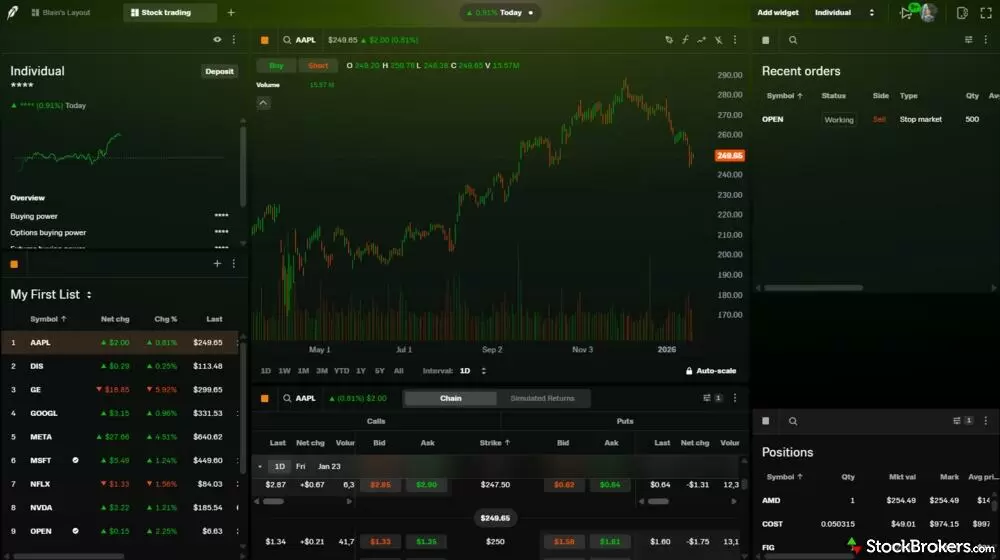
Robinhood Legend is arguably one of the best-looking active trading platforms on the market, with a sleek, modern interface that’s a pleasure to use. However, that clean design comes with trade-offs: some advanced tools and features are missing compared to more robust platforms. It’s a great experience for visual clarity and ease of use, but power traders may find themselves wanting more.
Execution covers the essentials. Level 2 quotes (the order book behind the best price) sit beside hot keys and ladder trading, and the ticket shows margin impact and lets you choose tax lots. Extended-hours, overnight, and 24-hour sessions are available. Active traders will miss OCO and OTO orders, the one-cancels-other and one-triggers-other pairs that automate an exit, along with a wash sale indicator, the flag that warns a loss will be disallowed.
Market context from the Investor's Guild and the Macro tab
Market commentary is excellent at Robinhood, but actual market data is thin. The Investor's Guild is my favorite branded macro research at any retail brokerage, reading like a conversation with sharp analysts and pitched at the investor who wants the why, not just the what. It lives on a separate site, though, one step off robinhood.com.
The website's own market data is Robinhood's weakest research. There is no research landing page and no markets hub, only three indices in a small ticker and a news feed. The Upcoming Earnings list is the only calendar, without EPS estimates or report timing, and with no economic calendar. FOMC meetings and CPI releases are also nowhere to be found.
The app does better. Its Macro tab opens on swipeable sector heat maps, then cards for the S&P 500, the Nasdaq 100, and Bitcoin, and futures quotes for gold, copper, crude oil, and silver. Each economic release carries odds from Robinhood's own prediction markets, such as a 53% chance of a 25 basis point hike, useful as sentiment as long as you remember those are traders' odds, not a forecast. Add Treasury yields and a yield curve, and this is a complete markets page.
Trading stocks on the Robinhood app
The Robinhood app is easy to use, and as someone who trades stocks, options, and prediction markets across several accounts, I find moving between them clean. The home screen stacks every asset you hold as you scroll, and search doubles as a discovery feed, with tabs for now, upcoming, macro, crypto, and sports. Live NFL scores sit at the very top of the Now tab, which tells you where the business is going.
The watchlist has not kept pace. Each row shows the symbol, name, a spark chart, and the last price, and I found no way to add earnings dates, ex-dividend dates, or valuation. A dedicated options watchlist and five iPhone home-screen widgets help, but for an app that has added this much depth everywhere else, the watchlist is overdue.
Looking at the mobile order ticket
Robinhood's order ticket changes depending on how you size the trade. StockBrokers.com's co-founder Blain Reinkensmeyer placed three of them: a share-count order, a dollar-based fractional order, and a limit order.
Learning to invest in stocks
This is the stock on-ramp I wish every broker built. I could learn what a stock is, how it makes money, and how to analyze one, and the articles go on to common versus preferred stock, all through out-of-the-box analogies rather than jargon.
The Learning Center as a whole sets the bar for self-directed education. It opens on an illustration of a tiny explorer standing on a book the size of a continent, then moves from Investing 101 to Options, Futures, and The Library, with contextual links inside every article. What is missing is structure. There are no courses, quizzes, progress tracking, or webinars, though the articles are sequenced so methodically that they nearly read like a course.
New stock investors who want to learn while they buy belong here. Investors who value a company from its financial statements will find this the wrong tool.
ETF trading
ETF research is where Robinhood punches above its overall research reputation, and the fund quote page is the reason. ETF trades cost $0 and fractional shares let you invest by the dollar, which makes this a comfortable home for the passive investor building positions a little at a time.
ETF research and the QQQ quote page
QQQ's quote page is one of the strongest ETF pages I have seen at a retail broker, on the website and in the app. "What's in this fund" is my favorite ETF widget anywhere, rendering sector weights as a color-coded list and an interactive 3D stacked bar that animates in the app, with technology at 57.99% and communication services at 14.52%. It clearly shows that the top 10 holdings make up 47.38% of assets, led by NVDA at 8.30%.
When I pulled QQQ, the page showed $493.99 billion in assets across 104 holdings, a 0.18% expense ratio, a 0.43% 30-day yield, and a P/E of 38.90, a field some peers leave blank. The return table splits price return from NAV return, the value of the fund's holdings, which is the right way to judge tracking, and the app adds the next ex-dividend and pay dates. Fund ratings and risk analysis are missing, however.
Finding ETFs with Discover lists and the screener
Browsing for ETFs functions adequately, but building with hard criteria does not. ETF sets such as Index ETFs and Growth & Value ETFs sit among the Discover lists covered under Stock trading, which suits an investor who already knows the exposure they want. The screener shares its universe with stocks and filters mostly on price and volume. I could not cap the expense ratio, set a minimum fund size, screen by asset class, or exclude leveraged and inverse funds, which multiply or flip an index's daily move.
Building an ETF portfolio
The automation for a hands-off fund portfolio is here, though the analysis layer is thin. Recurring investments and dividend reinvestment (DRIP, which turns each payout into more shares) handle small, regular buys, and Robinhood even keeps a Popular Recurring Investments list. An asset allocation tool shows your mix, but no correlation tool shows how your holdings move together.

Robinhood’s education center is one of the most accessible and well-crafted out there, offering clear, engaging content for all levels. This article on understanding ETFs stands out with creative examples, relatable analogies, and a deep dive into how ETFs work.
With no mutual funds on offer, index investors build with ETFs here, and those who automate their buys will be well served. Anyone who shops for funds by cost and exposure will outgrow the screener quickly.
Options trading
Options are Robinhood's strongest asset on the phone, and the website is where the experience thins out. Contracts cost $0, exercise and assignment are free, and a dime buyback program covers short options bought back at $0.10 or less. Orders can run up to four legs, but spreads are not allowed inside IRAs.
Trading options on the Robinhood app
I have found few better places to trade options on a phone. The chain now defaults to a side-by-side view, calls left and puts right, with last price, volume, open interest (contracts still outstanding), and delta shown by default and a focused view that zooms in on one side. I would still add a put/call ratio, earnings and dividend labels, days to expiration, and the implied move.
Single-leg orders: Buying a call is simple. Tap an ask and a window reads the trade back in plain English (buy $335 call 9/21) with the cost, and a hard press lets you drag it to another strike. The Greeks can be added to the chain as columns, but I would like them on the review page too.
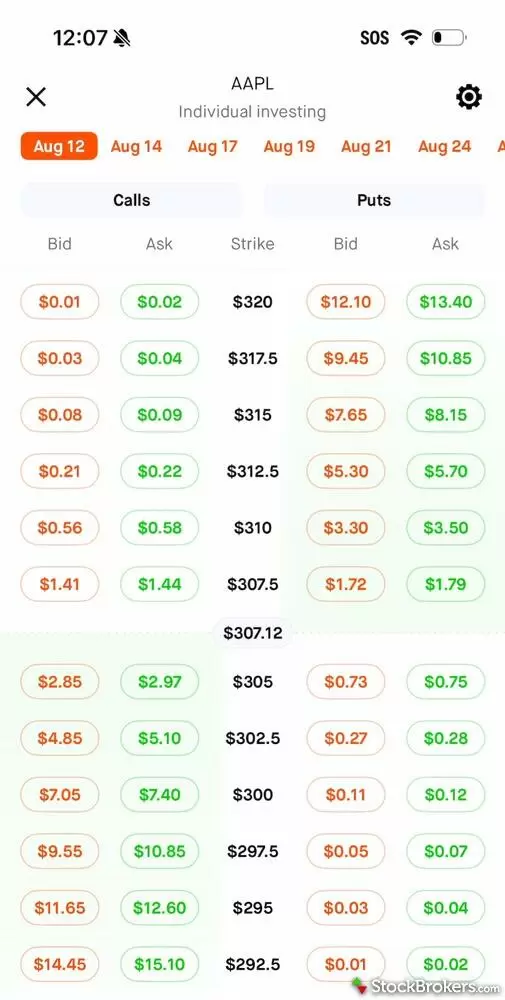
Robinhood's side-by-side view lines up AAPL calls and puts on either side of the strike column, with a $307.12 marker showing where the stock was trading. This view shows the bid and ask for each contract. Other columns, including the Greeks, can be added to the chain.
Multi-leg orders: Spreads are where the app earns its keep. On AAPL, I tapped the ask on the 335 call and the bid on the 340 call, a call debit spread, and the chain drew a box around both legs with each leg's bid and ask in view. The profit and loss chart showed a $312 max profit, a $336.88 breakeven, and a $188 max loss, with a time slider through expiration, which is how I would teach time decay.
Your max loss on a debit spread is what you pay, and the chart makes that obvious without a formula. The ticket repeats the math, with limit orders good for the day or until canceled, but net Greeks for the spread, the combined delta, gamma, theta, and vega, are still missing.
Jessica's take
"The real upgrade is in the workflow itself. The bid and ask are shown for the combined spread, which last year I could not see. So I can finally evaluate spread liquidity without flipping back and forth."
Jessica Inskip
Director of Investor Research
The web options chain and Strategy Builder
On the website, the options chain now works for a directional trade and not much more. I pulled NVDA's same-day (0DTE) expiration, and last year's biggest gripe is fixed, with the bid and ask finally side by side, plus a Price History button for checking premium decay. Open interest, the Greeks, and implied volatility, the move the market is pricing in, are still absent, and volume is hidden by default.
The Strategy Builder is the better tool. It covers single legs, verticals, straddles, strangles, and calendars, and choosing a call debit spread opened preset strike pairs such as $217.50/$220, a $2.50 width you can change, with a bid and ask for the combined spread. The ticket warns when your price is unlikely to fill.
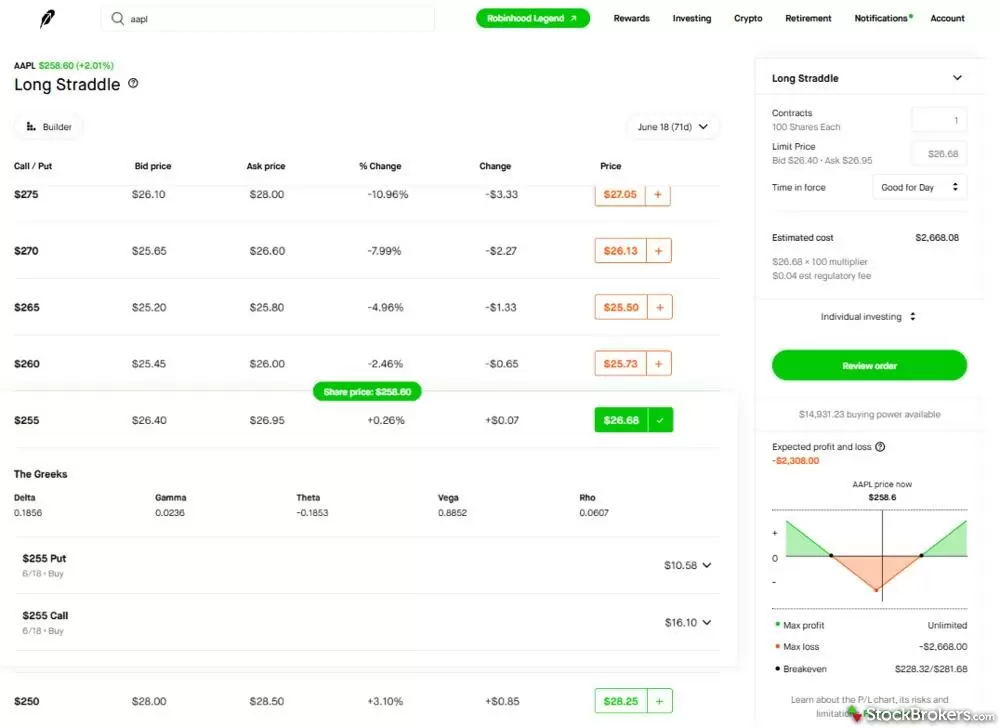
In Robinhood's web Strategy Builder, an AAPL long straddle priced each strike as one position, with the $255 straddle at $26.40 bid and $26.95 ask. Expanding a strike shows the Greeks and a single price for each leg, with no bid or ask for either one. The payoff chart on the right puts the max loss at $2,668.00 and the breakevens at $228.32 and $281.68.
Two flaws remain. Payoff diagrams are colored green for bullish and red for bearish rather than for profit and loss, which confuses newer traders, and each leg's bid and ask stays hidden, so you cannot tell which leg is the liquidity problem.
Building spreads in Robinhood Legend
Legend is where Robinhood sends serious options traders, and its chain carries the Greeks, open interest, and implied volatility the web version lacks. When I last tested, single-leg trades there were effortless, with implied volatility shown clearly for each expiration. Spreads took more work, because the multi-leg ticket lacked net Greeks, and the missing conditional orders covered under Stock trading hurt here too.
Options education and the application test
I grade options education harder than any other category, and Robinhood's is among the best I have read. It opens with risk, moves to a primer, and only then explains strategies, calling the four base strategies (long call, long put, short call, short put) the Four Horsemen, which I love. "Best case to nail it" and "Watch out for" sections introduce time decay, volatility, and the other Greeks without naming them.
The application test is split. Lessons live inside the tools, from the Strategy Builder's cards on when to use and how to monitor each strategy to the fill-likelihood explainer on the ticket, but there is no paper trading, so the only way to practice is with real money. Beginners and spread traders should trade options from the app, and anyone who wants full chain analytics on a big screen should open Legend.
Futures trading
Futures are an add-on at Robinhood rather than a specialist's platform, priced at $0.75 per contract and switched on inside the same account as your stocks and options.
Getting started: Futures are easy to find, with a Stock Index Futures list among the Discover lists and futures quotes on the app's Macro tab, both covered under Stock trading. In my account, futures approval also covers prediction markets, covered below. The Learning Center has a futures section, but with no paper trading, practice happens with real margin at stake. Traders whose sole focus is futures should weigh a more best-in-class futures platform.
Crypto trading
Crypto trading at Robinhood covers 22 coins in the same app as your stocks, which suits an investor who wants to speculate in crypto beside a brokerage account. The coins do not sit in your brokerage account. They are held by Robinhood Crypto, LLC, a separate entity, so SIPC protection does not apply. There is no commission, but a fee of up to 0.95% is built into the spread.
Pricing: Small investors pay the most. The fee depends on your trailing 30-day volume of crypto orders sent through Exchange Routing and on whether your order is a taker, which fills immediately, or a maker, which posts a limit order and waits. Below $10,000 in volume, takers pay 0.95% and makers 0.50%, so a small taker's round trip costs nearly 2% before the price moves.
Coins and transfers: The menu is short but covers the names most retail investors look for, such as Bitcoin, Ethereum, Dogecoin, and Solana. You can send and receive coins to and from outside wallets, which is what separates actually owning crypto from merely owning exposure to it.
Finding crypto: Browsing is easy, with a crypto tab in the app's search and Discover lists for altcoins and new listings, both covered under Stock trading. Traders hunting for small altcoins will want an exchange with a longer menu.
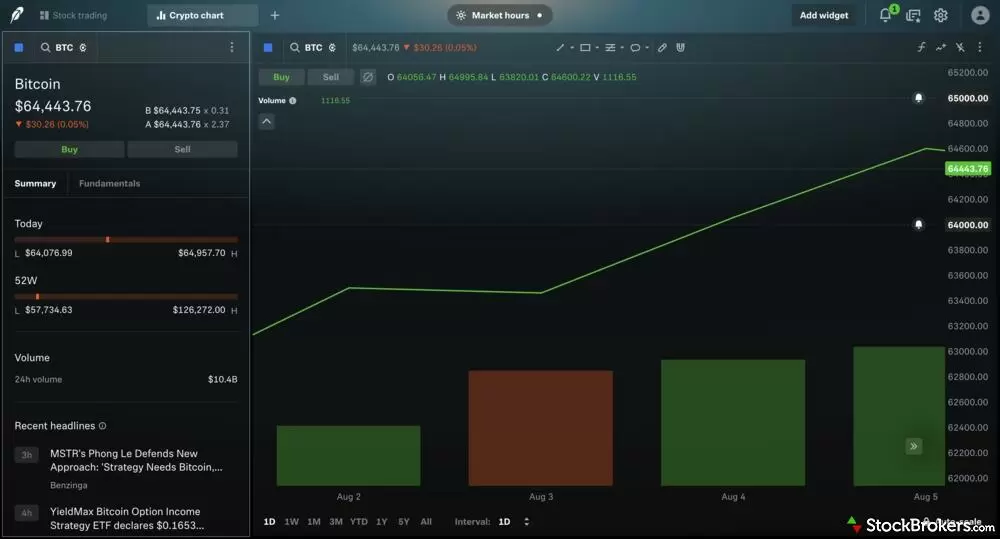
In Robinhood Legend, a crypto chart layout puts Bitcoin's quote panel beside a daily chart, with Buy and Sell buttons on both. The Summary tab adds the day's range, the 52-week range, 24-hour volume, and recent headlines. The two bells on the chart mark price alerts at $64,000 and $65,000.
Robinhood prediction markets
Robinhood is my top pick for the everyday investor who wants the ability to make a casual prediction market bet. Event contracts live in the same app and login as your brokerage account, which neither Kalshi nor Polymarket can offer. Contracts cost a flat $0.02 each and come through Robinhood's subsidiary, Robinhood Derivatives, in partnership with Kalshi.
Finding markets in the Robinhood app
Navigation is clean and easy. The Prediction Markets section of the home screen shows your open positions and the event count, 1,915 when I tested. A "Hide sports prediction markets" setting helps if you only want economic or political contracts.
The menu is curated and shares its liquidity with Kalshi. Binary Yes or No contracts, which pay out only if your side is right, cover major U.S. and college sports, interest rates and GDP, elections, and culture. For one game in the 2026 NBA playoffs, Robinhood offered winner, spread, and totals plus six kinds of player props, while Kalshi offered more than twice as many bets, adding first-half lines and double-double props. For sports alone, I still prefer FanDuel's deeper menu and licensed team logos.
Jessica's take
"Having used Robinhood's prediction markets for well over a year now, it's easy to see that sports are the dominant markets, simply based on how featured sports are versus any other events. That said, I have seen this change, for example when elections are taking place, those markets are more prominently featured."
Jessica Inskip
Director of Investor Research
Everything happens on your phone. On the website, a notice reads "Event contracts can't be traded on the web, but may impact buying power and portfolio calculations," and neither the website nor Legend showed my open positions.
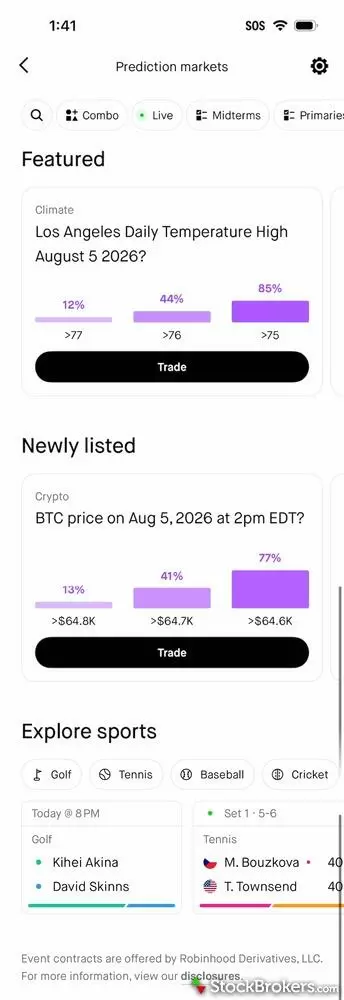
Robinhood's Prediction markets page opens with filters for combos, live games, midterms, and primaries, followed by featured and newly listed markets. The odds come from traders, so the 85% on a Los Angeles high above 75 and the 77% on Bitcoin topping $64.6K are market prices, not forecasts. Below them, Explore sports adds golf, tennis, baseball, and cricket.
The event page and order ticket
Placing a bet is as simple as placing a stock trade. The event page opens on a chart of the leading outcomes that runs from second-by-second Live through one day and one week to Max, the default, then lists every bet with a button straight to the ticket, followed by the contract terms. Your open position sits under a Your positions header rather than behind a sub-tab, which I prefer to Kalshi's layout.
The ticket defaults to a dollar amount and converts it to contracts, and conditional orders fill only at your price or better. Combos, Robinhood's parlays, start from a Build a combo button in the upper left, and player props can be combined from a game's page. What I want next is more personality, from market-specific design to a more personal experience.
Prediction market fees and the price of convenience
Convenience has a price, and the flat fee lands hardest on long shots. A penny goes to Robinhood and a penny to the exchange, Kalshi or ForecastEx. Buying 100 contracts at $0.50 costs $52 here, against $51 at Interactive Brokers, $51.75 on Kalshi as a taker (whose order fills immediately) or about $50.44 as a maker (who posts a limit order), and $50.38 on Polymarket's sports markets.
Two cents is 4% of a coin-flip contract and 40% of a $0.05 long shot, while Kalshi and Polymarket shrink their fees as prices approach zero or a dollar. I would not send professionals or cost optimizers here. I usually bet $1 to $3 at a time for fun, and at that size the convenience is worth it, as long as you treat it as entertainment money rather than investing.
Robinhood agentic trading
Robinhood lets an AI agent trade for you in two ways, and both fence the agent into an account of its own. Robinhood Agents builds one inside the mobile app, and Agentic Trading connects an outside agent, such as Claude or ChatGPT, through the Robinhood Trading MCP server. MCP, short for Model Context Protocol, is an open standard that lets AI tools take actions inside other apps. Connecting is free.
Built-in agents and outside agents
The built-in agent is the simpler start. You name it, pick a model from providers such as OpenAI and Anthropic, and chat with it, and it answers with live charts, tables, and order tickets and remembers earlier conversations. It runs only in the mobile app, and chatting draws on a prepaid token balance that starts with $5 free and is billed at the model's public token price.
Outside agents connect from Claude Code, Claude Desktop, ChatGPT, Codex, Cursor, Grok, Perplexity, and other MCP-compatible tools, and your AI platform bills you for usage instead of Robinhood. Setup has to be completed in a desktop browser. Outside agents also get Legend tools that read your saved chart layouts and change indicators.
What an agent can see and trade
Robinhood draws a hard line around trading and a loose one around data. Of the seven brokers with a first-party MCP server in our guide to the best agentic trading platforms, Robinhood is the only one that gives the agent its own account, a separate self-directed account you fund yourself. The agent can trade only there, which keeps your primary account and your IRA out of its reach.
Your data gets no such fence. Once connected, the agent can read every Robinhood account you hold, from account numbers and balances to your full order history. Interactive Brokers, by comparison, authorizes an agent for a single account.
The toolkit reaches past Robinhood's own website. An agent can pull a real-time Level 2 order book for up to four stocks, compute indicators such as RSI and MACD, read SEC filings and analyst price targets, and build and run saved scans, and review tools simulate each order and flag pre-trade warnings. Orders cover long stocks, options, and crypto, though an agent cannot transfer or stake coins, and agent crypto trading is not available in New York and some other states.
Trade approvals and the missing guardrails
Trade approvals are the setting that matters most, and outside agents start without them. With approvals on, the agent proposes a trade and you place it yourself. Robinhood turns approvals on by default for built-in agents but off for outside agents, so a newly connected agent can trade on its own until you change the setting under Safety Controls.
Past that switch, the guardrails are thin. Robinhood sets no per-order dollar limit or list of approved symbols, while Webull lets you set a hard per-order limit an agent cannot exceed. Even Robinhood's Agentic Credit Card, a virtual Gold Card number for AI shopping, requires a monthly limit when you skip purchase approvals. Robinhood says it does not supervise or audit agents and warns that their strategies can move too fast to stop in real time.
I would turn approvals on before moving a dollar into the account and fund it only with money you can afford to lose. Treat it as a sandbox for testing an AI strategy, because the guardrails are too thin to hand an agent the keys.
Final thoughts
-
Minimum Deposit:
$0.00 -
Stock Trades:
$0.00 -
Options (Per Contract):
$0.00
| Range of Investments | |
| Mobile Trading Apps | |
| Advanced Trading | |
| Research | |
| Education | |
| Ease of Use | |
| Customer Service | N/A |
Check out StockBrokers.com's picks for the best stock brokers in 2026.
| #1 Prediction Markets | Winner |
| 2026 | #7 |
| 2025 | #12 |
| 2024 | #10 |
| 2023 | #10 |
| 2022 | #13 |
| 2021 | #11 |
| 2020 | #12 |
| 2019 | #15 |
Robinhood is built for the opening chapters of an investing life. A new investor can learn from some of the clearest education I have read, open a Roth IRA that pays a match, grow into options spreads, and put a few dollars on the Fed or a ballgame in prediction markets.
Later chapters are where it runs out. There is no 529 plan, business account, or planning calculator, and futures and crypto are add-ons rather than reasons to join. Robinhood teaches better than it researches, so start here, stay for the options app, and add a research-first broker when your questions outgrow the quote page.
Robinhood Star Ratings
| Feature |
 Robinhood Robinhood
|
|---|---|
| Overall |
|
| Range of Investments |
|
| Mobile Trading Apps |
|
| Advanced Trading |
|
| Research |
|
| Customer Service | N/A |
| Education |
|
| Ease of Use |
|
StockBrokers.com Review Methodology
Why you should trust us
Jessica Inskip is Director of Investor Research at StockBrokers.com, bringing 15 years of experience in brokerage and trading strategy. A former FINRA-licensed rep, she held Series 7, 63, 66, and 4 licenses. Jessica focuses on investor education and brokerage industry research, appears regularly on CNBC, Bloomberg, The Schwab Network, Fox Business, and Yahoo! Finance, and hosts the Market MakeHer podcast.
Blain Reinkensmeyer, co-founder of StockBrokers.com, has been investing and trading for over 25 years. After having placed over 2,500 trades in his late teens and early 20s, he became one of the first in digital media to review online brokerages. Today, Blain is widely respected as a leading expert on finance and investing, specifically the U.S. online brokerage industry. Blain has been quoted in The New York Times, The Wall Street Journal, Forbes, and Fast Company, among others. Blain created the original scoring rubrics for StockBrokers.com and oversees all testing and rating methodologies.
How we tested
- We used our own brokerage accounts for testing.
- We collected thousands of data points across the brokers we review.
- We tested each online broker's website, desktop platforms, and mobile app, where applicable.
- We maintained strict editorial independence; brokers cannot pay for inclusion or a higher rating.
Our research team meticulously collected data on every feature of importance to a wide range of customer profiles, including beginners, casual investors, passive investors, and active traders. We carefully track variables like margin rates, trading costs, fees, and platform features and use them to help rate brokers across a range of categories measuring ease of use, range of investments, research, education, and more.
At StockBrokers.com, our reviewers use a variety of computing devices to evaluate platforms and tools. Our reviews and data collection were conducted using the following devices chosen to reflect the everyday hardware our readers are likely to be using rather than top-tier configurations: iPhone SE running the latest iOS version, MacBook Pro M1 with 8 GB RAM running the current MacOS, and a Dell Vostro 5402 laptop i5 with 8 GB RAM running Windows 11 Pro.
Each broker was evaluated and scored on over 200 different variables across seven key categories: Range of Investments, Platforms & Tools, Research, Mobile Trading, Education, Ease of Use, and Overall. Learn more about how we test.
Trading platforms tested in 2026
We tested 14 online trading platforms in 2026:
Read next
Read our Webull review and discover its commission-free trading, sleek platforms, paper trading tools, and fractional shares.
Jessica Inskip September 18, 2026
Read our Charles Schwab review to learn why its platforms, research, and investor resources make it one of the top-ranked brokerages.
Jessica Inskip September 30, 2026
Fidelity charges $0 stock and ETF trades and won #1 for Research and Education in 2026. See our tested review of its fees, platforms, IRAs, and apps.
Jessica Inskip September 30, 2026
Our eToro review rates the social investing platform 3.0/5. Stock and ETF trades cost $0, crypto trades carry a 1% fee, and the minimum deposit is $50.
Jessica Inskip September 25, 2026More Guides

Find the best penny stock brokers. Compare Fidelity, Firstrade, Schwab, E*TRADE, and TradeStation for OTC access, fees, and tools.
Jessica Inskip August 02, 2026
Explore the best international brokers for U.S. investors. Compare Interactive Brokers, Charles Schwab, and Fidelity for global stock trading access.
Jessica Inskip May 22, 2026
Find the best brokerage for high-net-worth investors. Compare Fidelity, Schwab, Merrill, and more for premium services and tailored investment tools.
Jessica Inskip January 27, 2026
Find the best rollover IRA accounts. Compare Fidelity, Schwab, and E*TRADE for easy transfers, low fees, and smart retirement investing tools.
Andrea Coombes May 15, 2026
We tested the best options trading platforms for 2026. Compare tastytrade, Fidelity, IBKR, E*TRADE & Schwab on tools, fees, and picks for beginners.
Jessica Inskip September 09, 2026
Discover the best day trading platforms. Compare IBKR, Schwab, Fidelity, E*TRADE, and TradeStation for speed, tools, and margin rates.
Jessica Inskip August 03, 2026
Interactive Brokers and Fidelity lead our 2026 ranking of the best free stock trading platforms, tested on the true cost of $0 commissions and hidden fees.
Jessica Inskip September 02, 2026
Find top U.S. forex brokers. From tastyfx to OANDA, explore platforms with strong regulation, great tools, and user-friendly trading.
Steven Hatzakis May 29, 2026
Find the best IRA accounts. Compare Fidelity, Schwab, Merrill Edge, E*TRADE, & J.P. Morgan for retirement planning, fees, tools, and account flexibility.
Jessica Inskip March 31, 2026
Practice investing risk-free with the best paper trading platforms. Compare Webull, Schwab, Interactive Brokers, E*TRADE, and more.
Jessica Inskip July 24, 2026
Find the top bank brokerages. From Merrill Edge to Ally, discover brokers that combine banking, investing, and rewards in one account.
Jessica Inskip April 16, 2026
We tested the 5 best futures trading platforms of 2026. Compare commissions, margin rates, and tools for beginners and active traders. Find the right platform for you.
Jessica Inskip September 17, 2026
Start investing with ease. Explore the best beginner-friendly trading platforms with low fees, great education, and intuitive apps.
Jessica Inskip August 06, 2026
Find the best Roth IRA accounts. Fidelity, Schwab, and E*TRADE lead with low fees, smart investing tools, and retirement planning support.
Andrea Coombes April 27, 2026
Discover the best brokers for trade execution. Compare Fidelity, Interactive Brokers, and more for price improvement, speed, and transparency.
Jessica Inskip May 22, 2026
Find the best crypto trading platform for 2026. We rank eToro, Fidelity, Interactive Brokers, Webull, and Robinhood on fees, security, and coin selection.
Steven Hatzakis May 27, 2026
Discover the best stock brokers of 2026. Compare Schwab, Fidelity, Interactive Brokers, E*TRADE, and more to find the top trading platform for your needs.
Jessica Inskip August 06, 2026About Robinhood
Founded in 2013 and based in Menlo Park, California, Robinhood is an online broker that has raised $2.2 billion in venture capital funding and has more than 14 million monthly active users. It is best known for commission-free stock, ETF, options, and crypto trading through an easy-to-use app and website. Robinhood is a member of FINRA and SIPC, its crypto trading runs through Robinhood Crypto, LLC, and its prediction markets run through its subsidiary Robinhood Derivatives.
About the Editorial Team
Jessica Inskip is Director of Investor Research at StockBrokers.com, bringing 15 years of experience in brokerage and trading strategy. A former FINRA-licensed rep, she held Series 7, 63, 66, and 4 licenses. Jessica focuses on investor education and brokerage industry research, appears regularly on CNBC, Bloomberg, The Schwab Network, Fox Business, and Yahoo! Finance, and hosts the Market MakeHer podcast.
Jeff Anberg is a Senior Editor at StockBrokers.com. Along with years of experience in media distribution at a global newsroom, Jeff has a versatile knowledge base encompassing the technology and financial markets. He is a long-time active investor and engages in research on emerging markets like cryptocurrency. Jeff holds a Bachelor’s Degree in English Literature with a minor in Philosophy from San Francisco State University.
Blain Reinkensmeyer has 25 years of trading experience with over 2,500 trades placed during that time. He heads research for all U.S.-based brokerages on StockBrokers.com and is respected by executives as the leading expert covering the online broker industry. Blain’s insights have been featured in the New York Times, Wall Street Journal, Forbes, and the Chicago Tribune, among other media outlets.