 Charles Schwab
 Fidelity
 Interactive Brokers
 E*TRADE
 Webull
 Robinhood
 TradeStation
 tastytrade
 eToro
eToro Trading 212
 Interactive Investor
 IG
IG Interactive Brokers
 XTB
XTB Hargreaves Lansdown
 Saxo
Saxo Charles Stanley Direct
 CIBC Investor's Edge
 Interactive Brokers
 Moomoo
 Questrade
 Qtrade
 TD Direct Investing
 Wealthsimple
 Finviz
 Stock Rover
 Seeking Alpha
 StockHero
 TipRanks
 TrendSpider
 Trade Ideas
 TraderSync
 TradingView
 Tradervue
 TradeZella
TrendSpider vs TradingView in 2026

Written by David Rodeck
Contributing Writer

Edited by Hannah Smith
Staff Editor

Fact-checked by Joey Shadeck
Research Analyst
David RodeckContributing Writer
David Rodeck is a financial writer based in New York City. He specializes in making investing, trading, and retirement planning understandable.

 Why you can trust us
Led by Jessica Inskip, Director of Investor Research, the StockBrokers.com research team collects thousands of data points across hundreds of variables. We evaluate features important to every kind of investor, including beginners, casual investors, passive investors, and active traders. We carefully track data on margin rates, trading costs, and fees to rate stock brokers across our proprietary testing categories.
Our researchers open personal brokerage accounts and test all available platforms on desktop, web, and mobile for each broker reviewed on StockBrokers.com. Learn more about how we test.
TrendSpider and TradingView are two of the most popular investment research platforms for traders who want to study markets and plan their next moves. For years, TradingView has been the go-to platform for technical analysis, while TrendSpider has carved out a niche with AI-assisted research that can ultimately build toward automated trading bots.
After testing TrendSpider vs TradingView extensively, I compared the cost, features, and ease of use to help you decide which platform is best for you.
TrendSpider vs TradingView
- Free version: Yes
- Monthly Pricing: $14.95/mo
- Annual Pricing: $155.40/yr
TradingView deserves its place as one of the most popular investment tools on the market today. Its charting platform is robust, with tons of research features. Despite the almost overwhelming amount of capabilities, the platform is well-designed so that you can dive right in. Read full review
- Charting powerhouse: 400+ indicators, 110+ drawing tools
- Easy signup; under a minute
- Active social network for ideas and user strategies
- Free plan has ads and limits multi-chart/advanced indicators
- Frequent upgrade prompts on free plan
- Education exists, but little in-platform guidance
- Free version: No
- Monthly Pricing: Starts at $82/mo
- Annual Pricing: Starts at $648/yr
TrendSpider offers comprehensive market research tools, including charting, strategy development, and AI-powered market scanners for various assets. Subscription plans start at $82 per month, offering different levels of bot access and alerts. It’s ideal for traders looking to automate strategy creation and backtesting with extensive educational support. Read full review
- Customizable AI trading bots
- No programming knowledge required
- Wide array of research tools
- Pricey services and no free trial
- Platform can be complicated
- No direct link to brokers for trades
Top takeaways for TradingView in 2026
- High-quality charting experience, with flexible layouts, hundreds of indicators, and drawing tools in a user-friendly design.
- Screeners cover stocks, ETFs, bonds, crypto, and more, with autosave and quick editing tools for building detailed searches.
- Active community where traders share ideas, strategies, indicators, and chart setups.
- New AI Chart Copilot shows promise, but it’s still in beta and not fully built into the platform.
- Competitively priced, with a free plan and free trials for paid subscriptions.
Top takeaways for TrendSpider in 2026
- Offers an end-to-end research workflow, from initial market analysis to strategy testing to launching automated trading bots.
- AI Sidekick can help users navigate the platform and set up tools like charts and alerts.
- Strategy Lab uses machine learning to test possible strategies before traders put them into action.
- The platform can feel complex given all its capabilities, even with AI guidance.
- Pricing is expensive, especially since there is a separate subscription for regularly using the AI Sidekick beyond the low monthly limits.
Cost and plans
TrendSpider and TradingView both use paid subscriptions, with discounts for annual versus monthly billing. Both have multiple subscription tiers, with higher-cost plans unlocking more capacity and advanced features based on what each company specializes in. For example, TrendSpider’s Standard plan lets users run up to five trading bots, while the Advanced plan supports up to 100. TradingView’s most affordable Essential plan only runs two charts per tab, while the highest-cost Ultimate can run up to 16 simultaneously.
That said, there is a substantial difference in overall cost and initial access. TradingView has relatively affordable paid subscriptions and gives traders more room to test the platform before committing. TrendSpider doesn’t provide free access to its full platform, and even its lowest-cost plan is expensive compared with other top investment research tools.
| Feature |
 TradingView TradingView
|
 TrendSpider TrendSpider
|
|---|---|---|
| Monthly Pricing | $14.95/mo | Starts at $82/mo |
| Annual Pricing | $155.40/yr | Starts at $648/yr |
| Free version | Yes | No |
Where TradingView stands out
TradingView stands out by giving users multiple ways to test the platform before committing. All paid plans include a free trial: Essential, Plus, and Premium come with 30-day free trials, while Ultimate includes a 14-day trial.
That flexibility is valuable for a research platform because traders may not know how much charting power, alert capacity, or market data access they need until they start experimenting with the tools.
TradingView also has a completely free plan. There are annoying popup ads and significant restrictions on platform capabilities, but it still gives users on a tight budget some access.
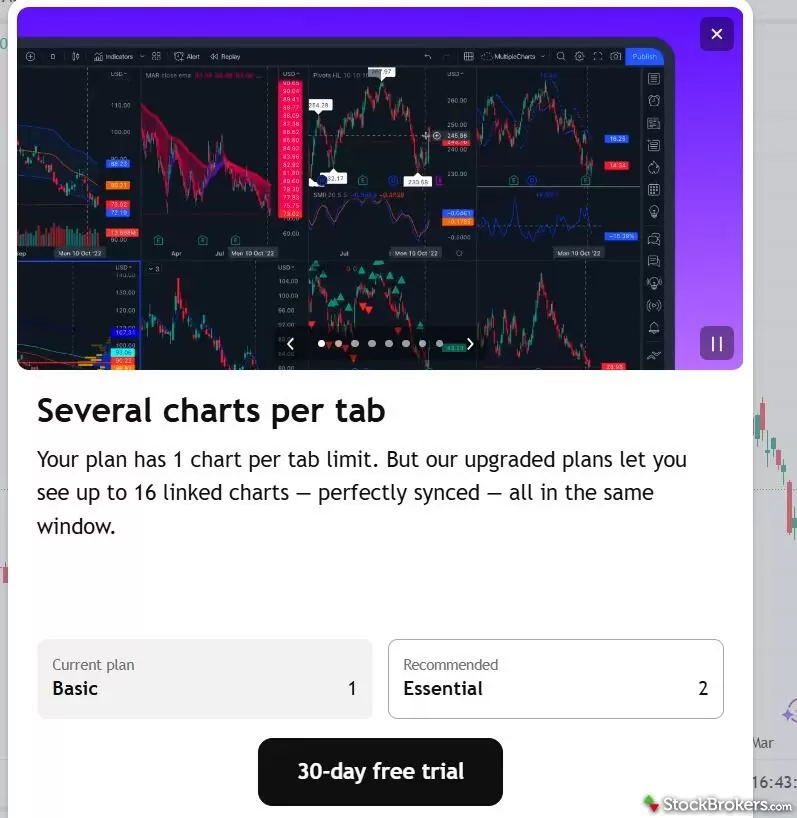
TradingView does offer a free plan, but it comes with popup ads and restricted capabilities. It's still enough to explore the charting interface and test a few screeners before deciding whether a paid tier is worth it.
Where TrendSpider stands out
TrendSpider stands out less for affordability and more for the advanced capabilities included across its plans. Even the Standard plan includes all the platform’s core tools, such as analyzing stocks with the AI Sidekick, machine learning backtesting, and the ability to create custom trading bots.
The tradeoff is that the starting price is high. TrendSpider’s lowest-cost plan is $82 per month before discounts, which is more expensive than most TradingView subscriptions. All TrendSpider plans only include 25 AI Sidekick messages per month, and I found they go quickly. Adding more costs extra.
TrendSpider doesn’t have a free version of its full platform. Users can apply for a discounted 14-day paid trial, but there is no completely free trial.
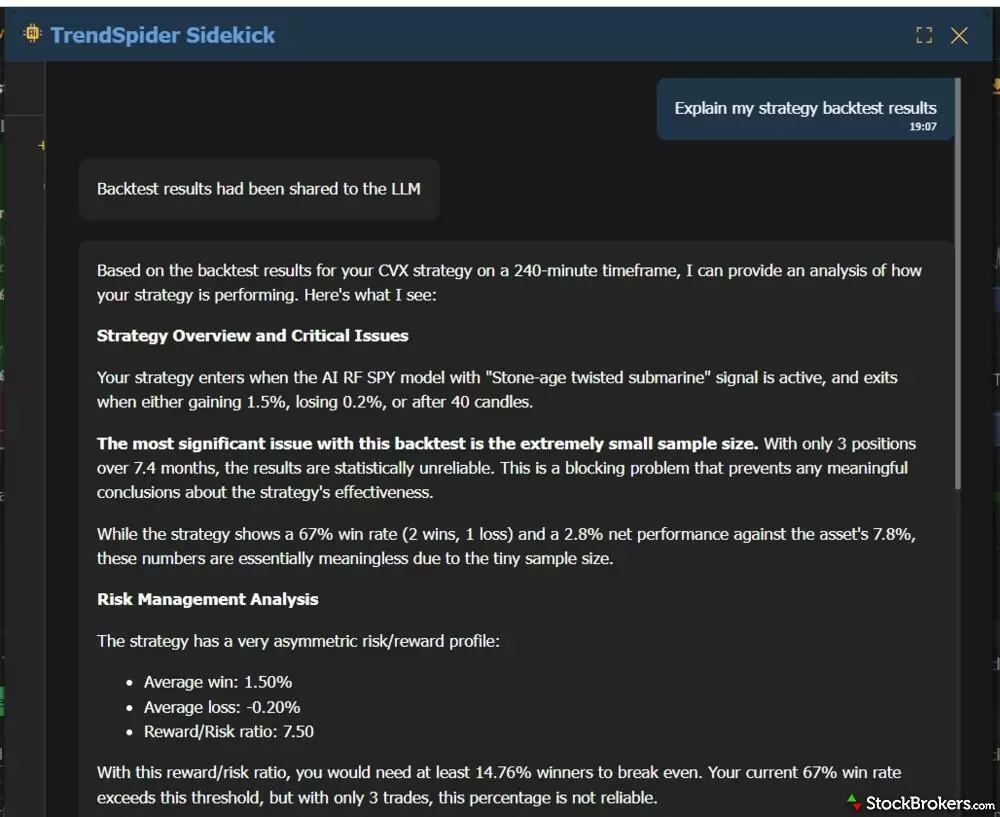
TrendSpider's AI Sidekick is one of the platform's most valuable tools, but every plan caps monthly chats at 25 messages. Traders who lean on it for setup help and strategy brainstorming will burn through that quickly and need to pay for an additional subscription.
Verdict
Winner: TradingView
TradingView is the better fit for traders who want strong research tools at a more accessible price. It has a wider range of entry points, from a free plan for basic testing to higher-tier subscriptions for more active traders and professionals.
TrendSpider is harder to justify on cost alone. All its plans are on the pricey side, but the higher cost reflects its advanced AI, trading bots, and other powerful research capabilities.
| Feature |
TradingView
|
TrendSpider
|
|---|---|---|
| Cost |
|
|
Features
The TrendSpider vs TradingView features comparison is not a strict apples-to-apples matchup because the platforms are built around different priorities.
TradingView is strongest as a technical analysis platform, with standout charting, screeners, alerts, watchlists, and community-built tools that all connect into a polished day-to-day experience.
TrendSpider has many of those same core functions, but its bigger differentiator is what happens after users come up with an idea. Traders can use machine learning to develop and backtest strategies, then use trading bots to help put those ideas into action. That makes TrendSpider especially useful for traders who want to move beyond analysis and build automated workflows.
Where TradingView stands out
TradingView stands out by making familiar tools feel exceptionally polished. Many other investment research platforms and brokers include charts, screeners, watchlists, and alerts, but TradingView delivers them with a level of depth that is hard to match. Its charting and screeners in particular rank among our top picks in the industry.
The charting tool gives traders a lot of room to customize the experience. During my test, I was able to manage eight charts at once with my Premium account, while also keeping watchlists, screeners, market news, and other information connected to the charting workspace. The screen can get crowded quickly, but it’s easy to add and subtract tools as needed.
The screener also felt more capable than the typical version built into many platforms. Traders can build detailed searches across multiple asset classes, save their progress, and quickly undo changes if a filter doesn’t work the way they expected.
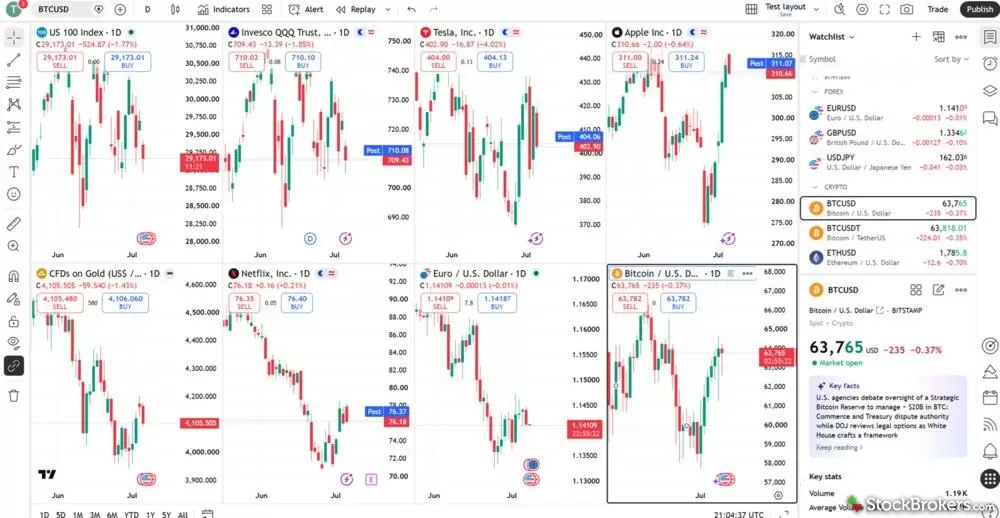
TradingView's charting tool lets users compare up to 16 charts simultaneously on a single tab, depending on the subscription tier. Watchlists, screeners, and market news can all stay connected to the same workspace, making it easy to move between analysis and execution.
Where TrendSpider stands out
During my test, the AI Strategy Lab was one of the most interesting parts of TrendSpider. It uses machine learning to develop and backtest trading models to determine whether the ideas are worth implementing. That process took trial and error, but it was valuable to spot potential problems before putting a strategy into action with real money.
The AI support was also useful on the front end. The AI Sidekick helped me think through possible trading ideas and set up the tools I needed to test them. From there, the lab handled the model training and feedback, giving TrendSpider a more complete workflow than a standard charting or screening tool.
TrendSpider also makes it possible to create automated trading bots without coding, which gives advanced traders another way to build automation around the ideas they have already researched and tested.
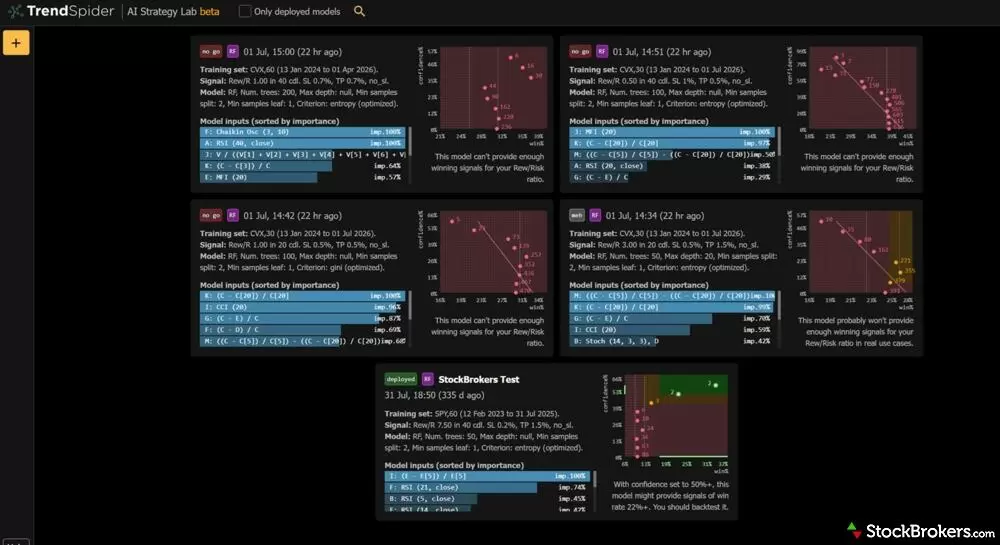
TrendSpider's strategy lab uses machine learning to train and test trading models, flagging the ones that don't hold up. Seeing a strategy fail during backtesting helps surface problems before real money is on the line, and successful models can then be launched as automated bots.
Verdict
Winner: TradingView for charting, TrendSpider for the broader feature set.
TradingView is the stronger fit for traders who want the best day-to-day charting and screening tools. It’s easier to use and better suited for hands-on technical analysis.
TrendSpider has the edge for traders who want to move beyond research into strategy development, giving users more ways to test and automate trading ideas.
| Feature |
TradingView
|
TrendSpider
|
|---|---|---|
| Features |
|
|
Ease of Use
TrendSpider and TradingView both include a lot of features, so either can feel intimidating at first, especially for traders who are still learning the fundamentals. The difference is how each helps users get comfortable.
TradingView relies on a cleaner, more intuitive design that makes it easier to start building charts, running screens, and experimenting with ideas. TrendSpider has a more complex interface, but has AI guidance throughout to support users.
Where TradingView stands out
TradingView stands out for making advanced charting feel manageable. Even though the charting tool includes a deep set of features, it feels natural to add indicators, adjust layouts, and create a multi-chart setup. The screener is also easy to experiment with, which makes the platform less frustrating when testing different ideas.
TradingView also benefits from its active user community. Traders can look for shared ideas, ask questions, and find user-built indicators or strategies, which helps make the platform easier to learn over time.
The main gap is AI. TradingView is experimenting with its AI Chart Copilot, but the tool is still in beta, can operate slowly, and currently requires a separate Chrome extension.
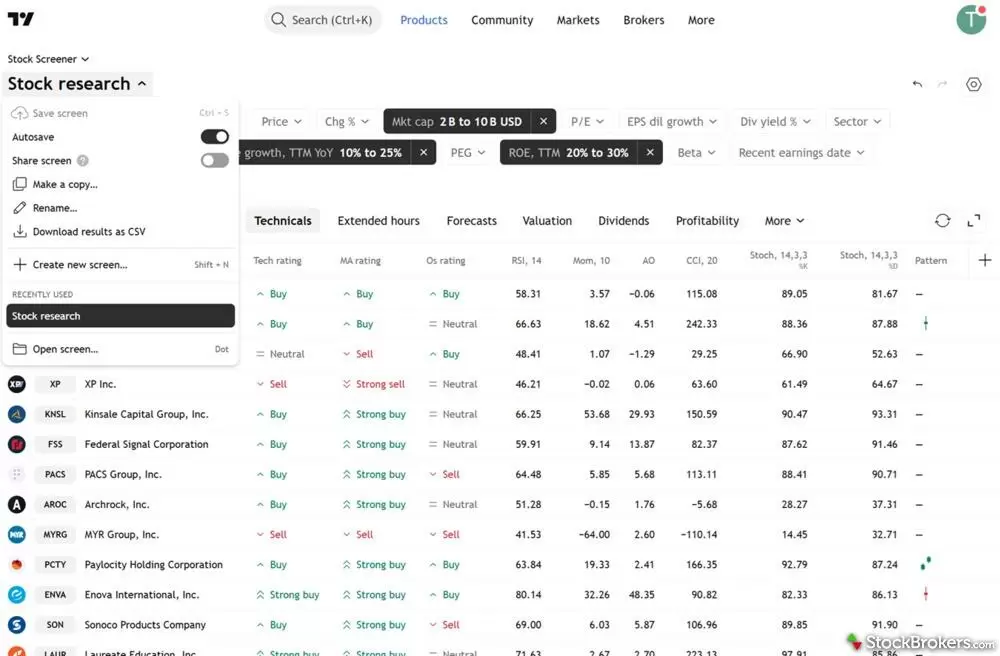
TradingView's tools, including the screener, are built for new users to pick up quickly. Traders can filter across stocks, ETFs, bonds, and crypto, save their progress, and undo changes without rebuilding a search from scratch.
Where TrendSpider stands out
TrendSpider stands out for how directly its AI Sidekick supports the learning process. Users can ask for help while building charts, brainstorming strategies, setting alerts, or working through more advanced features. That guidance matters because TrendSpider has a steeper learning curve than TradingView.
The interface can feel overwhelming at first, especially for traders who are new to backtesting or automation. I needed some time to get oriented, but once I started using the AI Sidekick, TrendSpider became easier to navigate.
Adding an additional AI Sidekick subscription is likely well-worth it for users who plan to spend serious time with the platform, given how much it improves the ease-of-use.
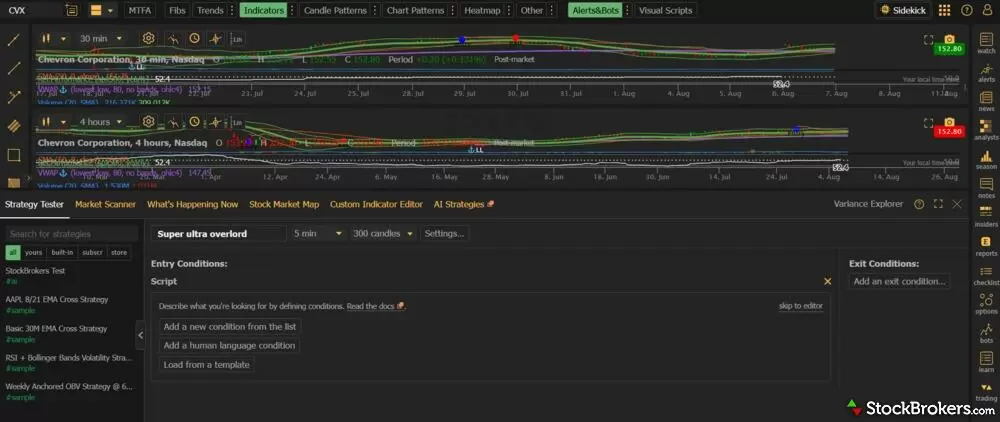
TrendSpider packs so many tools into a single view that the platform can feel intimidating at first. The AI Sidekick helps close the gap, guiding users through chart setup, alerts, and backtesting until the layout starts to make sense.
Verdict
Winner: TradingView
TradingView is the better fit for traders who want a smoother overall platform experience. It’s easier to learn, more engaging to use, and supported by an active community of traders sharing ideas.
TrendSpider is better for those who like working with AI. The platform itself is less intuitive and harder to learn, especially for users exploring backtesting and automation for the first time, but it provides stronger AI support throughout to help close the usability gap.
| Feature |
TradingView
|
TrendSpider
|
|---|---|---|
| Ease of Use |
|
|
Final thoughts
TrendSpider and TradingView can both be excellent choices, but they’re built for different types of traders. TradingView is the better overall pick for most users because it offers a stronger mix of affordability, usability, and core research features. If you want a polished platform built around technical analysis, backed by an active community, TradingView is the better option.
However, if you’re a more experienced trader who wants an advanced, systemic research workflow, TrendSpider is worth the higher cost. Its AI support, backtesting, and automation tools could justify the price for serious traders who will use them regularly.
David's take:
"Most traders will get more value from TradingView's charts and community without stretching their budget. TrendSpider earns its price tag only if you're genuinely going to build, test, and automate strategies. Otherwise you're paying for features you won't touch."
David Rodeck
Contributing Writer
Verdict
Winner: TradingView
| Feature |
TradingView
|
TrendSpider
|
|---|---|---|
| Overall |
|
|
| Cost |
|
|
| Features |
|
|
| Ease of Use |
|
|
| Monthly Pricing | $14.95/mo | Starts at $82/mo |
| Annual Pricing | $155.40/yr | Starts at $648/yr |
| Free version | Yes | No |
StockBrokers.com Review Methodology
Why you should trust us
David Rodeck, a contributing writer for StockBrokers.com, has over a decade of writing experience specializing in investing, trading, and retirement planning. Before becoming a full-time writer, David was a financial advisor and passed the Series 6 and CFP exams. He has written for AARP, Kiplinger Magazine, Forbes Advisor, and Investopedia.
Blain Reinkensmeyer, co-founder of StockBrokers.com, has been investing and trading for over 25 years. After having placed over 2,000 trades in his late teens and early 20s, he became one of the first in digital media to review online brokerages. Today, Blain is widely respected as a leading expert on finance and investing, specifically the U.S. online brokerage industry. Blain has been quoted in The New York Times, The Wall Street Journal, Forbes, and Fast Company, among others. Blain created the original scoring rubrics for StockBrokers.com and oversees all testing and rating methodologies.
How we tested
- We used paid trading tool accounts for testing.
- We collected dozens of data points across the tools we review.
- We tested each tool’s website, desktop platforms, and mobile app, where applicable.
- We maintained strict editorial independence; trading tools cannot pay for a higher rating.
Our researchers thoroughly test a wide range of popular trading tools' features, such as trading journals and screeners, charting providers, and educational resources. We also evaluate the overall design of each tool’s mobile experience and look for a fluid user experience moving between mobile and desktop tools.
At StockBrokers.com, our reviewers use a variety of devices to evaluate trading tools. Our reviews and data collection are conducted using the following devices: iPhone SE running iOS 17.5.1, MacBook Pro M1 with 8 GB RAM running the current MacOS, and a Dell Vostro 5402 laptop i5 with 8 GB RAM running Windows 11 Pro.
Each trading tool was evaluated and scored across three key categories: Ease of Use, Features, and Cost. Learn more about how we test.
Trading tools tested in 2026
We tested 11 trading tools and service providers for stock traders in 2026:
Read next
Read our Finviz review and see how it delivers advanced filtering, interactive heat maps, and in-depth financial visualizations.
David Rodeck August 25, 2026
Read our Trade Ideas review to see how Holly AI and Money Machine deliver daily AI-powered trading strategies, backtesting, and real-time market scans.
Steven Hatzakis June 15, 2026
TipRanks uses AI and big data to rate stocks and spot ideas. Read our review to learn its pros, cons, pricing, and if it’s right for your portfolio.
David Rodeck May 15, 2026
TradingView has a free plan plus paid tiers from $14.95/mo. Our hands-on review covers pricing, charting, screeners, and whether TradingView is worth it in 2026.
David Rodeck August 19, 2026Trading tool guides
Download a free trading journal spreadsheet in Excel or Google Sheets to track profits, losses, and lessons learned. Build better trading habits today.
Blain Reinkensmeyer September 17, 2026
TradingView, StockCharts and Yahoo Finance offer the best free stock charts in 2026. We compare the top free charting websites on indicators, data, free vs paid tiers and how to read a chart.
Blain Reinkensmeyer June 04, 2026
The best free stock screeners of 2026, tested on filters, data and speed. TradingView, Finviz, Yahoo Finance, Stock Rover and more, plus the paid screeners worth upgrading to.
Blain Reinkensmeyer September 14, 2026
We tested the best AI trading bots and AI stock trading platforms for 2026. Compare Trade Ideas, StockHero, TrendSpider and broker-built AI tools on price, strategies and risk.
Steven Hatzakis September 18, 2026
Learn to trade stocks step by step: open a broker account, practice with a simulator, and place your first trade. A beginner's guide from a 25-year trader.
Blain Reinkensmeyer August 26, 2026
We tested the best trading journals of 2026. Tradervue, TraderSync, TradeZella, Stonk Journal and Trademetria compared, plus free trading journal templates and how to keep a journal that improves your trading.
David Rodeck August 25, 2026Other guides

Find top U.S. forex brokers. From tastyfx to OANDA, explore platforms with strong regulation, great tools, and user-friendly trading.
Steven Hatzakis May 29, 2026
Practice trading risk-free with the best paper trading apps and simulators of 2026. Compare Webull, Schwab thinkorswim, Interactive Brokers, E*TRADE and TradeStation, plus how paper trading works.
Jessica Inskip July 24, 2026
Find the top bank brokerages. From Merrill Edge to Ally, discover brokers that combine banking, investing, and rewards in one account.
Jessica Inskip April 16, 2026
The best brokerage accounts of 2026, tested by our team. Compare Schwab, Fidelity, Interactive Brokers, E*TRADE and more online stock brokers on fees, platforms and research.
Jessica Inskip August 06, 2026
Fidelity, E*TRADE, and Schwab top our 2026 list of trading platforms and apps for beginners, with $0 minimums, $0 stock trades, and built-in education.
Jessica Inskip October 15, 2026
We tested the 5 best futures trading platforms of 2026. IBKR wins overall, and TradeStation has the lowest day-trade margins we found. Compare commissions, margins, and micros.
Jessica Inskip October 05, 2026
Find the best Roth IRA accounts. Fidelity, Schwab, and E*TRADE lead with low fees, smart investing tools, and retirement planning support.
Andrea Coombes April 27, 2026
The best free stock trading platforms and commission-free apps for 2026. Interactive Brokers, Fidelity, Ally, J.P. Morgan and E*TRADE tested on the true cost of $0 trades, hidden fees and how free brokers make money.
Jessica Inskip September 02, 2026
Find the best crypto trading platform for 2026. We rank eToro, Fidelity, Interactive Brokers, Webull, and Robinhood on fees, security, and coin selection.
Steven Hatzakis May 27, 2026
Discover the best brokers for trade execution. Compare Fidelity, Interactive Brokers, and more for price improvement, speed, and transparency.
Jessica Inskip October 12, 2026
Find the best IRA accounts. Compare Fidelity, Schwab, Merrill Edge, E*TRADE, & J.P. Morgan for retirement planning, fees, tools, and account flexibility.
Jessica Inskip March 31, 2026
The best day trading platforms and apps for 2026. Interactive Brokers, Schwab thinkorswim, Fidelity, E*TRADE and TradeStation tested on execution speed, Level 2 data, hotkeys, margin rates and the pattern day trader rule.
Jessica Inskip October 05, 2026
Find the best penny stock brokers. Compare Fidelity, Firstrade, Schwab, E*TRADE, and TradeStation for OTC access, fees, and tools.
Jessica Inskip August 02, 2026
We tested 14 brokers with real accounts. See the best options trading platforms for beginners, low fees and advanced traders, with contract fees compared.
Jessica Inskip September 09, 2026
Find the best rollover IRA accounts. Compare Fidelity, Schwab, and E*TRADE for easy transfers, low fees, and smart retirement investing tools.
Andrea Coombes May 15, 2026
Find the best brokerage for high-net-worth investors. Compare Fidelity, Schwab, Merrill, and more for premium services and tailored investment tools.
Jessica Inskip January 27, 2026
Explore the best international brokers for U.S. investors. Compare Interactive Brokers, Charles Schwab, and Fidelity for global stock trading access.
Jessica Inskip May 22, 2026About the Editorial Team
David Rodeck is a financial writer based in New York City. He specializes in making investing, trading, and retirement planning understandable. David’s work has appeared in AARP, Kiplinger, Forbes Advisor, and Investopedia. Before writing full-time, David was a financial advisor and passed the Series 6 and CFP exams.
Hannah Smith is a former Staff Editor at StockBrokers.com. With a background in SEO and years of experience in digital media, Hannah is focused on creating high-quality, data-driven content that helps investors make informed decisions. With a master's degree in English from North Carolina State University, she brings a strong foundation in writing, research, and editorial strategy to her work.
Joey Shadeck is the Content Strategist and Research Analyst for StockBrokers.com. He holds dual degrees in Finance and Marketing from Oakland University, and has been an active trader and investor for close to 10 years. An industry veteran, Joey obtains and verifies data, conducts research, and analyzes and validates our content.