 Charles Schwab
 Fidelity
 Interactive Brokers
 E*TRADE
 Webull
 Robinhood
 TradeStation
 eToro
 Moomoo
 Trading 212
 Interactive Investor
 IG
 Interactive Brokers
 XTB
 Hargreaves Lansdown
 Saxo
 Charles Stanley Direct
 CIBC Investor's Edge
 Interactive Brokers
 Moomoo
 Questrade
 Qtrade
 TD Direct Investing
 Wealthsimple
 Finviz
 Stock Rover
 Seeking Alpha
 StockHero
 TipRanks
 TrendSpider
 Trade Ideas
 TraderSync
 TradingView
 Tradervue
 TradeZella
SuperTrader Review

Written by Colin Graves
Contributing Writer

Edited by John Bringans
Managing Editor

Fact-checked by Joey Shadeck
Research Analyst
Colin GravesContributing Writer
Colin Graves is a Winnipeg-based financial writer and former banker with more than eight years of experience covering investments, brokerages, and personal finance.

SuperTrader is a trading journal for active traders. It combines trade logging and daily reflections with performance analytics, AI agents that can identify trading patterns, and backtesting.
I tested SuperTrader on web and mobile, connected my own brokerage account, and used a demo portfolio to see how its analytics handled a larger trading history. I found the platform easy to get started with on both web and mobile. The trade log and analytics tools were fairly easy to use, and importing trades via broker sync was very quick. I did struggle to get a timely response from a live support rep on a couple of occasions, which slightly dampened my overall experience.
-
Free version:
Yes -
Monthly Pricing:
$9.99 - $29 -
Annual Pricing:
$74.99 - $199
| Ease of Use | |
| Features | |
| Cost |
SuperTrader pros and cons
PROS
- Free plan available, paid plans are more affordable than many competitors
- Modern, intuitive mobile app for journaling on the go
- AI agents (presets or you can create your own) provide 24/7 analysis on trades
CONS
- AI agents and advanced analytics require a paid plan
- Broker sync missing some large brokerages
- Customer support is not very responsive
Overall summary
| Feature |
 SuperTrader |
|---|---|
| Overall |
|
| Features |
|
| Ease of Use |
|
| Cost |
|
| Free version | Yes |
| Monthly Pricing | $9.99 - $29 |
| Annual Pricing | $74.99 - $199 |
Is SuperTrader free?
Yes. SuperTrader has a Free plan that includes up to 30 entries in total, a basic analytics dashboard, and trade journaling, though it doesn’t include AI agents or broker syncing. Because the 30-entry cap covers both trades and daily recaps and doesn’t reset, the Free plan works more like a free trial.
Cost and plans
SuperTrader offers three plans: Free, Pro, and Elite, all geared toward individual traders, though the Elite plan includes features for coaches and proprietary firms. Pro costs $9.99 per month or $74.99 per year when paid annually. Elite costs $29 per month or $199 per year. You can also opt for lifetime access to both plans for $199 and $399, respectively. Both Pro and Elite come with a 7-day free trial when billed annually, but you’ll need to enter a credit card to start it.
| Plan | Price (Monthly) | Price (Yearly) | Lifetime |
|---|---|---|---|
| Free | Free | Free | N/A |
| Pro | $9.99/month | $74.99/year | $199 |
| Elite | $29/month | $199/year | $399 |
Free
SuperTrader’s free plan includes up to 30 entries in total, a basic analytics dashboard (you can’t access the AI agents), trade journaling, and a single portfolio. You can also access community support. The 30-entry cap counts both trades and daily recaps, and it doesn’t reset each month, so the Free plan is really more of a free trial than an ongoing free plan. It’s enough to see whether trade journaling suits you, but a busy day trader could use it up within days. You’ll also need to enter your trades manually. I tried connecting my brokerage account for auto-syncing, and it quickly prompted me to upgrade to Pro.
Does SuperTrader’s free trial require a credit card?
Yes. The Free plan doesn’t need a card, but the 7-day trials of Pro and Elite do. SuperTrader charges the full annual fee automatically if you don’t cancel before the trial ends.
Pro
Pro is the plan I signed up for. As mentioned, it’s $74.99 per year when paid annually, or around $6.25 per month. You can also purchase a lifetime subscription for $199. It removes the free plan’s entry limit and adds advanced analytics (including AI tools and 100 AI credits per day), mental state tracking, one broker account connection, and trade importing and exporting. You also get a backtesting engine and an economic calendar.
If you’re a frequent trader, I think Pro makes the most sense as a starting point among the paid plans. Auto-syncing alone will save you a lot of time compared to manual entry or CSV upload, and unlimited trades remove the free plan's volume restriction. However, keep in mind you can only sync one brokerage account, which isn’t great if you’re like me and trade across multiple accounts.
Elite
Elite is SuperTrader’s top-tier plan. It gives you everything in Pro, plus 300 AI credits per day (versus 100 for Pro), unlimited portfolios, and up to 10 broker connections (versus 1 for Pro). It also has a mentor mode for coaches and prop firms. Elite is priced at $199 per year with annual billing, which works out to $16.58 monthly. That’s much lower than the top-tier prices of other trading journals as of November 2026. TraderSync’s Elite plan costs $719.52 per year, and Tradervue’s Gold plan costs $479.52 per year through its account settings. You can also buy lifetime access for a one-time payment of $399.
The main reasons I’d consider Elite are the AI credits and the additional broker connections. If you trade across multiple brokerages and journal all of your trading activity, the Pro plan's single broker connection could feel very restrictive. The unlimited portfolios also give you more room to organize different trading strategies.
If you’re a coach or funded trader, Elite also includes a mentor mode, student management, and trade feedback tools. These tools won’t be relevant for every user, but if they are, then this is the plan you’ll want to choose.
Is SuperTrader a broker?
No. SuperTrader is a trading journal; it syncs or imports trade history from your broker but doesn’t place trades.
Features
SuperTrader’s trade log and journal are the features I would use most often. It took me less than a minute to connect my brokerage account, and I liked being able to see the strategy and notes right in the trade log. The daily journal adds context by asking you whether you followed your plan, and can give you far more insight into your decisions than just relying on the day’s profit or loss alone.
For a deeper review, the analytics dashboard lets you break down performance by ticker, strategy, or asset class. The Symbol Edge table is a great way to quickly identify which trades you might want to revisit. SuperTrader also offers AI Agents that monitor specific trading habits, plus backtesting tools to compare setups.
Trade journaling and importing
SuperTrader separates individual trades from daily reflections through its Trade Log and Journal screens. Connecting my brokerage account was easy, and the whole process took less than a minute.
Is it safe to connect your brokerage account to SuperTrader?
According to SuperTrader, broker sync uses read-only access, so it can’t place trades. SuperTrader says it never sees or stores your brokerage login and that connections use 256-bit SSL encryption.
The Trade Log lists all of your trades in a table and includes the ticker, asset class, direction (long or short), share quantity, entry and exit prices, strategy, and your profit or loss. You can search for trades by symbol or strategy, and filter by trade type, asset type, or outcome. I like that they include your strategy and notes in the trade log, so you can quickly gauge why you entered a position without opening the full trade journal.
For more detail, select the Journal screen from the left menu to access daily trading recaps. The following demo entry screenshot shows losses of $79.75 on NVDA and $103 on MSFT, partly offset by a $170 gain on HOOD, resulting in a net loss of $12.75. Below those results, you can rate your day (Good day, Mixed, or Tough Day), record your mood before trading, and indicate whether you followed your plan. Those prompts are the most useful part of the journal because a profitable day doesn’t always mean you made good decisions, and a losing day doesn’t necessarily mean you traded poorly. Overall, I found SuperTrader’s Trade Log and Trading Journal intuitive and easy to navigate.
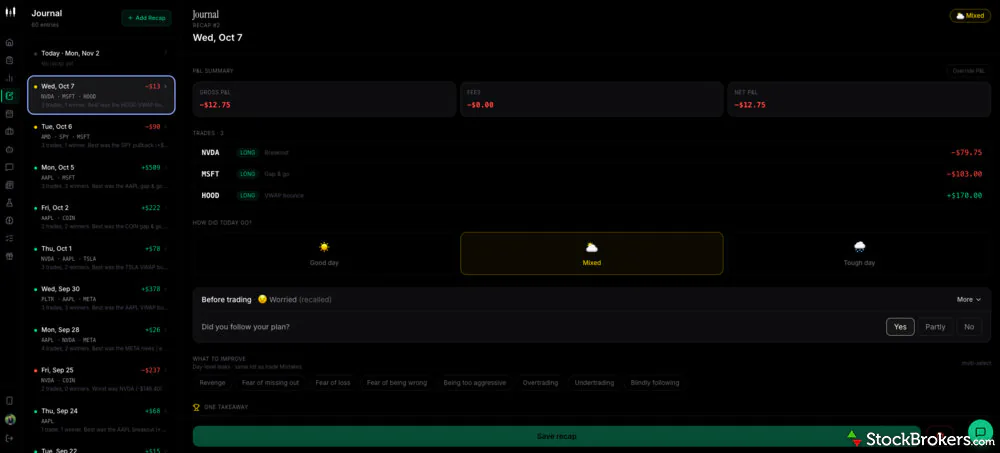
SuperTrader’s Journal brings daily results and personal reflections together in one screen, with past recaps accessible from the sidebar. Sample data shown.
Analytics dashboard
SuperTrader’s analytics dashboard displays your overall performance above the fold, so you don’t have to scroll to see your key performance metrics. You can toggle between portfolios and choose different date ranges. From there, you can break down your results by strategy or asset class. I really like the Symbol Edge table, which breaks down performance by ticker. It's a great starting point for reviewing where your approach is working and where you might need to make adjustments.
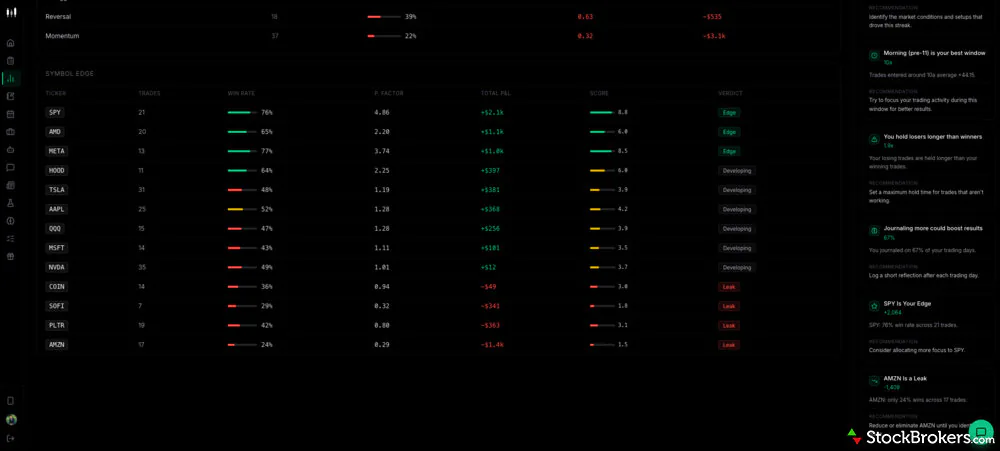
SuperTrader’s Symbol Edge Table, which you’ll find on the Analytics dashboard, breaks down portfolio performance by ticker, showing trade count, win rate, profit factor, and total profit or loss. The AI Insights on the right menu bar flag patterns in your trades, such as holding losing positions longer than winning ones.
AI Agents and the Custom Agent Builder
SuperTrader offers 13 preset AI agents in its Pro and Elite plans (you can’t access agents in the free plan). Each agent watches your trade history for a specific pattern. For example, Revenge Radar looks for trades placed within 30 minutes of a loss and compares their ticker, direction, and size with the losing trade. Setup Decay tracks win rates by setup over rolling 30-day periods to flag strategies that may be losing their edge.
According to SuperTrader, agents can run daily or weekly, with some also checking when you add trades. When an agent flags the pattern it’s designed to identify, it posts the finding and the numbers behind it in your Agents inbox.
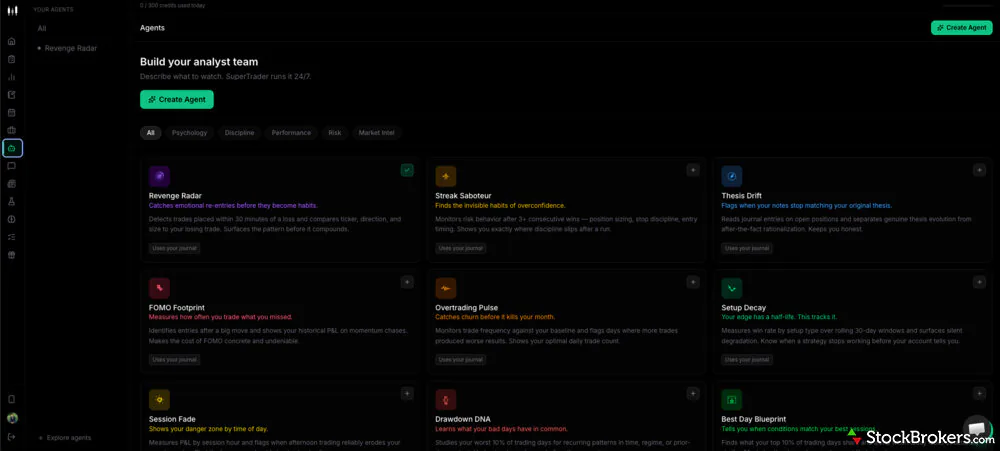
SuperTrader’s Agents dashboard lets you choose a preset agent or create your own by describing what you want it to monitor. Presets include Streak Saboteur, which looks for changes in risk-taking after consecutive wins, and Thesis Drift, which checks whether your journal notes still align with your reason for taking a trade.
Want even more control over your trade analysis? You can also create your own custom agent. I could describe what I wanted to watch in plain English, like “Alert me when my win rate drops 3 days in a row.” From there, you name your agent (it will suggest a name or you can use your own), choose a category, such as Psychology, Discipline, Risk, etc., a data source, and how often it checks. This could be very appealing if you have a specific habit that you’re trying to track, but it’s not covered by the preset agents.
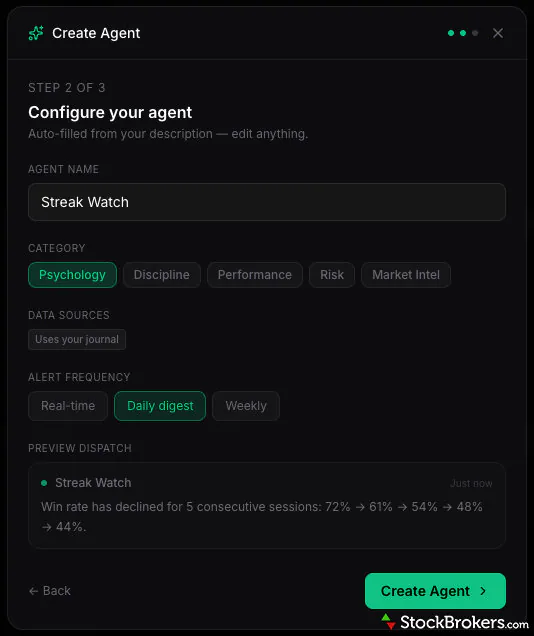
SuperTrader lets you build custom AI agents. This example previews a daily alert that flags a falling win rate over five consecutive sessions.
I noticed the AI Pattern Analysis agent working alongside an older trade in the demo account I was using. It flagged a potentially late entry and suggested reviewing the timing. The feedback was very specific and gave me something to check in the trade log.
How do SuperTrader’s AI credits work?
Pro includes 100 AI credits per day and Elite includes 300. In my testing, creating a custom agent used one credit, and each agent dispatch used another.
AI Insights and Max Coaching
SuperTrader’s AI works in two ways within the same account. As Akash from SuperTrader explained it to me in an email, “They’re two (website) pages describing the AI in one SuperTrader account.”
On the journal side, the AI analyzes your trading history and automatically highlights patterns by providing a list of AI Insights in the right-side menu. I saw both strengths and potential trouble spots in the AI Insights panel on the right side of the Analytics dashboard.
In the demo account, SuperTrader flagged a nine-trade winning streak and suggested that I review the market conditions and setups behind it. It also flagged that losing trades were held about 1.9 times as long as winners and suggested setting a maximum hold time for trades that weren’t working.
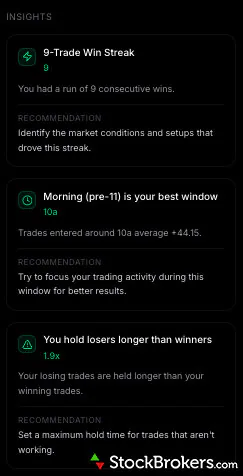
This SuperTrader’s AI Insights panel flagged a nine-trade winning streak, stronger results on morning entries, and losing trades held 1.9 times as long as winners in the demo accounts. Each insight includes a suggested next step, such as reviewing the setups behind the winning streak.
Then there is the coaching side of SuperTrader’s AI, where Max, the AI coach, lets you ask questions about your performance and insights inside a chat. According to SuperTrader, Max uses your performance stats, recent trades, setup and mistake tags, open positions, and daily check-in details when answering.
I tested Max by asking it to dig into one of the AI Insights from the demo account that I mentioned earlier. The dashboard said losing trades were held 1.9 times as long as winners, so I asked which trades drove the difference and whether they shared a setup.
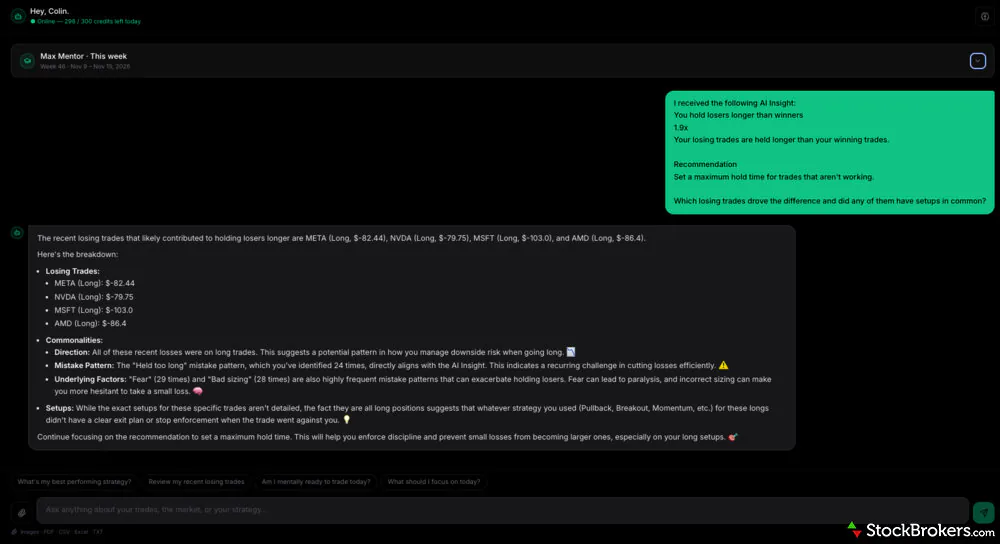
I asked SuperTrader’s Max AI coach which trades in the demo account contributed to losing positions held 1.9 times as long as winners. Max flagged four recent losses, all long positions, but left their holding times.
Max pointed to four recent losing trades, all long positions, and reported that “Held too long” had been logged as a mistake 24 times! That gave me a starting point for reviewing exit decisions. However, Max didn’t show how long any of the four trades were held or identify a common setup. I would have found the answer more helpful if it had shown the holding times alongside each trade, so I could see whether those positions actually made the difference.
Chart AI Analyst
SuperTrader’s Chart AI Analyst is one of a number of free standalone tools and calculators it offers. It reads and analyzes screenshots of price charts, and is accessible from the SuperTrader website homepage, so you don’t need an account to use it. You simply upload a chart from your brokerage account or a platform like TradingView, and it looks for patterns, estimated support and resistance levels, and provides its insight on the trend. It can also comment on indicators that are visible on the screenshot.
I uploaded an Amazon (AMZN) candlestick chart with Bollinger Bands and volume bars. The tool correctly identified the indicators and picked out the stretch where the stock traded mostly between $245 and $260. But it missed the sharp rally that preceded the August decline, and its “Uptrend” label seemed a bit premature given that the price had already slipped back below $260 after first moving above it.
All of that to say that I found it helpful for getting a quick read on the chart, but if you planned to use it, I would check the order of price moves myself; don’t blindly rely on its analysis.
Backtesting
A typical backtest applies your trading rules to historical market data to see how hypothetical trades would have performed. However, SuperTrader describes its backtesting tool as a way to evaluate a strategy using trades that you’ve already logged. You can filter your trade history by strategy tag, asset class, date range, or market conditions to see how a particular setup has performed. The results include win rate, average profit or loss per trade, and maximum drawdown, which shows how far your account value fell from a previous peak.
You can also compare two setups over the same period, which is helpful because two strategies may have a similar win rate while producing very different results. For example, one might earn less per trade or incur deeper losses along the way.
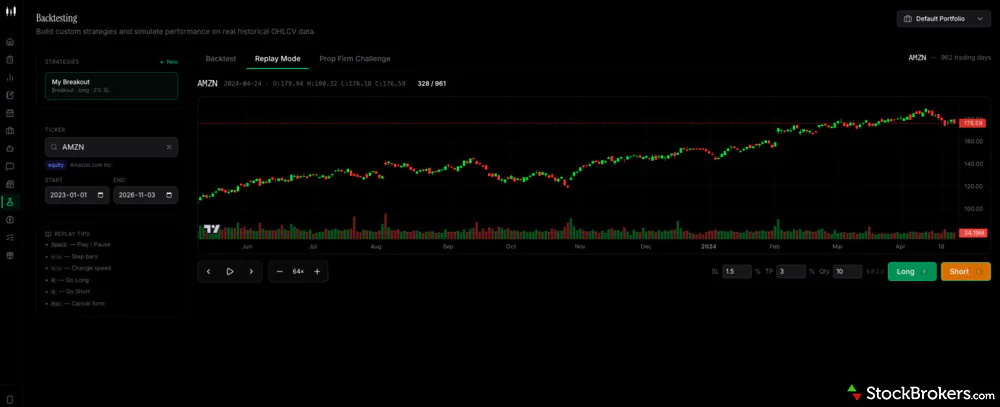
SuperTrader’s Replay Mode shows Amazon’s historical price and volume through April 24, 2024. You can advance the chart one bar at a time and practice entering long or short trades as prices unfold.
Ease of use
I found SuperTrader’s web app easy to navigate. Everything is clean and modern-looking, and the sidebar gives you direct access to tools like the Trade Log, Journal, and Analytics, making it easy for a beginner to get started. There’s definitely a learning curve when you get into backtesting or setting up custom AI agents that are actually useful, but you can always start with the basics.
The mobile app is a big plus. It’s available on iOS and Android devices and looks and feels a lot like the web app, so switching between the two was easy. You can log trades, access your journal, and connect a supported brokerage from your phone. One downside is that some major brokerages, including names like Charles Schwab and Webull, aren’t yet supported via broker sync, even though they appear on SuperTrader’s list.
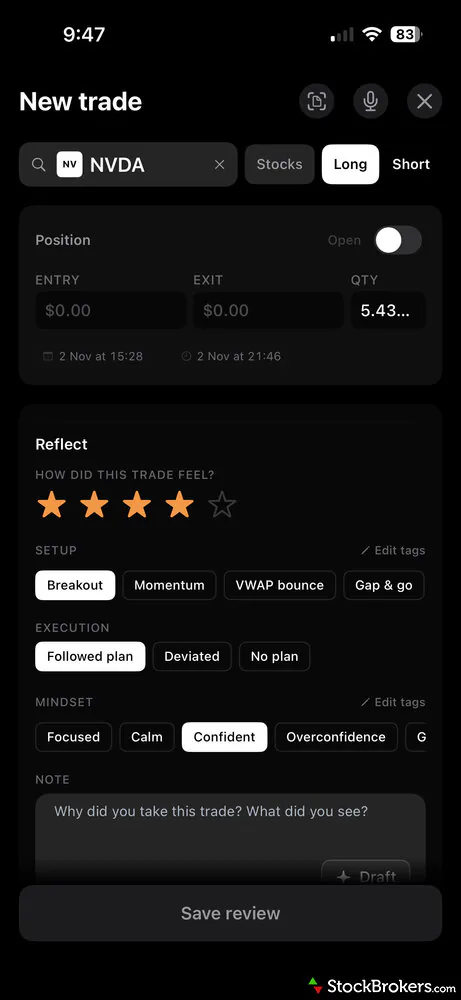
SuperTrader’s mobile app has the same modern, intuitive layout as the web app. You can log trades, add journal entries, and view your performance analytics from your phone.
Does SuperTrader sync with Charles Schwab?
Not yet. Schwab appears on SuperTrader’s broker list, but auto-sync was marked “coming soon” during my testing. Pro subscribers can upload a trade file in the meantime.
Getting help from SuperTrader’s support team took longer than I expected. It offers an AI Chatbot, but on the two occasions I needed additional help, I waited several hours for a live representative. One replied by email; the other in chat. They were very helpful when I was able to speak with them, but the wait time slowed my onboarding.
I also found a discrepancy between the pricing on SuperTrader’s website and what was displayed inside the app. When I flagged it, customer support confirmed that they’d missed the update and corrected their pricing page. I appreciated the fix, but it gave me the impression that SuperTrader operates with a very small team, and that some product pricing or features may not always be accurately reflected on the website. When we checked again in November 2026, SuperTrader’s website listed Pro at $74.90 per year, while the in-app price was $74.99.
Final thoughts
-
Free version:
Yes -
Monthly Pricing:
$9.99 - $29 -
Annual Pricing:
$74.99 - $199
| Ease of Use | |
| Features | |
| Cost |
Is SuperTrader worth it?
My overall impression of SuperTrader was positive. It was easy to open an account, sync my portfolio, and start using the tools, and I liked the clean layout on both web and mobile. But the best part about SuperTrader might be the price. The Pro plan, which includes most features, works out to about $6.25 per month when billed annually and adds broker sync, advanced analytics, and AI agents. The free plan works more like a free trial, since its 30-entry cap covers both trades and daily recaps and doesn’t reset.
I’d recommend SuperTrader to active traders who want an affordable way to review their trades, why they took each position, and whether they’re sticking to their plan. The various AI insights allow you to investigate specific patterns, though I’d double-check the underlying trades before you act on them. If you’re a sophisticated trader looking for the most in-depth analytics, I would compare SuperTrader’s pricing and features with top trading journals like Tradervue, TraderSync, or TradeZella before making a final decision.
FAQs
Does SuperTrader offer a free trial?
Yes. SuperTrader offers a 7-day free trial for both paid plans, Pro and Elite, when you choose annual billing. You’ll need to enter a credit card to start, and SuperTrader charges the full annual fee if you don’t cancel before the trial ends. I missed the cutoff and was charged, so set a reminder. I recommend following your normal trading routine during the trial period. Import some trades, review your results, and write a few journal entries. This will help you quickly figure out whether the subscription is worth paying for.
Which brokers and platforms does SuperTrader integrate with?
SuperTrader advertises more than 1,000 broker integrations, but that count includes CSV uploads and manual entry. When I went to connect a broker, the auto-sync list showed 53 brokerages, and SuperTrader says its auto-sync feature is still in development. Some listed brokers, including Charles Schwab and Webull, weren’t available to sync during my testing. For auto-syncing, you'll need to pay for a Pro subscription. If your platform can’t be connected or you don’t want to pay for a Pro plan, the Free plan lets you enter trades manually.
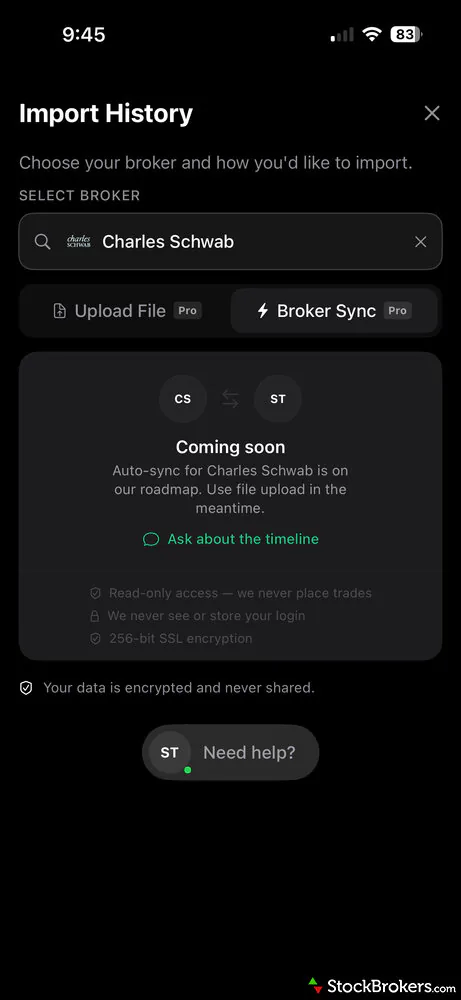
You can set up automatic trade syncing from the mobile app if your broker is supported. Some major brokers, including Charles Schwab and Webull, weren’t available for automatic syncing when I tested it.
What type of trader is SuperTrader best for?
SuperTrader is a good fit for price-conscious active traders who want the ability to track and review their performance without adding another expensive monthly or yearly subscription. You can opt for a free plan that lets you get started with trade journaling and basic analytics, but even the Pro plan, at around $6.25 per month when paid annually, is easy on the wallet.
If you don’t want to be limited by the number of trades you can track (the free plan caps you at 30 entries in total) or want the convenience of automated broker syncing and access to additional tools, the Pro plan will be your best bet.
What AI features does SuperTrader offer?
SuperTrader offers automated trade analysis through AI Insights, a conversational AI coach called Max, 13 preset AI agents, a custom agent builder, and a free standalone Chart AI Analyst.
AI Insights highlight patterns in your trading history, such as holding losing trades longer than winners. Max uses the same account data to answer questions about your performance. The AI agents, available on the Pro and Elite plans, monitor specific patterns such as trades opened shortly after a loss or a setup’s declining win rate. You can also create a custom agent by describing what you want it to monitor.
The standalone Chart AI Analyst reads uploaded chart screenshots and identifies potential patterns, support and resistance levels, and trend direction. It’s free to use without logging in.
StockBrokers.com Review Methodology
Why you should trust us
Colin Graves, a contributing writer for StockBrokers.com, has over eight years of experience covering investments and Canadian brokerage platforms. Before becoming a full-time writer, Colin spent over two decades in the banking industry, including 15 years as a people manager with a Top 10 North American financial institution. He has completed both the Canadian Securities (CSC) and the Professional Financial Planning (PFPC) courses and has appeared in leading Canadian personal finance publications such as MoneySense, Money.ca, MapleMoney, and The College Investor.
Blain Reinkensmeyer, co-founder of StockBrokers.com, has been investing and trading for over 25 years. After having placed over 2,000 trades in his late teens and early 20s, he became one of the first in digital media to review online brokerages. Today, Blain is widely respected as a leading expert on finance and investing, specifically the U.S. online brokerage industry. Blain has been quoted in The New York Times, The Wall Street Journal, Forbes, and Fast Company, among others. Blain created the original scoring rubrics for StockBrokers.com and oversees all testing and rating methodologies.
How we tested
- We used our own brokerage accounts for testing.
- We collected hundreds of data points across the brokers we review.
- We tested each online broker's website, desktop platforms, and mobile app, where applicable.
- We maintained strict editorial independence; brokers cannot pay for inclusion or a higher rating.
Our research team meticulously collected data on every feature of importance to a wide range of customer profiles, including beginners, casual investors, passive investors, and active traders. We carefully track variables like margin rates, trading costs, fees, and platform features and use them to help rate brokers across a range of categories measuring ease of use, range of investments, education, and more.
At StockBrokers.com, our reviewers use a variety of computing devices to evaluate platforms and tools. Our reviews and data collection were conducted using the following devices chosen to reflect the everyday hardware our readers are likely to be using rather than top-tier configurations: iPhone SE running the latest iOS version, MacBook Pro M1 with 8 GB RAM running the current MacOS, and a Dell Vostro 5402 laptop i5 with 8 GB RAM running Windows 11 Pro.
Each broker was evaluated and scored on over 60 different variables across six key categories for Canadian investors: Range of Investments, Platforms & Tools, Mobile Trading, Education, Ease of Use, and Overall. Learn more about how we test.
Read next
Read our Stock Rover review and learn how its advanced screeners, portfolio insights, and research tools stack up for serious, data-driven investors.
David Rodeck September 14, 2026
Discover if TrendSpider is right for you in this in-depth review. Explore its AI trading bots, chart tools, pricing plans, and how it compares to alternatives like TradingView and StockHero.
David Rodeck July 28, 2026
Read our Trade Ideas review to see how Holly AI and Money Machine deliver daily AI-powered trading strategies, backtesting, and real-time market scans.
Steven Hatzakis June 15, 2026
Read our Finviz review and see how it delivers advanced filtering, interactive heat maps, and in-depth financial visualizations.
David Rodeck August 25, 2026Trading tool guides
We tested the best trading journals of 2026. Tradervue, TraderSync, TradeZella, Stonk Journal and Trademetria compared, plus free trading journal templates and how to keep a journal that improves your trading.
David Rodeck November 20, 2026
TradingView, StockCharts and Yahoo Finance offer the best free stock charts in 2026. We compare the top free charting websites on indicators, data, free vs paid tiers and how to read a chart.
Blain Reinkensmeyer June 04, 2026
Learn to trade stocks step by step: open a broker account, practice with a simulator, and place your first trade. A beginner's guide from a 25-year trader.
Blain Reinkensmeyer August 26, 2026
Download a free trading journal spreadsheet in Excel or Google Sheets to track profits, losses, and lessons learned. Build better trading habits today.
Blain Reinkensmeyer September 17, 2026
We tested the best AI trading bots and AI stock trading platforms for 2026. Compare Trade Ideas, StockHero, TrendSpider and broker-built AI tools on price, strategies and risk.
Steven Hatzakis September 18, 2026
The best free stock screeners of 2026, tested on filters, data and speed. TradingView, Finviz, Yahoo Finance, Stock Rover and more, plus the paid screeners worth upgrading to.
Blain Reinkensmeyer September 14, 2026Other guides
Find the best crypto trading platform for 2026. We rank eToro, Fidelity, Interactive Brokers, Webull, and Robinhood on fees, security, and coin selection.
Steven Hatzakis May 27, 2026
The best brokerage accounts of 2026, tested by our team. Compare Schwab, Fidelity, Interactive Brokers, E*TRADE and more online stock brokers on fees, platforms and research.
Jessica Inskip August 06, 2026
Find the best brokerage for high-net-worth investors. Compare Fidelity, Schwab, Merrill, and more for premium services and tailored investment tools.
Jessica Inskip January 27, 2026
The best brokerage accounts with checking and the best banks for investing in 2026. Merrill Edge, J.P. Morgan, Ally, Fidelity and E*TRADE compared on cash management, debit cards, rewards and investing tools.
Jessica Inskip April 16, 2026
Find the best IRA accounts. Compare Fidelity, Schwab, Merrill Edge, E*TRADE, & J.P. Morgan for retirement planning, fees, tools, and account flexibility.
Jessica Inskip March 31, 2026
Discover the best brokers for trade execution. Compare Fidelity, Interactive Brokers, and more for price improvement, speed, and transparency.
Jessica Inskip October 12, 2026
We tested 14 brokers with real accounts. See the best options trading platforms for beginners, low fees and advanced traders, with contract fees compared.
Jessica Inskip September 09, 2026
Find top U.S. forex brokers. From tastyfx to OANDA, explore platforms with strong regulation, great tools, and user-friendly trading.
Steven Hatzakis May 29, 2026
Find the best Roth IRA accounts. Fidelity, Schwab, and E*TRADE lead with low fees, smart investing tools, and retirement planning support.
Andrea Coombes October 28, 2026
The best day trading platforms and apps for 2026. Interactive Brokers, Schwab thinkorswim, Fidelity, E*TRADE and TradeStation tested on execution speed, Level 2 data, hotkeys, margin rates and the pattern day trader rule.
Jessica Inskip October 05, 2026
Practice trading risk-free with the best paper trading apps and simulators of 2026. Compare Webull, Schwab thinkorswim, Interactive Brokers, E*TRADE and TradeStation, plus how paper trading works.
Jessica Inskip July 24, 2026
Find the best rollover IRA accounts. Compare Fidelity, Schwab, and E*TRADE for easy transfers, low fees, and smart retirement investing tools.
Andrea Coombes October 28, 2026
Explore the best international brokers for U.S. investors. Compare Interactive Brokers, Charles Schwab, and Fidelity for global stock trading access.
Jessica Inskip May 22, 2026
Find the best penny stock brokers. Compare Fidelity, Firstrade, Schwab, E*TRADE, and TradeStation for OTC access, fees, and tools.
Jessica Inskip August 02, 2026
The best free stock trading platforms and commission-free apps for 2026. Interactive Brokers, Fidelity, Ally, J.P. Morgan and E*TRADE tested on the true cost of $0 trades, hidden fees and how free brokers make money.
Jessica Inskip September 02, 2026
Fidelity, E*TRADE, and Schwab top our 2026 list of trading platforms and apps for beginners, with $0 minimums, $0 stock trades, and built-in education.
Jessica Inskip October 15, 2026
We tested the 5 best futures trading platforms of 2026. IBKR wins overall, and TradeStation has the lowest day-trade margins we found. Compare commissions, margins, and micros.
Jessica Inskip October 05, 2026About the Editorial Team
Colin Graves is a Winnipeg-based financial writer with more than eight years of experience covering investments and brokerages. A former banking exec who managed over $1B in assets, he holds CSC and PFPC credentials. His work appears in MoneySense, Money.ca, MapleMoney, and more.
John Bringans is the Managing Editor of StockBrokers.com. An experienced media professional, John has a decade of editorial experience with a background that includes key leadership roles at global newsroom outlets. He holds a Bachelor’s Degree in English Literature from San Francisco State University, and conducts research on forex and the financial services industry while assisting in the production of content.
Joey Shadeck is the Content Strategist and Research Analyst for StockBrokers.com. He holds dual degrees in Finance and Marketing from Oakland University, and has been an active trader and investor for close to 10 years. An industry veteran, Joey obtains and verifies data, conducts research, and analyzes and validates our content.