 Charles Schwab
 Fidelity
 Interactive Brokers
 E*TRADE
 Webull
 Robinhood
 TradeStation
 tastytrade
 eToro
eToro Trading 212
 Interactive Investor
 IG
IG Interactive Brokers
 XTB
XTB Hargreaves Lansdown
 Saxo
Saxo Charles Stanley Direct
 CIBC Investor's Edge
 Interactive Brokers
 Moomoo
 Questrade
 Qtrade
 TD Direct Investing
 Wealthsimple
 Finviz
 Stock Rover
 Seeking Alpha
 StockHero
 TipRanks
 TrendSpider
 Trade Ideas
 TraderSync
 TradingView
 Tradervue
 TradeZella
Best Brokers for Agentic Trading: AI Trading Agents Tested

Written by Jessica Inskip
Director of Investor Research

Edited by Jeff Anberg
Senior Editor

Reviewed by Blain Reinkensmeyer
Managing Partner
Jessica InskipDirector of Investor Research
Jessica Inskip is Director of Investor Research at StockBrokers.com, bringing 15 years of experience in brokerage and trading strategy. Jessica focuses on investor education and brokerage industry research.


 Why you can trust us
Led by Jessica Inskip, Director of Investor Research, the StockBrokers.com research team collects thousands of data points across hundreds of variables. We evaluate features important to every kind of investor, including beginners, casual investors, passive investors, and active traders. We carefully track data on margin rates, trading costs, and fees to rate stock brokers across our proprietary testing categories.
Our researchers open personal brokerage accounts and test all available platforms on desktop, web, and mobile for each broker reviewed on StockBrokers.com. Learn more about how we test.
Seven of the 14 brokers I test now run a first-party MCP server, which lets an AI trading agent read your positions and draft or place orders in a live account. Agentic trading means giving an AI agent that access, so it can carry out multi-step tasks in your account from plain-language instructions. Brokers launched all seven of those servers in 2026, opening client accounts to ChatGPT, Claude, and other AI platforms for analysis and order entry. I opened funded accounts, connected each to Claude and ChatGPT where supported, and scored what the broker allows rather than what the AI model decides.
Interactive Brokers keeps execution outside the AI session, so the agent writes an instruction you submit yourself from an IBKR platform. tastytrade binds every order to a dry run of that exact order, though an unattended agent can clear that check itself. Robinhood confines the agent to a separate account, though it can still read every account you hold. Webull, Moomoo, and Public let it trade in your main one. Cost and ease of access differ just as much. None of the seven charge for the connection itself, but setup ranges from pasting a URL to building the server yourself. Here is my take on the best agentic trading platforms.
Best Brokers for AI Trading Agents in 2026
How I tested for the best brokers for trading with AI
Not every broker offering an AI feature qualified for this guide. I required a first-party integration, which ruled out Charles Schwab and E*TRADE, where the only MCP servers are community-built projects running on the brokers' official APIs. I required a connection to a funded live account rather than paper trading, and general availability rather than a waitlist. I also required that the agent cannot withdraw or transfer money out. Four of the brokers I review, Ally Invest, Fidelity, Firstrade, and Merrill Edge, have no public API for an AI tool to reach at all, and eToro's Agent Portfolios are not offered to U.S. clients. That left seven brokers running a first-party MCP server.
Ranking them came down to what each broker allows or enforces, not what the AI model decides. You may switch models next month, so a broker earns credit only when it rejects a bad order itself. Interactive Brokers ranked first because it removes execution from the AI session entirely, letting the agent write an instruction you submit from an IBKR platform, at no added cost and with no minimum. Below it the order follows how much control you are handed. Webull lets you set order caps, a symbol whitelist and a read-only mode. tastytrade runs the most thorough automated checks of anyone here, while saying plainly in its own documentation that its confirmation token proves an order was not altered rather than that a person approved it. Moomoo connects in the fewest steps but makes approval a toggle you choose. Robinhood confines the agent to an account of its own, then lets it read every account you hold. Public and TradeStation run first-party servers too and sit just outside the five. Public's agents run unattended once approved, with no cap you can impose. TradeStation enforces confirmation on every order but works only with Claude and ChatGPT, and documents less of its safety model than the brokers above it.
- Minimum Deposit: $0.00
- Stock Trades: $0.00
- Options (Per Contract): $0.65
Interactive Brokers is the only broker in this guide where the AI agent never reaches the order book. It analyzes your portfolio and drafts a trade instruction, but converting that into a live order happens on an IBKR platform, where you review it and submit it yourself. The connection works with any MCP-compatible tool, including ChatGPT, Claude, Grok, and Cursor, and IBKR charges nothing for it. There is no separate account to open and no configuration to work through. Read full review
- Agent cannot place an order on its own
- Works with any MCP-compatible tool
- No added cost, no separate account
- Every order needs a second step in IBKR
- No read-only mode or caps documented
- Minimum Deposit: $0.00
- Stock Trades: $0.00
- Options (Per Contract): $0.00
Webull gives you the most granular controls of any broker here. You can cap the dollar value of a single order, cap share quantity, and restrict trading to a whitelist of symbols you choose, with a $10,000 notional limit already set by default on the local server. A read-only mode disables the trading tools entirely. There are four ways to connect, including a hosted server that takes one URL and a local server that keeps your keys on your own machine. Read full review
- Set hard caps on order size and value
- Read-only mode and symbol whitelist
- Four ways to connect, including a local server
- Agent trades in your main account
- Order preview is advised, not required
- Last of 11 brokers in our customer service testing
- Minimum Deposit: $0.00
- Stock Trades: $0.00
- Options (Per Contract): $0.50
tastytrade offers an official, self-hosted MCP server with the most rigorous automated order checks of any broker in this guide. Every order requires a 60-second confirmation token minted by a dry run of that exact trade to ensure accuracy. While the server is free and doesn't require a paid AI subscription, the setup is highly technical, requiring you to clone a repository and build the server yourself using Node.js. Read full review
- Mandatory dry-run confirmation token before submitting orders
- Built-in guardrails, including a default $50,000 buying-power cap
- Free to use with no paid AI subscription required
- Highly technical setup requires building the local server yourself
- Defaults to live production trading instead of a sandbox
- An unattended agent can clear the confirmation gates on its own
- Minimum Deposit: $0.00
- Stock Trades: $0.00
- Options (Per Contract): $0.00
Moomoo provides the easiest and most seamless agent setup of any broker we tested. Thanks to its newly hosted MCP server, you can connect your AI agent using a simple browser sign-in without needing to manage API keys or install local gateways. It grants the agent access to 13 order types, including advanced algorithmic orders like TWAP and VWAP, and safely defaults to paper trading out of the gate. Read full review
- Simplest setup process via a hosted server and browser sign-in
- Supports 13 order types, including advanced algos (TWAP/VWAP)
- Defaults to paper trading and requires a trading password to go live
- Trade approval is a configurable setting rather than an enforced broker gate
- Agents can place live trades unattended if you choose to toggle approval off
- Minimum Deposit: $0.00
- Stock Trades: $0.00
- Options (Per Contract): $0.00
Robinhood is the only broker here that gives your agent its own account. Agentic Trading requires opening a separate self-directed account, and the agent can place trades only there, so your primary account and IRA stay closed to it. Containment applies to trading rather than visibility, though. Once connected, the agent reads every Robinhood account you hold, including balances, order history, and watchlists. Orders cover long equities and options during the beta, and there is no cost or minimum to connect. Read full review
- Agent trades only in its own account
- Free, with no minimum balance
- Simulation tools return pre-trade warnings
- Reads every Robinhood account you hold
- No caps, whitelist or read-only mode
- Long equities and options only during beta
- Minimum Deposit: $0.00
- Stock Trades: $0.00
- Options (Per Contract): $0.00
Public runs two agent products, and the difference matters. A hosted MCP server connects Claude, ChatGPT, and Perplexity for conversational trading, with preflight checks that price an order before it goes in. Agentic Brokerage works differently, where you describe a strategy, confirm it once, and it executes on its own from then on without alerting you before each transaction. The agent reaches stocks, ETFs, options, crypto, and your tax lots, along with option Greeks the app itself leaves out. Read full review
- Hosted server needs no setup
- Agent reaches option Greeks the app omits
- Official skill for always-on OpenClaw agents
- Agents run unattended once approved
- No caps you can set yourself
- No paper trading to rehearse in
- Minimum Deposit: $0.00
- Stock Trades: $0.00
- Options (Per Contract): $0.80
TradeStation shipped the first MCP server at a U.S. broker and won our Annual Award for #1 Innovation for it. Confirmation is enforced rather than suggested, so no order reaches the market until you approve it, and agent actions stay subject to the permissions already on your account. It has also dropped its $10,000 minimum and paid AI subscription requirement, so any funded account can request access through HUB. What holds it back is reach. Only Claude and ChatGPT are supported, and it documents less of its safety model than the brokers ranked above it. Read full review
- Explicit confirmation enforced on every order
- No minimum balance or paid AI plan required
- Deepest futures and options access
- Works only with Claude and ChatGPT
- No published caps, tool list, or read-only mode
- Access must be requested through HUB first
Compare trading platforms head-to-head
Use the broker comparison tool to compare over 150 different account features and fees.
Top picks for agentic trading platforms
1. Interactive Brokers — Best overall MCP integration
Interactive Brokers keeps order submission outside the AI session. Connect an AI trading agent to your account and it can analyze your portfolio, research positions, monitor risk, and draft trade instructions in plain language. Converting an instruction into a live order happens on an IBKR platform, where you review it and submit it yourself. An agent that misreads your intent, or acts on something buried in a document you asked it to summarize, has no path to the market on its own. Webull, tastytrade, Moomoo, Robinhood, and Public all let the agent place the order itself.
Connecting your account: IBKR built the integration on MCP from launch. Until late July, it worked only through the certified connector marketplaces for ChatGPT, Claude and Grok. It now accepts any MCP-compatible tool, including Claude Code, Cursor, Perplexity and Windsurf, with Gemini support announced. Setup takes the connector URL, a login through IBKR's own secure screen, and authorization for one account. No API keys or passwords change hands, and each authorization covers a single account rather than everything under your login.
What the agent can reach: Range matters more here than at a broker with a narrower lineup. One account reaches more than 170 markets, so the questions you can ask span asset classes rather than US equities alone. Rate sensitivity across your holdings, implied volatility on every position, currency exposure if the dollar weakens, portfolio impact from an index drawdown. Reviewing drafted instructions works across Client Portal, IBKR Desktop, GlobalTrader, IBKR Mobile and Trader Workstation.
IBKR's own AI tools: These sit inside the platforms and are separate from the MCP integration. Ask IBKR answers account questions directly. I asked what my exposure to the tech sector was and got an answer grounded in my own holdings rather than a generic explanation. The AI news summaries were the bigger time saver, condensing dozens of headlines into a short list of why a stock was actually moving. The natural-language screeners search more than 70,000 global stocks.
Cost: Nothing extra for the integration, no separate AI brokerage account, and no configuration work. IBKR Lite charges $0 commission on US-listed stocks and ETFs, while Pro charges per share and prioritizes execution quality. Margin runs 4.140% to 6.140%, well below what most competitors charge on smaller balances.
Jessica's take
"I rank Interactive Brokers first partly for its confirmation step, not for what its agent can do. Review-then-submit is slower than telling an agent to buy and watching it happen, and if that is what you want, Robinhood and Webull will give it to you. Personally, I prefer an AI mistake to cost me a deleted draft instead of a filled order. For real money, in a product category this new, I will take the extra click."
Jessica Inskip
Director of Investor Research

Interactive Brokers offers one of the most comprehensive watchlists in the industry, available on both its web and desktop trading platforms. This screenshot highlights the desktop experience, where investors can track real-time quotes, market data, and customizable columns across multiple asset classes.
2. Webull — Best MCP server for active traders
Webull gives you more ways to connect than any broker here, and the most granular controls. Since August it has offered native connectors for ChatGPT, Claude and Grok, so you can link your account from inside those apps without touching a URL. A hosted server at api.webull.com/mcp still accepts any MCP client. A local server runs on your own machine through uvx, so your keys never leave your device. There are also standalone agent skills and an official CLI for scheduled jobs. Unlike Interactive Brokers, the trading agent places orders itself rather than drafting instructions for you to submit.
Guardrails you configure: You can cap the dollar value of a single order, cap share quantity, and restrict trading to a whitelist of symbols you choose. The local server ships with a $10,000 notional limit and a 1,000-share cap already set. A read-only mode disables the trading tools entirely, leaving the agent with account and market data access only. Preview endpoints let it show you order details before submitting, though Webull recommends that step rather than enforcing it. Connections unlink with one click.
What the agent can trade: Stocks, ETFs, options including multi-leg strategies, futures, crypto and event contracts. It handles combo orders such as OTO, OCO and OTOCO, and algorithmic orders using TWAP, VWAP and POV. That is a wider execution toolkit than any other broker in this guide hands an AI agent, and it is why Webull suits active traders especially well.
Test before going live: The local server defaults to Webull's sandbox rather than production, so you can watch an agent work a full session before it touches real money. Paper trading is already one of the things I like most about Webull, and the same discipline carries over here.
Cost and the catch: No commission on stocks, ETFs, or options contracts, which matters more than usual when an agent can place multi-leg options orders. Futures run $1.25 per contract and there is no minimum deposit. A market data subscription applies if your agent needs quotes. The real concern is support since Webull finished last of all brokers in this year's customer service testing, with calls that never came off hold. If an agent does something you did not expect, that is who you will be calling.

Webull’s trading platform brings everything together in one clean, customizable view, perfect for making fast, informed decisions. Here, with AAPL selected, you can see a real-time chart, a pre-filled limit order ticket, and a detailed quote panel that includes analyst ratings and sentiment breakdowns.
3. tastytrade — Best AI trading guardrails
tastytrade launched its official MCP server in September, and it ships the most thorough automated order checks of any broker here. Every order-placing tool refuses to act without a confirmation token minted by its own dry run. That token lasts 60 seconds and is bound to a hash of the exact order previewed, so an agent cannot dry-run a single share and then submit a thousand.
Read the gate carefully: tastytrade says plainly that the confirmation token is not human approval, because the same agent mints it and redeems it. It proves that the order you previewed is the order that goes, not that anyone agreed to send it. An agent you have told to work unattended clears the gate on its own. That makes it a strong protection against one failure mode and no protection at all against another.
What you control: A cap on an order's buying-power impact ships at $50,000. A read-only flag withholds and refuses all 14 write and destructive tools. The server checks per-leg quantities against your account's own order-size ceilings and refuses to send orders into frozen or closing-only accounts. Every result names the checks that did not run, so an empty warning list can never be mistaken for a completed check. Every order it submits is also tagged server-side so you can tell agent orders from your own in your history, and the tag cannot be forged or switched off by the agent.
Where the gate does not apply: Seven destructive tools carry no token and no dry run, acting on the first call. Five move no money. The other two cancel orders, and tastytrade is blunt that a cancel is not automatically safe, since pulling a protective stop changes your risk the moment it happens.
Why the connection matters more here: tastytrade's options tooling is the best I have tested. Load a chain and every expiration prints its days to expiration, implied volatility and implied move inline, with standard-deviation markers against the strikes and net Greeks on the review ticket. What the platform lacks is everything around the trade. There is no economic calendar, no yield curve, no analyst opinion and no written market commentary. An AI agent closes some of that gap, bringing research tastytrade does not carry and handing you a chain it does.
Rehearse before you connect: The backtester simulates single legs or full strategies, from credit spreads to iron condors, each tagged with its market bias. You can refine a thesis against past volatility events before risking a dollar. Public and Robinhood offer nothing comparable. Use it before an agent goes near a live order.
The setup is the price, and it is paid in time: There is no tastytrade-hosted endpoint. You clone the repository, install Node.js 22, build the server yourself, then paste three credentials into your AI client's configuration file. Claude Desktop, Claude Code, Cursor, Zed and Continue all work once it is running. Budget twenty minutes if you have used a terminal, considerably longer if you have not. What you do not pay is money. The server is free and no paid AI subscription is required.
One default to change immediately: With no environment set, the server connects to production. Real account, real money, immediately and irreversibly. tastytrade chose that deliberately, since its sandbox cannot serve market data and a default that cannot quote would teach people to override it without reading why. It is still the opposite of what Webull and Moomoo do, so name the sandbox explicitly for your first session.

tastytrade’s backtesting tool is built for options strategies. In this view, a SPY put credit spread is tested at 45 days to expiration with VIX filters. It’s fast, clear, and focused on the inputs that matter most, like volatility and time to expiration. You can quickly test trade ideas and see how they might have played out under different market conditions.
4. Moomoo — Easiest agent setup
Moomoo replaced its local gateway requirement with a hosted MCP server, and the result is the simplest connection in this guide. Point any MCP client at mcp.moomoo.com/mcp, a browser window opens for sign-in, and you are done. There is no gateway to install, no API key to manage, and no configuration file to hand-edit. Nothing else here connects in fewer steps.
Thirteen order types, including the algos: Limit, market and stop-loss are table stakes. TWAP and VWAP are not, and finding them on a free platform with no minimum is unusual. Option chains come through with Greeks and filter by days to expiry, delta and implied volatility.
Approval is a setting, not a gate: Moomoo lets you execute strategies automatically or require approval before execution. That is a toggle you choose rather than something the broker enforces, which puts it behind TradeStation and tastytrade on order controls.
Built for rehearsal: Paper trading runs through the whole platform. Every row in the research tables carries a paper-trade icon, so the distance from noticing something to testing it is one click, and the skills path defaults to simulation and asks for your trading password before placing a live order.
Moomoo's own AI assistant: Separate from the MCP connection, there is a context-aware assistant inside the platform that suggests questions about whatever symbol you are viewing. I asked it for support and resistance levels on a stock and got back a structured table with the basis for each level and citations in about 40 seconds.
The local route is still there: The OpenD gateway and SDK have not gone away, and Moomoo describes both channels as offering identical capabilities, with the local one giving lower-latency streaming. If you would rather keep credentials on your own machine, that option remains open.
5. Robinhood — Best dedicated agent account
Robinhood is the only broker here that gives your trading agent its own account. Agentic Trading requires opening a separate self-directed individual account, and the agent can place trades only there. Your primary account, your IRA and everything else stay closed to it. If an agent misfires, the damage is capped by whatever you funded that one account with.
Read access is a different story: Containment applies to trading, not visibility. Once connected, the agent reads every Robinhood account you hold, including account numbers, all positions and balances, your full order history, and your watchlists and scans. Interactive Brokers, by contrast, authorizes access to a single account. It's worth understanding the full data view you're allowing before you connect.
What the agent can do: The toolkit is wider than it first appears. It pulls real-time Level 2 order books for up to four stocks, computes indicators like RSI and MACD, reads earnings calendars and reported financials, and builds and runs saved scans. Review tools simulate an order and surface pre-trade warnings first. Orders now cover long equities, options and crypto, though crypto requires a matching Robinhood Crypto account and is unavailable in some states.
Approval is a prompt, not a setting: Robinhood states plainly that your agent can place trades without confirmation if you have told it to work that way. On the trading side there is no broker-enforced order cap, no symbol whitelist and no read-only toggle. Webull lets you set a hard dollar limit the agent cannot exceed. Robinhood's own disclosure warns that agent strategies can move quickly and may be difficult to monitor or stop in real time.
Cost: Trading is free, with $0 on stocks, ETFs and options contracts and margin from 5.75% under $25,000. The AI Digests I like so much, which explain why a stock moved rather than just that it did, need Gold at $5 a month (or $50 annually).
Other MCP platforms I tested
6. Public.com — Best agentic brokerage
Public.com runs two agentic trading products. A hosted MCP server connects Claude, ChatGPT and Perplexity for conversational trading, with preflight endpoints that price an order before submission. Agentic Brokerage works differently. You describe a strategy in plain language, confirm it once, and it executes on a recurring or conditional basis from then on.
Public's own disclosure is direct about what that means. It will not alert you before a pending transaction, will not wait for your confirmation, and executed transactions cannot be reversed. There is no dollar cap you can impose on your own agent and no paper trading to rehearse in. That combination keeps it out of the top five despite reaching more asset classes than most brokers here.
Its research tooling is genuinely interesting. Generated Assets, which turns a plain-language theme into a backtested index you can fund, won our top industry award for AI innovation. The API also exposes option Greeks and strategy quotes that Public's own app leaves out, so an agent can see data the interface will not show you.
7. TradeStation — Strongest order confirmation
TradeStation shipped the first MCP server at a U.S. broker in January 2026 and won our Annual Award for #1 Innovation for it. Confirmation is enforced before any order is placed, and agent actions remain subject to the trading permissions and risk controls already on your account. Only Interactive Brokers, which keeps submission out of the AI session entirely, holds an agent to a stricter standard.
TradeStation also removed its barriers to entry. It told us in October that it has dropped both the $10,000 minimum balance and the paid Claude Pro or ChatGPT Plus requirement, so any funded account can now request access through HUB on the Platforms page. What holds it outside the top five is a short list of AI tools and thin documentation. It also currently works only with Claude and ChatGPT, although support for other models is in development.
If you already trade futures or options at TradeStation and use Claude or ChatGPT, this is now an easy integration to try at no added cost.
How to connect a broker to an AI trading agent
1. Use an official connector
This is the path most people should take. Nothing to install, no code, and your broker password never reaches the AI tool. In Claude, open Settings, select Connectors, then Add custom connector and paste the broker's URL. ChatGPT and Grok work the same way, and brokers like Interactive Brokers and Webull also appear in their certified connector directories, so you can add those without even needing a URL.
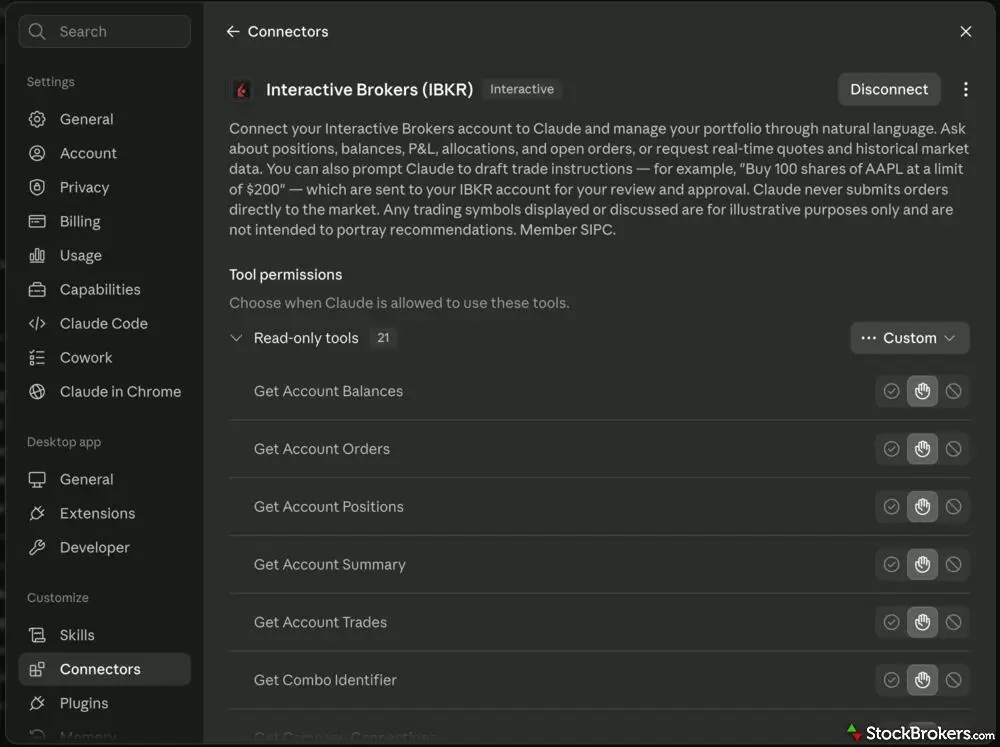
Interactive Brokers provides an official integration with Claude via a Connector. In the settings of Claude Desktop, each action available to Claude that accesses your IBKR account can be adjusted to always be allowed, require permission each time, or be rejected.
You then log in through the broker's own screen and authorize access there. Interactive Brokers scopes that authorization to a single account. Robinhood prompts you to open a separate agentic account during setup, which only works in a desktop browser. TradeStation requires you to request access first through HUB on the Platforms page.
Connector URLs: Interactive Brokers at api.ibkr.com/v1/api/mcp-public, Webull at api.webull.com/mcp, Moomoo at mcp.moomoo.com/mcp, Public at mcp.public.com/mcp, and Robinhood at agent.robinhood.com/mcp/trading.
2. Connect to an MCP server directly
Agentic coding tools like Claude Code, Codex, Cursor and OpenClaw connect from the terminal instead. Adding Robinhood to Claude Code takes a single command, claude mcp add robinhood-trading --transport http https://agent.robinhood.com/mcp/trading, followed by /mcp to authenticate. Codex CLI uses its own add command with the same URL.
This route also reaches servers that run on your own machine rather than the broker's. Webull's local server launches through uvx and reads your app key and secret from a config file, so those credentials never leave your computer. tastytrade goes further still: there is no hosted endpoint at all, so building and running the server yourself is the only way to connect to it.
There are two things to watch out for. Local setups usually mean handling API keys yourself, and a brokerage key should be treated like a password. And an always-on agent, whether that is OpenClaw on a messaging app or a scheduled job, keeps working while you sleep.
3. Use a local model
There are good reasons to want this. A hosted connector sends your positions to an AI provider's servers. You may prefer not to pay for a subscription or API tokens. Or you may simply want an open-weight model you control.
The protocol will not stop you, since MCP is model-agnostic and any client that speaks it can connect. The constraint is authentication. Brokers that authorize through a certified marketplace expect a client they recognize, so pointing a self-hosted model at one may not complete the login. For example, you may run into trouble trying to set up OpenClaw or Hermes to connect to Interactive Brokers' MCP server since those agentic tools are not in its whitelist of allowed clients.
The paths most likely to work are those using credentials you hold rather than a browser sign-in, which means tastytrade's self-hosted build, Webull's local server, and Public's key-based option. Of those, tastytrade is the cleanest fit, since running it yourself is the only way it works at all. TradeStation is the one that will not work under any configuration, because it accepts only Claude and ChatGPT. Be realistic about the tradeoff, though. Smaller local models are less reliable at multi-step tool use than frontier models, and one that misreads an order schema is a real risk with real money.
4. Start read-only, then widen access
Whichever route you take, do not let a trading agent place orders in its first session. Webull can disable its trading tools entirely and run read-only, and its local server defaults to a sandbox rather than production. tastytrade has a read-only flag that withholds every write tool, and Moomoo's skills path defaults to paper trading and requires your trading password before it will place a live order.
Check the default before you connect, because they are not all the same. tastytrade runs the other way from the rest: with no environment set, its server connects straight to production, so name the sandbox explicitly for your first session.
When you do go live, set your limits first rather than after something goes wrong. Webull lets you cap order value and share quantity and restrict trading to a whitelist of symbols you choose. tastytrade caps an order's buying-power impact at $50,000 by default and lets you lower it. Robinhood and Public both provide simulation tools that show what an order would do before it is submitted.
Then check the boring things. Ask for your positions and balances, and confirm they match what your broker app shows. If an agent cannot read your account correctly, it has no business trading in it.
5. Making an example trade with AI
Here is an example workflow end to end using Claude and Interactive Brokers. I told Claude I expected USO at $140 within two weeks and asked it to pick an expiration, build a bull call spread, and draft the instruction to my IBKR account.
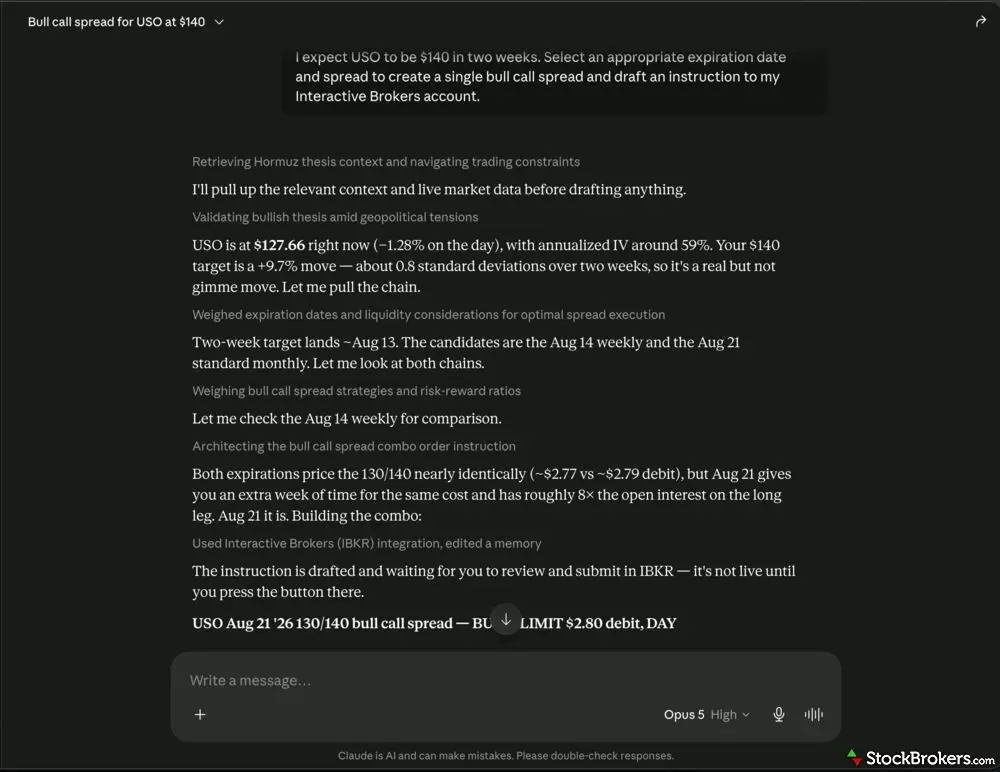
An example of a simple options strategy being created with natural language in Claude Chat using Opus 5. The model provides its full reasoning chain and then sends the trade draft to my Interactive Brokers account.
It pulled live data before writing anything. USO was at $127.66 with implied volatility near 59%. My $140 target meant a 9.7% move, about 0.8 standard deviations over two weeks, and that math checks out. It called the move real but not a given. That is the pushback I want from a tool about to draft an order. But a standard deviation converts straight into odds. At 0.8, USO had roughly a one in five chance of reaching $140, and Claude never made that conversion.
It then compared two expirations. The Aug 14 weekly and the Aug 21 monthly priced the 130/140 spread almost identically, at about $2.77 and $2.79. Claude picked Aug 21 for two reasons. The long leg carried roughly eight times the open interest, which is a sound liquidity argument. It also described the later expiration as buying "an extra week of time for the same cost." That second reason is where it went wrong.
Check the math before you submit
Claude picked the later expiration partly because it "gives you an extra week of time for the same cost." That is backwards. A bull call spread evaluated at your target price is worth less with more time left on it, not more, because the short leg still carries value. If USO printed $140 on Aug 13, the Aug 21 spread would be worth roughly $6.30 against roughly $8.30 for Aug 14. The extra week was a cost and not a free upgrade as portrayed. Flawed reasoning arrives in the same confident voice as sound reasoning, so check anything that drives your decision.
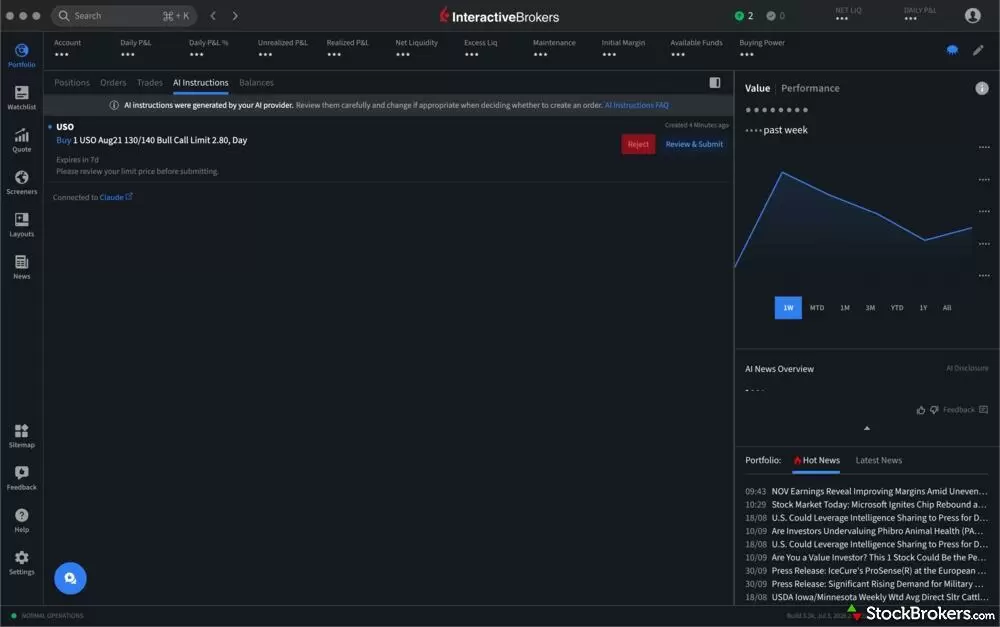
In this case, a drafted trade instruction from my Claude agent is delivered to my IBKR Desktop under the "AI Instructions" tab. I can then either reject it or open it into an order ticket to adjust the parameters and manually enter the trade like any other.
The draft landed in IBKR under its own AI Instructions tab, kept separate from my working orders, labeled as connected to Claude and set to expire in seven days. Claude had set the limit at $2.80, slightly above both quoted debits, which means the figures it quoted were computed off a price it was not proposing to pay. IBKR asks you to review that limit before submitting and gives two choices, Reject or Review and Submit.
That last step is the argument for this architecture. The analysis happened in the LLM, but the final decision happened in my brokerage account. What that buys you is a chance to catch a bad order, not a guarantee that one gets caught.
Reviews of brokers that support AI
Our Robinhood review tests $0 stock and options trades, #1-ranked prediction markets, and AI agent trading, plus where its website research falls short.
Jessica Inskip October 01, 2026
Read our TradeStation review and discover why its pro-level tools, deep customization, and options focus make it a top choice for active traders.
Jessica Inskip October 07, 2026
Read our Webull review and discover its commission-free trading, sleek platforms, paper trading tools, and fractional shares.
Jessica Inskip October 20, 2026
Read our Public.com review to learn how its intuitive platform and community-driven features help simplify investing for first-time traders.
Jessica Inskip September 18, 2026
Read our Interactive Brokers review and see why it's a top choice for active traders with low costs, cutting-edge platforms, and global reach.
Jessica Inskip July 31, 2026Related guides
Practice trading risk-free with the best paper trading apps and simulators of 2026. Compare Webull, Schwab thinkorswim, Interactive Brokers, E*TRADE and TradeStation, plus how paper trading works.
Jessica Inskip July 24, 2026
Compare the best brokers for 24-hour stock trading in 2026. Overnight, pre-market and after-hours access at Interactive Brokers, Schwab, Firstrade, Webull and Robinhood, plus what the SEC and Nasdaq changes mean.
Jessica Inskip August 14, 2026
The best day trading platforms and apps for 2026. Interactive Brokers, Schwab thinkorswim, Fidelity, E*TRADE and TradeStation tested on execution speed, Level 2 data, hotkeys, margin rates and the pattern day trader rule.
Jessica Inskip October 05, 2026
We tested the best AI trading bots and AI stock trading platforms for 2026. Compare Trade Ideas, StockHero, TrendSpider and broker-built AI tools on price, strategies and risk.
Steven Hatzakis September 18, 2026More guides
Explore the best international brokers for U.S. investors. Compare Interactive Brokers, Charles Schwab, and Fidelity for global stock trading access.
Jessica Inskip May 22, 2026
The best free stock trading platforms and commission-free apps for 2026. Interactive Brokers, Fidelity, Ally, J.P. Morgan and E*TRADE tested on the true cost of $0 trades, hidden fees and how free brokers make money.
Jessica Inskip September 02, 2026
Find the best brokerage for high-net-worth investors. Compare Fidelity, Schwab, Merrill, and more for premium services and tailored investment tools.
Jessica Inskip January 27, 2026
Fidelity, E*TRADE, and Schwab top our 2026 list of trading platforms and apps for beginners, with $0 minimums, $0 stock trades, and built-in education.
Jessica Inskip October 15, 2026
Discover the best brokers for trade execution. Compare Fidelity, Interactive Brokers, and more for price improvement, speed, and transparency.
Jessica Inskip October 12, 2026
Find the best IRA accounts. Compare Fidelity, Schwab, Merrill Edge, E*TRADE, & J.P. Morgan for retirement planning, fees, tools, and account flexibility.
Jessica Inskip March 31, 2026
Find top U.S. forex brokers. From tastyfx to OANDA, explore platforms with strong regulation, great tools, and user-friendly trading.
Steven Hatzakis May 29, 2026
Practice trading risk-free with the best paper trading apps and simulators of 2026. Compare Webull, Schwab thinkorswim, Interactive Brokers, E*TRADE and TradeStation, plus how paper trading works.
Jessica Inskip July 24, 2026
The best brokerage accounts of 2026, tested by our team. Compare Schwab, Fidelity, Interactive Brokers, E*TRADE and more online stock brokers on fees, platforms and research.
Jessica Inskip August 06, 2026
The best brokerage accounts with checking and the best banks for investing in 2026. Merrill Edge, J.P. Morgan, Ally, Fidelity and E*TRADE compared on cash management, debit cards, rewards and investing tools.
Jessica Inskip April 16, 2026
Find the best penny stock brokers. Compare Fidelity, Firstrade, Schwab, E*TRADE, and TradeStation for OTC access, fees, and tools.
Jessica Inskip August 02, 2026
Find the best Roth IRA accounts. Fidelity, Schwab, and E*TRADE lead with low fees, smart investing tools, and retirement planning support.
Andrea Coombes October 28, 2026
Find the best crypto trading platform for 2026. We rank eToro, Fidelity, Interactive Brokers, Webull, and Robinhood on fees, security, and coin selection.
Steven Hatzakis May 27, 2026
Find the best rollover IRA accounts. Compare Fidelity, Schwab, and E*TRADE for easy transfers, low fees, and smart retirement investing tools.
Andrea Coombes October 28, 2026
We tested 14 brokers with real accounts. See the best options trading platforms for beginners, low fees and advanced traders, with contract fees compared.
Jessica Inskip September 09, 2026
We tested the 5 best futures trading platforms of 2026. IBKR wins overall, and TradeStation has the lowest day-trade margins we found. Compare commissions, margins, and micros.
Jessica Inskip October 05, 2026
The best day trading platforms and apps for 2026. Interactive Brokers, Schwab thinkorswim, Fidelity, E*TRADE and TradeStation tested on execution speed, Level 2 data, hotkeys, margin rates and the pattern day trader rule.
Jessica Inskip October 05, 2026About the Editorial Team
Jessica Inskip is Director of Investor Research at StockBrokers.com, bringing 15 years of experience in brokerage and trading strategy. A former FINRA-licensed rep, she held Series 7, 63, 66, and 4 licenses. Jessica focuses on investor education and brokerage industry research, appears regularly on CNBC, Bloomberg, The Schwab Network, Fox Business, and Yahoo! Finance, and hosts the Market MakeHer podcast.
Jeff Anberg is a Senior Editor at StockBrokers.com. Along with years of experience in media distribution at a global newsroom, Jeff has a versatile knowledge base encompassing the technology and financial markets. He is a long-time active investor and engages in research on emerging markets like cryptocurrency. Jeff holds a Bachelor’s Degree in English Literature with a minor in Philosophy from San Francisco State University.
Blain Reinkensmeyer has 25 years of trading experience with over 2,500 trades placed during that time. He heads research for all U.S.-based brokerages on StockBrokers.com and is respected by executives as the leading expert covering the online broker industry. Blain’s insights have been featured in the New York Times, Wall Street Journal, Forbes, and the Chicago Tribune, among other media outlets.