 Charles Schwab
 Fidelity
 Interactive Brokers
 E*TRADE
 Webull
 TradeStation
 tastytrade
 eToro
eToro Trading 212
 Interactive Investor
 IG
IG Interactive Brokers
 XTB
XTB Hargreaves Lansdown
 Saxo
Saxo Charles Stanley Direct
 CIBC Investor's Edge
 Interactive Brokers
 Moomoo
 Questrade
 Qtrade
 TD Direct Investing
 Wealthsimple
 Finviz
 Stock Rover
 Seeking Alpha
 StockHero
 TipRanks
 TrendSpider
 Trade Ideas
 TraderSync
 TradingView
 Tradervue
 TradeZella
TradeStation's TITAN X Review

Written by Jessica Inskip
Director of Investor Research

Edited by Jeff Anberg
Senior Editor

Reviewed by Blain Reinkensmeyer
Managing Partner
Jessica InskipDirector of Investor Research
Jessica Inskip is Director of Investor Research at StockBrokers.com, bringing 15 years of experience in brokerage and trading strategy. Jessica focuses on investor education and brokerage industry research.


TradeStation built its name on serving active traders, and for years that power came packaged in a dense, dated interface. TITAN X is the fix. It keeps the depth I rely on and wraps it in something modern that's far easier to move around in. Better onboarding, the Master Class educational series, and a new web hub round it out. It's more approachable now without asking serious traders to give anything up. Here's how it held up when I actually traded on it.
- Charting - Indicators / Studies: 294
- Charting - Drawing Tools: 45
- Complex Options Max Legs: 4
TradeStation is a brokerage best known for its highly customizable trading platforms, advanced options and futures capabilities, and powerful tools designed for active and experienced traders. Read full review
- New TITAN X platform.
- Tools for futures and options.
- "Why is it Moving?" and "Hot Lists" tools on price action.
- Not a good choice for beginners or casual investors.
- Annual IRA maintenance fees and steep option exercise charges.
- No spot cryptocurrency trading, fractional shares, or robo-advisory services.
 Why you can trust us
Led by Jessica Inskip, Director of Investor Research, the StockBrokers.com research team collects thousands of data points across hundreds of variables. We evaluate features important to every kind of investor, including beginners, casual investors, passive investors, and active traders. We carefully track data on margin rates, trading costs, and fees to rate stock brokers across our proprietary testing categories.
Our researchers open personal brokerage accounts and test all available platforms on desktop, web, and mobile for each broker reviewed on StockBrokers.com. Learn more about how we test.
Pros and cons
PROS
- Clean, intuitive charting with more than 105 indicators, drag-and-drop setup, and a built-in explainer on each.
- A redesigned options chain that flows straight into the trade ticket.
- Percentage-based position sizing with built-in take-profit and stop-loss.
CONS
- No built-in economic calendar and limited macro data.
- Backtesting and Portfolio Maestro aren't in TITAN X yet.
- Lighter options analytics and customization compared to the most advanced platforms.
Top takeaways for TITAN X in 2026
- The interface finally matches the engine. TITAN X is a Windows and Mac-native, widget-based workspace, and the Launch Pad drops you into prebuilt layouts by trader type instead of a blank screen on day one.
- Charting is the part I'd come back for. More than 105 indicators, drag-and-drop setup, and a built-in explainer on every study make it easy to validate a setup without digging through menus.
- Options execution and risk management are the real edge. The redesigned chain, the click-to-ticket flow, and take-profit and stop-loss levels you set by price, dollar, or percent take the friction out of building a position.
- Know the gaps before you commit. There's no economic calendar and very limited macro data inside the platform, and backtesting and Portfolio Maestro still live in legacy tools. If your process depends on those, you'll need to switch windows out of TITAN X.
Getting set up in TITAN X
Jessica Inskip, Director of Investor Research at StockBrokers.com, walks through the TradeStation TITAN X platform, from the Launch Pad to building a custom layout.
The Launch Pad
The first time I launched TITAN X, it didn't drop me into a blank screen. It opened to the Launch Pad, a starting point that respects the learning curve of an active trading platform. Right away you get prebuilt layout templates for Day Traders, Futures, Index ETFs, Options, Sectors, and Swing Traders. Below that are your saved layouts, then a set of guided video tutorials.
The six cover navigation, layouts, trade execution, charting analysis, options trading, and matrix trading. This is contextual education done well.
The workspace is widget-based, so you build it from parts. Charts, options chains, watchlists, positions, orders, news, and hot lists all snap in. You can run multiple layouts, float windows across screens, or keep one streamlined setup. Need to start over? The home tab takes you back to the Launch Pad, where your saved and template layouts sit together.
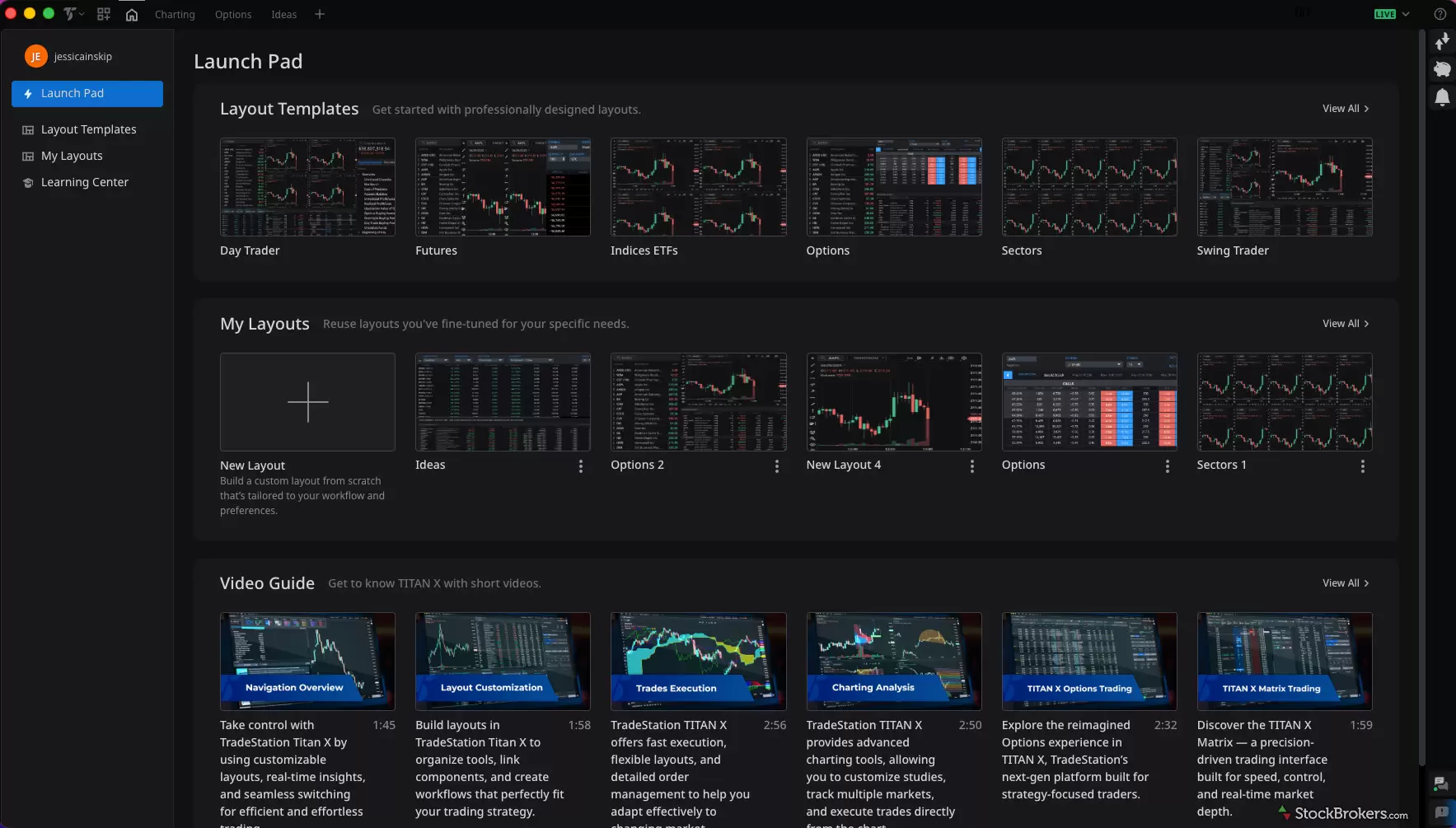
The Launch Pad is the first screen you hit. Rather than a blank canvas, I land on prebuilt templates sorted by how people actually trade: Day Trader, Futures, Options, Swing Trader, and more. My own saved layouts sit just below, so the workspace I built for ideas or options is one click away. For a newer trader, the Video Guide row is where I'd start. Six walkthroughs, none over three minutes, cover navigation, charting, options, and the Matrix. That's a lot of friction removed before you place a single trade.
Cost and access
A note on access. TITAN X is a downloadable desktop platform for Windows and Mac, and it's free to use with a TradeStation account. Trading costs follow TradeStation's standard schedule, which I break down in our full TradeStation review. TITAN X is desktop-only. If you need to manage positions away from your desk, TradeStation's mobile app is a separate tool, but your watchlists sync across devices.
Finding a trade in TITAN X
The hardest part of trading is deciding what to trade. TITAN X takes that on with its Hot Lists widget, which surfaces starting points to explore.
The Hot Lists widget features predefined screens that highlight market activity across multiple dimensions. You can filter by asset type: equities, stock options, or index options, and narrow results across major exchanges like AMEX, NASDAQ, NYSE, and ARCA. From there, TITAN X organizes opportunity into three key categories: price, volume, and volatility.
- Price: Price lists show you movement. With more than 38 variations, you can pull percentage or dollar gainers and losers across 1, 5, 10, and 30-day windows, plus names near or breaking 52-week highs and lows, gap ups and downs, and fast movers. This is where momentum and sentiment shifts show up.
- Volume: Volume lists show you participation. Sort by put/call open interest ratio, largest call or put activity, most active contracts, and changes in open interest or volume breakouts. If you're options-curious, this is where you see positioning building.
- Volatility: Volatility lists show you expectations. Track changes in implied volatility, percent shifts, breakouts against the 10-day average, and SV/IV ratios. This is where you see what the market is pricing in.
What's notable is how TITAN X organizes these into signals. Each list represents a different type of market behavior, movement, participation, or expectation, so you're starting with context.
It's also important to set expectations. This is where you find trading ideas, not long-term investing ideas. The Hot Lists highlight activity, not fundamentals or deeper technical analysis.
From there, the workflow is simple. When something catches your eye, you can quickly add it to your watchlist and move into the next stage: validation and analysis.
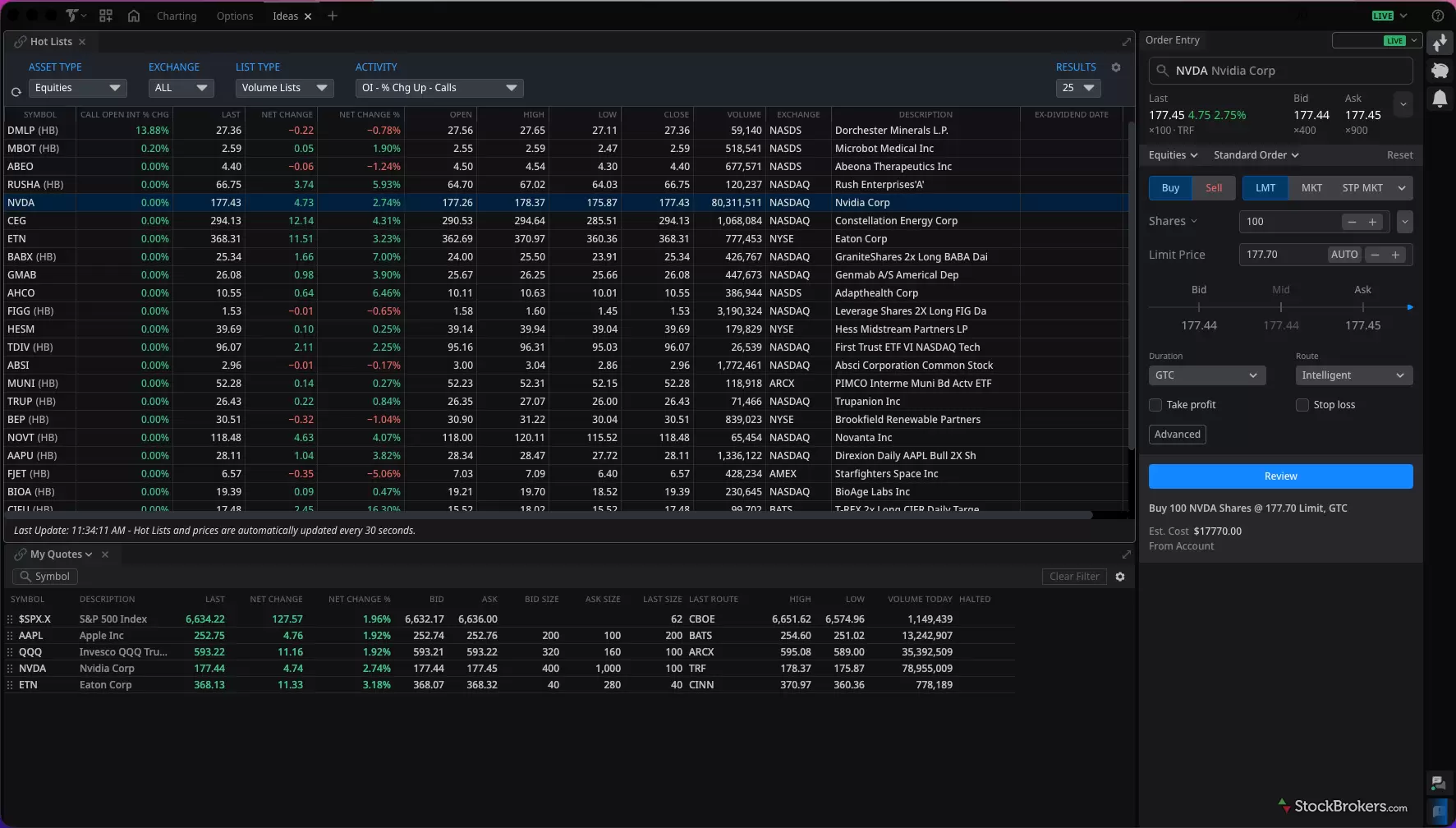
I filtered for equities and looked at volume signals, specifically rising call open interest. That points to building bullish positioning and is worth a closer look. Two names jumped out, NVDA and CEG, both tied to the AI narrative and showing notable call-side activity. I added them to my watchlist, which feeds my Ideas tab alongside Hot Lists and the order entry panel. That's a clean path from idea to evaluation.
Validating a trade in TITAN X
Jessica Inskip, Director of Investor Research at StockBrokers.com, walks through building and customizing a chart in TradeStation TITAN X, from indicators to drawing tools.
Charting tools
TITAN X gives you a wide range of chart types: candlestick, bar, line, area, Heikin-Ashi, hollow candles, and more specialized ones like equivolume and scatter plots. You can switch between standard, logarithmic, and percent views.
There are more than 105 technical indicators, and adding them is simple. Drag and drop onto the chart, then edit and modify in one place. It sounds small. It isn't. There's no clicking in and out of menus. Each indicator also has a question-mark explainer, which helps if you're still learning.
Drawing tools are just as easy. Mark key levels, extend lines left or right, and fine-tune exact prices in the settings. I keep a dedicated charting workspace where I validate ideas with my own layout. You can use predefined charting layouts instead if you prefer.
Defining sentiment
For me, validation is about defining sentiment. We all have our own process. Mine focuses on three things: the trading cycle, key support and resistance, and the overall trend or directional bias.
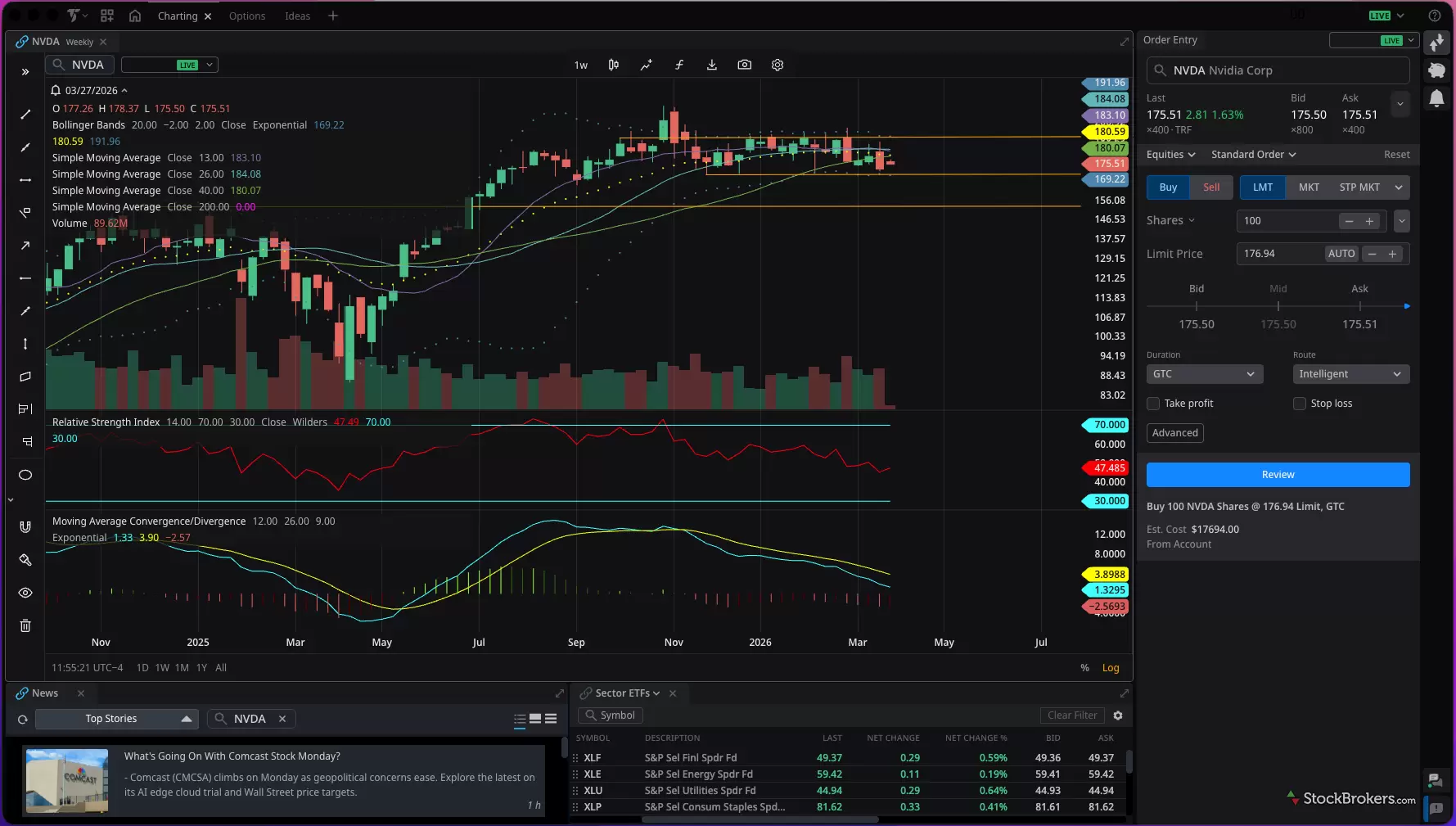
This is my charting workspace, and it's where an idea gets pressure-tested before it becomes a trade. I'm on a weekly view of NVDA with a few studies stacked: Bollinger Bands, several moving averages, RSI underneath, and MACD below that. The weekly timeframe matters here. It smooths out the daily noise and shows the longer trend, plus where price keeps stalling or finding support. Editing a study happens right on the chart, so I can change a setting without hunting through menus. News and a sector ETF watchlist sit in the same layout, which keeps the broader context one glance away while I define my view.
Practical example: Analyzing NVDA's chart
Looking at NVDA, I start with the 13, 26, and 40-week moving averages, which represent roughly one, two, and three quarters of price action. I also layer in Bollinger Bands, RSI, and MACD, and switch the chart to a logarithmic view.
What I see is a shift into a bearish trading cycle, where those longer-term moving averages are acting as resistance. Recently, those averages have begun to converge, and price has moved into a defined trading range.
I marked an extended trendline and identified key levels:
- Support: $169.55 (November 28 weekly low)
- Resistance: $191.05 (October 3 weekly high)
- Near-term resistance: $180–$184, where the moving averages are currently clustered
It’s important to remember that moving averages are dynamic and shift over time, so these levels are always evolving.
From here, I define my sentiment. While I remain bullish on the long-term AI narrative, the current setup suggests a more neutral stance in the short term.
That distinction matters. Because once your sentiment is defined, the next step is structuring a trade that aligns with it.
Placing a trade in TITAN X
Once your idea is validated and your sentiment is set, you execute. There are two ways to think about it, depending on how sophisticated a trader you are or your risk profile.
A straightforward stock trade works for beginners. A more strategic options trade works for building a position with defined risk.
Simple execution: a stock trade
At its most basic, you can stop here and use a standard order. Want exposure to NVDA? Place a limit or market order to buy shares.
TITAN X keeps a persistent trade bar on the right side, always there when you need it. You can toggle between live trading and simulation mode, which is worth using while you learn.
The ticket gives you real-time bid/ask and daily change in dollars and percent, quick access to order types like market, limit, stop market, stop limit, trailing stop, and trailing stop percent, plus quantity shortcuts and percentage-based sizing.
The feature I'd highlight is sizing a trade as a percentage of your account. That's a built-in risk tool. It pushes you to think in exposure, not share count. It nudges you toward the 2% rule: never risk more than 2% of your account on a single trade. More advanced users get routing choices, order duration, and conditional orders like OCO and OSO. None of that is required to get started.
Strategic execution: an options trade
If you want to be more strategic, the upgraded options chain is where you'll spend your time. The interface is much improved. It's clean, customizable, and easy to navigate even if you're newer to options.
You can add more than 25 data columns, including Greeks and implied volatility, see in-the-money versus out-of-the-money clearly, view weekly, monthly, and quarterly expirations with days to expiration, and read liquidity at a glance through volume bars on open interest and contract volume.
Selecting a trade is intuitive. Click a bid or ask and the ticket populates, and the platform recognizes the structure you're building. From there you refine in the ticket, adjusting quantity, strikes, expirations, or adding legs.
You get a clear summary of the position with max gain, max loss, breakeven, and, just as important, the net Greeks: delta, theta, and gamma for the whole structure. That matters when you're trading a spread. I don't want the delta of a single leg, I want the net exposure of the position I'm actually putting on, and seeing it at the point of entry is how I size risk before I commit. It's also something the TradeStation mobile app can't show, so this is a benefit to using TITAN X on the desktop.
Risk management is built in. Check a box to add take profit or stop loss, then enter a price, a dollar amount, or a percentage, and the system fills in the rest. It's a thoughtful design that cuts friction and reduces the potential of a manual error.
Once you're in a multi-leg trade, Position Spread Grouping keeps it readable. Instead of showing the four legs of an iron condor as four separate lines, the positions view groups them into one iron condor. That sounds cosmetic. It isn't. When you're carrying several spreads at once, reading each as a single position is the difference between managing a strategy and untangling a list of legs. You can also switch between an order-based and a margin-based view, which changes how you read what each position is tying up.
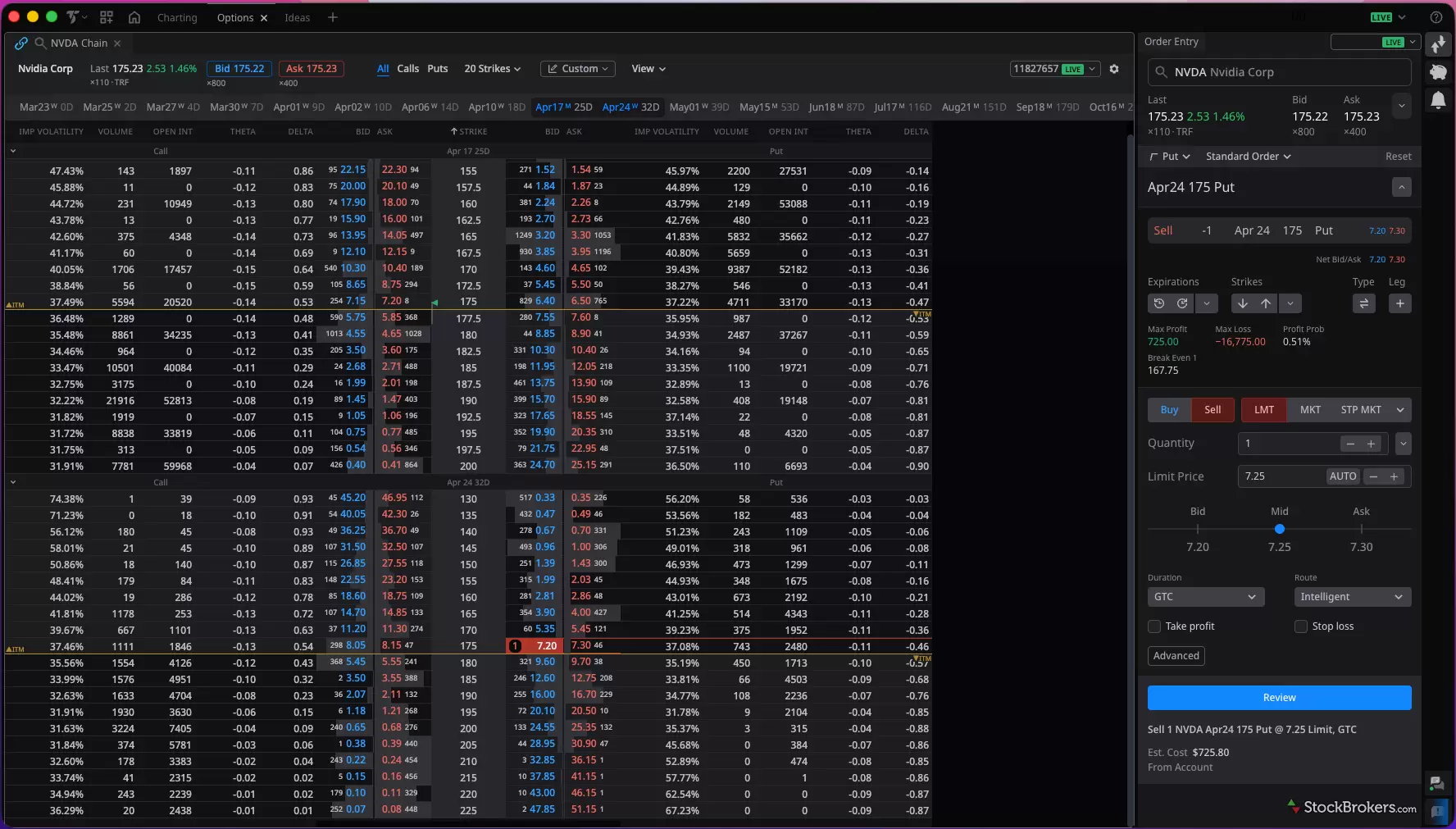
This is the redesigned options chain, and it's built to be read fast. Each strike shows what I actually want when I'm sizing a trade: implied volatility, volume, open interest, and the Greeks like theta and delta, with bid and ask on both the call and put sides. I can stack multiple expirations at once, each labeled with days to expiration, and in-the-money strikes are flagged so I'm never guessing. Click a bid or ask and it populates the ticket on the right. From there, the platform does the math, laying out max gain, max loss, break-even, and probability of profit before I commit. Take profit and stop loss are a checkbox away.
Practical example: Trading a cash-secured put on NVDA
Based on my earlier analysis, I have a neutral short-term and bullish long-term view on NVDA. Instead of buying shares outright, I chose to sell a cash-secured put to potentially enter the position at a discount by generating income.
Here’s how I structured the trade:
- Expiration: 32 days
- Strike: $175 (slightly out-of-the-money)
- Delta: ~0.50
- Premium collected: ~$7.25 per contract
Since one contract represents 100 shares, this results in $725 of premium collected, which is the maximum potential gain if the stock remains above $175 through expiration.
If NVDA moves below the strike, I may be assigned shares at $175. However, the premium received reduces my effective cost basis to $167.75 per share. That’s an important detail. My defined risk sits below the support level I identified during validation, which aligns the trade structure with my analysis.
In this scenario, the trade yields approximately 4.1% over ~30 days, while giving me a path to own the stock at a price I’m more comfortable with.
It’s important to emphasize that this is not a recommendation. This is an example of how a trade can be structured using Titan X based on a defined process. Market conditions change, and outcomes are never guaranteed. Past performance is not indicative of future results.
Final thoughts
TITAN X pulls off something hard. It modernized the interface without alienating the professionals who built TradeStation's reputation. The Launch Pad welcomes serious traders instead of intimidating them, and the whole thing runs native on Windows and Mac.
If you trade actively and your process runs on charts, options, and trade-level risk, TITAN X is an easy yes. The order ticket is the best part. Percentage sizing and built-in take-profit and stop-loss take the math off your plate.
If your process needs an economic calendar or deep backtesting, you won't find everything you need inside TITAN X yet, and you'll lean on legacy tools or outside sources instead.
If you're a buy-and-hold investor, this isn't your platform, and that's fine. It was never built for you. For an active trader who wants modern usability without giving up depth, it's one of the better platforms I've traded on.
StockBrokers.com Review Methodology
Why you should trust us
Jessica Inskip is Director of Investor Research at StockBrokers.com, bringing 15 years of experience in brokerage and trading strategy. A former FINRA-licensed rep, she held Series 7, 63, 66, and 4 licenses. Jessica focuses on investor education and brokerage industry research, appears regularly on CNBC, Bloomberg, The Schwab Network, Fox Business, and Yahoo! Finance, and hosts the Market MakeHer podcast.
Blain Reinkensmeyer, co-founder of StockBrokers.com, has been investing and trading for over 25 years. After having placed over 2,500 trades in his late teens and early 20s, he became one of the first in digital media to review online brokerages. Today, Blain is widely respected as a leading expert on finance and investing, specifically the U.S. online brokerage industry. Blain has been quoted in The New York Times, The Wall Street Journal, Forbes, and Fast Company, among others. Blain created the original scoring rubrics for StockBrokers.com and oversees all testing and rating methodologies.
How we tested
- We used our own brokerage accounts for testing.
- We collected thousands of data points across the brokers we review.
- We tested each online broker's website, desktop platforms, and mobile app, where applicable.
- We maintained strict editorial independence; brokers cannot pay for inclusion or a higher rating.
Our research team meticulously collected data on every feature of importance to a wide range of customer profiles, including beginners, casual investors, passive investors, and active traders. We carefully track variables like margin rates, trading costs, fees, and platform features and use them to help rate brokers across a range of categories measuring ease of use, range of investments, research, education, and more.
At StockBrokers.com, our reviewers use a variety of computing devices to evaluate platforms and tools. Our reviews and data collection were conducted using the following devices chosen to reflect the everyday hardware our readers are likely to be using rather than top-tier configurations: iPhone SE running the latest iOS version, MacBook Pro M1 with 8 GB RAM running the current MacOS, and a Dell Vostro 5402 laptop i5 with 8 GB RAM running Windows 11 Pro.
Each broker was evaluated and scored on over 200 different variables across seven key categories: Range of Investments, Platforms & Tools, Research, Mobile Trading, Education, Ease of Use, and Overall. Learn more about how we test.
Trading platforms tested in 2026
We tested 14 online trading platforms in 2026:
Read next
- Best Trading Platforms for Beginners in 2026
- Best Options Trading Platforms for 2026
- Best Paper Trading Apps & Platforms for 2026
- Best Day Trading Platforms and Apps for 2026
- Best Stock Trading Apps for 2026
- Best Brokerage Accounts for 2026
- Best Futures Trading Platforms for 2026
- Best Brokers for Penny Stock Trading of 2026
More Guides

Find the best brokerage for high-net-worth investors. Compare Fidelity, Schwab, Merrill, and more for premium services and tailored investment tools.
Jessica Inskip January 27, 2026
Discover the best stock brokers of 2026. Compare Schwab, Fidelity, Interactive Brokers, E*TRADE, and more to find the top trading platform for your needs.
Jessica Inskip August 06, 2026
Find top U.S. forex brokers. From tastyfx to OANDA, explore platforms with strong regulation, great tools, and user-friendly trading.
Steven Hatzakis May 29, 2026
Start investing with ease. Explore the best beginner-friendly trading platforms with low fees, great education, and intuitive apps.
Jessica Inskip August 06, 2026
Practice investing risk-free with the best paper trading platforms. Compare Webull, Schwab, Interactive Brokers, E*TRADE, and more.
Jessica Inskip July 24, 2026
Find the best rollover IRA accounts. Compare Fidelity, Schwab, and E*TRADE for easy transfers, low fees, and smart retirement investing tools.
Andrea Coombes May 15, 2026
We tested the best options trading platforms for 2026. Compare tastytrade, Fidelity, IBKR, E*TRADE & Schwab on tools, fees, and picks for beginners.
Jessica Inskip September 09, 2026
Explore the best international brokers for U.S. investors. Compare Interactive Brokers, Charles Schwab, and Fidelity for global stock trading access.
Jessica Inskip May 22, 2026
Find the top bank brokerages. From Merrill Edge to Ally, discover brokers that combine banking, investing, and rewards in one account.
Jessica Inskip April 16, 2026
Find the best penny stock brokers. Compare Fidelity, Firstrade, Schwab, E*TRADE, and TradeStation for OTC access, fees, and tools.
Jessica Inskip August 02, 2026
We tested the 5 best futures trading platforms of 2026. Compare commissions, margin rates, and tools for beginners and active traders. Find the right platform for you.
Jessica Inskip September 17, 2026
Find the best crypto trading platform for 2026. We rank eToro, Fidelity, Interactive Brokers, Webull, and Robinhood on fees, security, and coin selection.
Steven Hatzakis May 27, 2026
Find the best IRA accounts. Compare Fidelity, Schwab, Merrill Edge, E*TRADE, & J.P. Morgan for retirement planning, fees, tools, and account flexibility.
Jessica Inskip March 31, 2026
Find the best Roth IRA accounts. Fidelity, Schwab, and E*TRADE lead with low fees, smart investing tools, and retirement planning support.
Andrea Coombes April 27, 2026
Interactive Brokers and Fidelity lead our 2026 ranking of the best free stock trading platforms, tested on the true cost of $0 commissions and hidden fees.
Jessica Inskip September 02, 2026
Discover the best day trading platforms. Compare IBKR, Schwab, Fidelity, E*TRADE, and TradeStation for speed, tools, and margin rates.
Jessica Inskip August 03, 2026
Discover the best brokers for trade execution. Compare Fidelity, Interactive Brokers, and more for price improvement, speed, and transparency.
Jessica Inskip May 22, 2026Popular Stock Broker Reviews

Read our Public.com review to learn how its intuitive platform and community-driven features help simplify investing for first-time traders.
Jessica Inskip September 18, 2026
Read our Charles Schwab review to learn why its platforms, research, and investor resources make it one of the top-ranked brokerages.
Jessica Inskip September 21, 2026
Read our Webull review and discover its commission-free trading, sleek platforms, paper trading tools, and fractional shares.
Jessica Inskip September 18, 2026
Read our tastytrade review and discover why it’s the top choice for options traders, with low fees, advanced tools, and a seamless platform.
Jessica Inskip September 21, 2026
Fidelity charges $0 stock and ETF trades and won #1 for Research and Education in 2026. See our tested review of its fees, platforms, IRAs, and apps.
Jessica Inskip September 17, 2026
Read our Interactive Brokers review and see why it's a top choice for active traders with low costs, cutting-edge platforms, and global reach.
Jessica Inskip July 31, 2026
Ally Invest scores 3/5 in our 2026 review. See how its $0 stock trades, $0.50 options, strong fixed income tools, and Ally Bank integration stack up.
Jessica Inskip September 14, 2026
Our eToro review rates the social investing platform 3.0/5. Stock and ETF trades cost $0, crypto trades carry a 1% fee, and the minimum deposit is $50.
Jessica Inskip September 25, 2026
Read our 2026 E*TRADE review to see how powerful research, versatile platforms, and diverse investments make it a top choice for all investors.
Jessica Inskip September 14, 2026
Read our Robinhood review and see why it’s a top pick for beginners, with a sleek mobile app, zero commissions, and standout educational tools.
Jessica Inskip September 03, 2026
Read our Merrill Edge Self-Directed review and see how it combines powerful investing tools, robust research, and integrated banking benefits.
Jessica Inskip September 25, 2026
Read our TradeStation review and discover why its pro-level tools, deep customization, and options focus make it a top choice for active traders.
Jessica Inskip September 24, 2026
Read our J.P. Morgan Self-Directed Investing review and discover its strengths in research, planning tools, and integration for Chase clients.
Jessica Inskip May 15, 2026
Read our Firstrade review and see why it’s a top choice for options traders, offering $0 contract fees, robust tools, and a growing feature set.
Jessica Inskip May 04, 2026About TradeStation
Headquartered in Plantation, Florida, TradeStation is a wholly owned subsidiary of Monex Group, Inc. (TOKYO: 8698). TradeStation's roots date back to 1982, when the company was formed under the name Omega Research. The company's flagship TradeStation platform was launched in 1991, and TradeStation Group was a Nasdaq-listed company from 1997 until 2011, at which point it was acquired by Monex Group.
About the Editorial Team
Jessica Inskip is Director of Investor Research at StockBrokers.com, bringing 15 years of experience in brokerage and trading strategy. A former FINRA-licensed rep, she held Series 7, 63, 66, and 4 licenses. Jessica focuses on investor education and brokerage industry research, appears regularly on CNBC, Bloomberg, The Schwab Network, Fox Business, and Yahoo! Finance, and hosts the Market MakeHer podcast.
Jeff Anberg is a Senior Editor at StockBrokers.com. Along with years of experience in media distribution at a global newsroom, Jeff has a versatile knowledge base encompassing the technology and financial markets. He is a long-time active investor and engages in research on emerging markets like cryptocurrency. Jeff holds a Bachelor’s Degree in English Literature with a minor in Philosophy from San Francisco State University.
Blain Reinkensmeyer has 25 years of trading experience with over 2,500 trades placed during that time. He heads research for all U.S.-based brokerages on StockBrokers.com and is respected by executives as the leading expert covering the online broker industry. Blain’s insights have been featured in the New York Times, Wall Street Journal, Forbes, and the Chicago Tribune, among other media outlets.